After closing dynamo, and reopening i have duplicates as seen in the image, funny though that i see the following in some PCs and not in all of them. Civil 2024 with lastest updates. any sugestions?
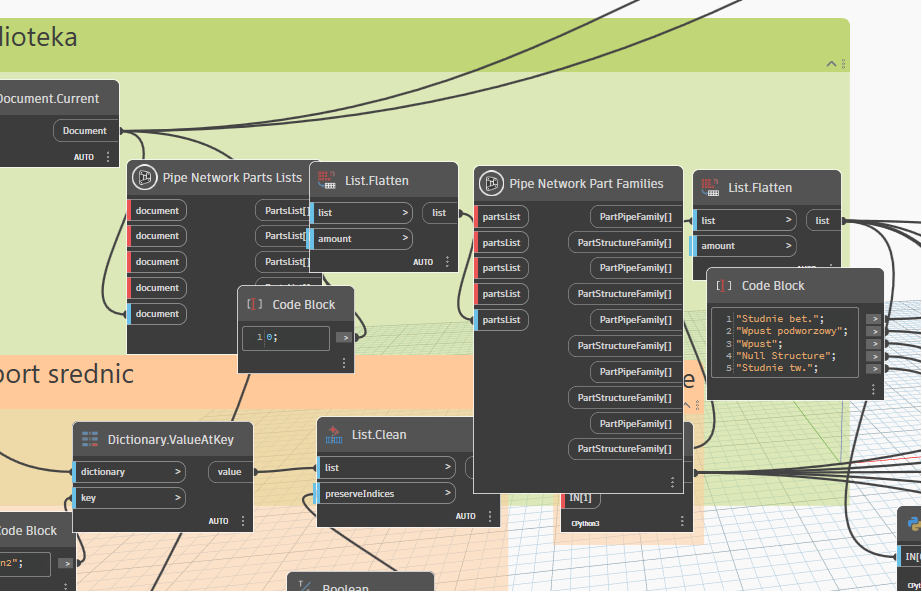
This is a telltale sign of a conflicting Revit add-in, but can also happen with conflicting Dynamo packages
- Restart the CPU
- Disable all Revit add-ins and customizations
- Disable all Dynamo packages and customizations
- Start Revit, launch Dynamo, and open this graph to confirm the issue doesn’t persist
- if it does confirm you disabled everything (every time I have heard “we did” they hadn’t, so double check. Once you’ve confirmed everything is off contact support directly via the accounts portal at manage.autodesk.com.
- Close Revit, and re-enable Dynamo packages and customizations
- Start Revit, launch Dynamo, and open this graph to confirm the issue doesn’t occur
- If it does occur, one of your Dynamo packages or customizations is at fault. Shut down and restart Revit, enabling packages and customizations in batches until you find the culprit.
- Once the culprit is found, either leave it disabled or update it to remove the conflict (this may require reaching out to the original author)
- If it does occur, one of your Dynamo packages or customizations is at fault. Shut down and restart Revit, enabling packages and customizations in batches until you find the culprit.
- Close Revit and re-enable Revit add-ins and customizations
- Start Revit, launch Dynamo and open this graph to confirm the issue doesn’t occur
- If it does occur, one of your Revit add-ins or customizations is at fault. Shut down and restart Revit, enabling packages and customizations in batches until you find the culprit.
- Once the culprit is found, either leave it disabled or update it to remove the conflict (this may require reaching out to the original author)
- If it does occur, one of your Revit add-ins or customizations is at fault. Shut down and restart Revit, enabling packages and customizations in batches until you find the culprit.