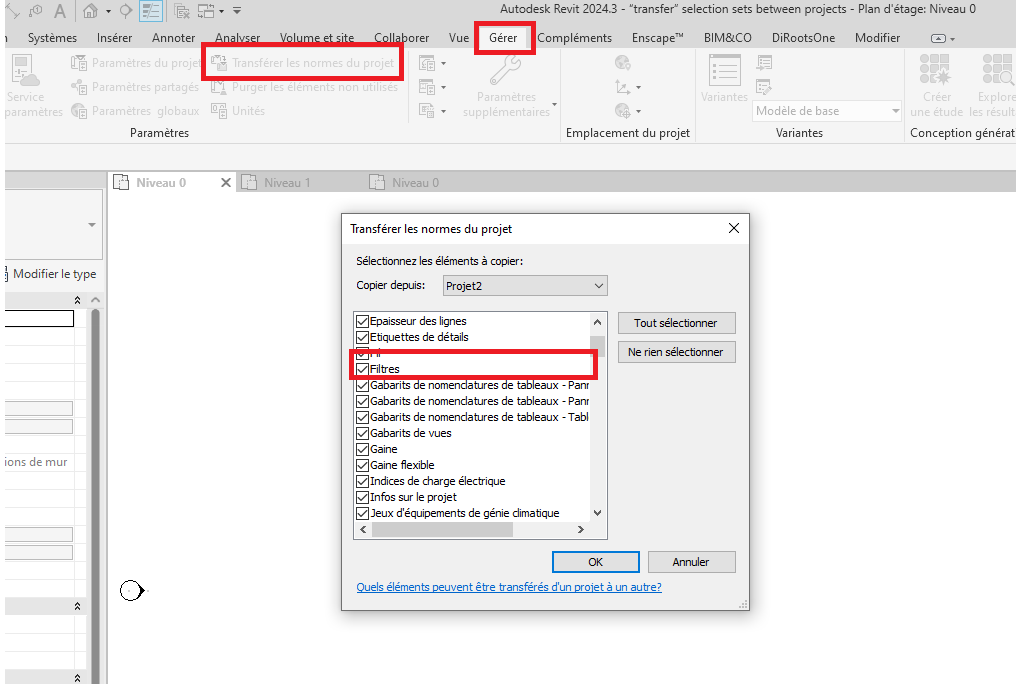
anyone tried “copy” selection sets across projects?

Selection filters are exactly that - a selection, which will be specific to a single file.
Do you want to copy the selected (filter) elements to a new file?
‘Transfer Project Standards’ will copy rule-based filters
Copying specific object selections doesn’t make sense- since it is specific to that file
same file but different version, selection sets don’t work in linked file, unless using live model, i have to use new version file replacing old version file for certain period of time, so basically same file and element ids, i can manually copying element ids of selection sets in old version file across to new version file, thought maybe there’s easy way.
You could try rebuilding the selection set(s) by creating new ones with the same ids.
SelectionFilterElement Class
you can only transfer rule based filters
thanks hayet, SelectionFilterElement is not available in OOTB Dynamo node, you have to use Python node, try creating one selection set filter in UI and you will see what i mean.
To transfer a selection filter from two versions of the same document you could use something like the following code - Both files have to be open in the UI with the file you want to copy the filter to active. Although if the selection filter is in the superseded version why is it not in the current version?
import clr

clr.AddReference("RevitServices")
from RevitServices.Persistence import DocumentManager
from RevitServices.Transactions import TransactionManager

clr.AddReference("RevitAPI")
from Autodesk.Revit.DB import *

from System.Collections.Generic import List

active_doc = DocumentManager.Instance.CurrentDBDocument
uiapp = DocumentManager.Instance.CurrentUIApplication
app = uiapp.Application

# Get the old document with filter by title
old_doc = next(
    doc
    for doc in app.Documents
    if active_doc.Title in doc.Title and doc.Title != active_doc.Title
)

# Get the required selection filter by name
sfe_name = "Foundations"

old_sfe = next(
    fe
    for fe in FilteredElementCollector(old_doc).OfClass(SelectionFilterElement)
    if fe.Name == sfe_name
)
ids = old_sfe.GetElementIds()

# It is safer to get the ids via UniqueId
ids = map(lambda id: active_doc.GetElement(old_doc.GetElement(id).UniqueId).Id, ids)

ids = List[ElementId](ids)

TransactionManager.Instance.EnsureInTransaction(active_doc)

sfe = SelectionFilterElement.Create(active_doc, sfe_name)
sfe.AddSet(ids)

TransactionManager.Instance.TransactionTaskDone()

OUT = sfe
thanks Mark, it’s because we model cable routing based on electrical equipment and cable tray which will be modified, it’s pretty much “background” file instead of live one.