dear all i upload image can you guide me how i change selection behavior i want select pipe once with mark (good) don’t want select with mark(x).
its very big drawing i upload small area please help me i want tagging after selection horizontal or vertical


Hi, sorry for the slight digression from the original topic.
In your codeblock the term Revit added comes from the fact that you are using a detached dynamo version of Revit?
I thank you in advance
I am a newbie.
cordially
christian.stan
No problem  not sure i understand what you mean by detached dynamo…I use Dynamo for revit here
Thank you for answering 
here are the pictures for better understanding


I’m on Revit version 2020.2.8 in education mode

Thank you for the time given
edit:
oops I had forgotten the Element after Elements.
Looks like we don’t need to specify Revit or Autodesk
sorry
dear sir thanks for help. can you share this .dyn file i face problem i m new user dynmo.
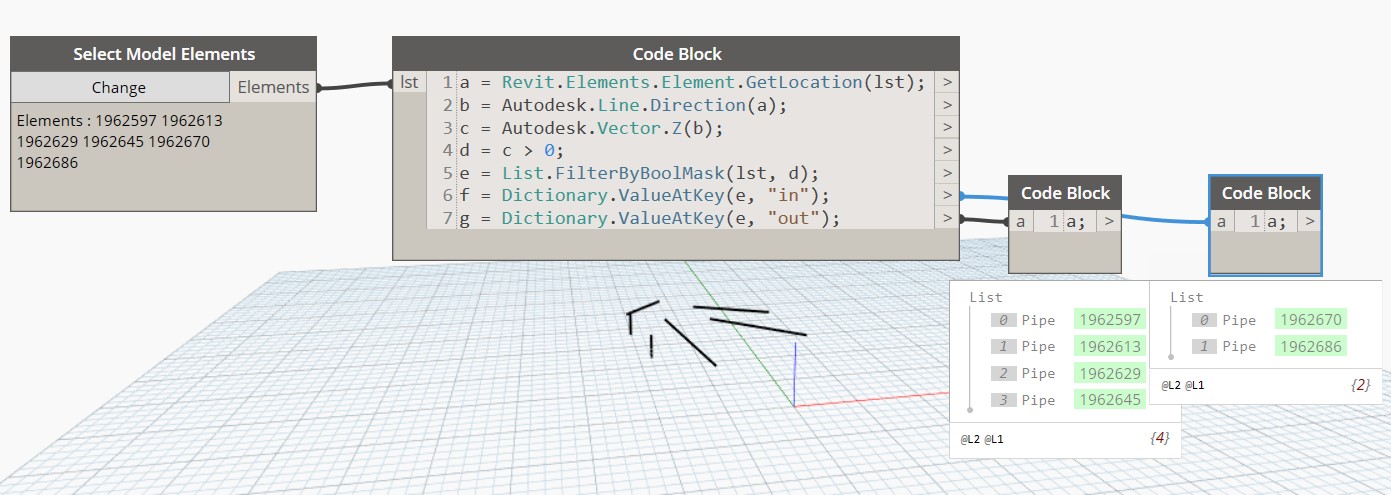
Hello @rashidsohail27 and @christian.stan …here is a way with ootb hope it helps…
PS when we need filter by bool mask as designscript the output is a dictionary
pipe designl.dyn (8.8 KB)


thanks sir. from my hart<> 
hello, you progress faster, by trying to redo the proposed approach (reflection and dexterity too), it’s actually educational, it’s still a beginner’s personal opinion, the script I saw here could potentially be part of automatic numbering of walls by horizontal and vertical rows.
Yes can probably be used for lot of things
Hi all.
I have one thing now again. I try to make vertical and horizantaly seprate and on top view b & c also want seprate example is image. Mention
In drawing i have 3 types pipe a is rizer b is top view but 180 degree and c is 90 degree direction.
How i make 3 option for 3 type slection
Can you guide me fore code.

Use a similar approach to before, but instead of just looking at the Z value of the vectors look at the X value. If X is less than 0.5, it will be B, if it is not vertical and is greater than 0.5 it will be C.