Hello i am currently getting the same issue but with Revit 2025.
I have the latest Clockwork 3.3.0 and changed it to ironpython2 also i have followed the steps from a previous post. but i am still getting the issue,
I have used this script before and it worked fine but its shows null.
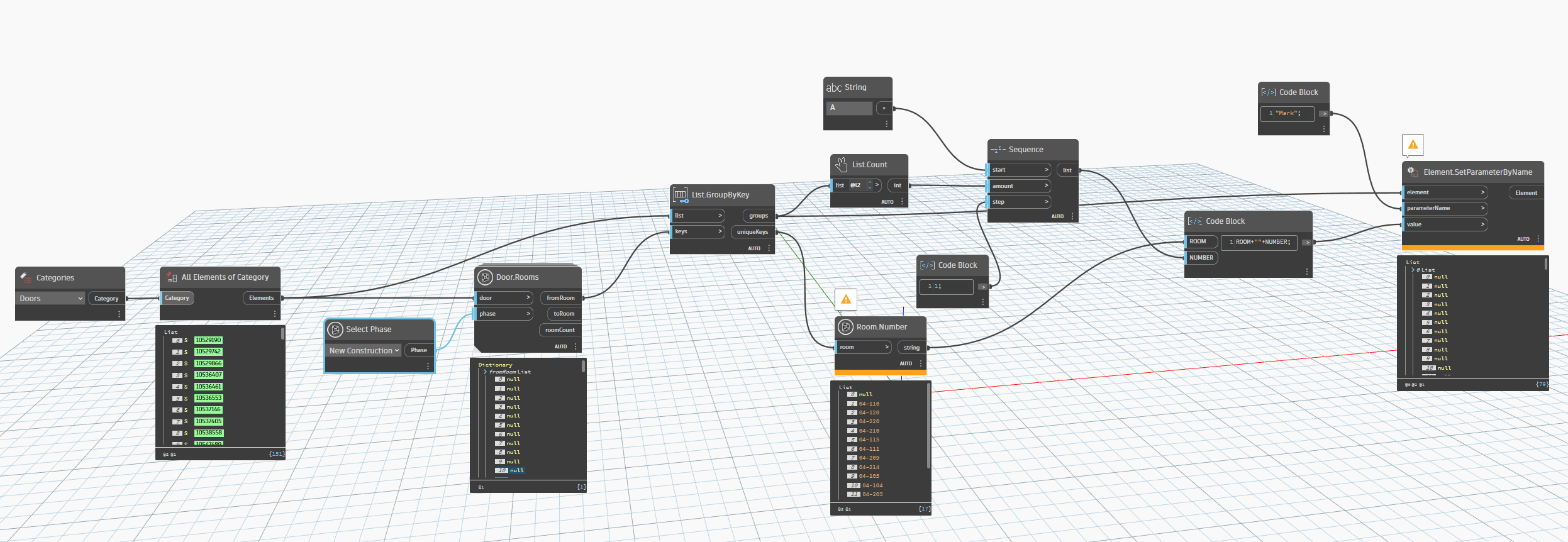
image2493×862 492 KB
Also i am using the same model and script that has worked before, but now i have to re number the doors to the new room numbers.
Thank you
It all starts at the front  .
.
Make sure get rid of the nulls.
Messy Lists carry downstreams.
Hello, i am still kinda new to dynamo but what would cause a “null”.
On a side note i made new model and placed doors and used this script and it worked fine but for some situation it wont work on the model i am currenlty in
Null values can be caused by a variety of reason. most of them related to missing, invalid, or mismatched data between Revit and Dynamo.
It essentially means no value or object exists. It can be caused by any number of reasons. In your case, you have doors that don’t have an associated room. This could be due to the door just not having any associated rooms at all (maybe the calculation point isn’t placed at a location where it’s intersecting a valid room), or it could be that the room is on a different phase or in a different document. You would have to confirm these things before we can give you some clearer direction.
Are your doors and rooms from the same model? Are the rooms all on the New Construction phase? Have you checked the location of the to/from room points and confirmed the “failing” doors have rooms at those locations?
I believe you were correct i adjusted the doors “calculation point” and it worked, i also adjusted the interior flooring to be not “room bounding” if any other future people might have issues.
I am greatly thankful for your help
