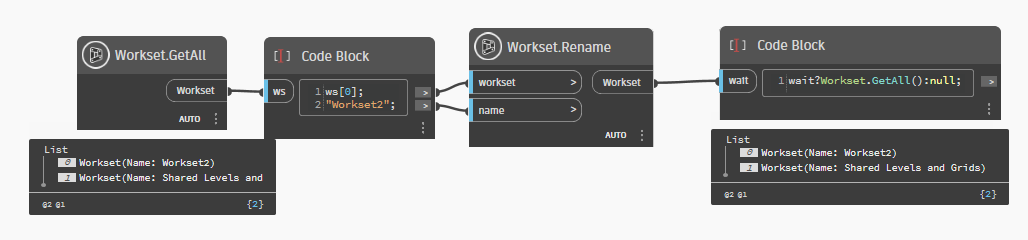
Hi everyone,
I am trying to join two graphs together so I can run them simultaneously.
- The first graph, creates new worksets (+ renaming of workset 1),
- The second graph creates the 3D views from these worksets,
- Both graphs work fine when I run them separately.
I have played around alot with the (Passthrough node). I assume that the (Workset.GetAll node) is operating at the same time as the first graph, since there is no Input into the Workset.GellAll node. Therefore, it is unable to distinguish between the creation of the new worksets and those worksets that previously existed (Workset 1, Shared Levels and Grids). I assume I need some sort of delay between the two graphs?
To add, they are not currently joined in the image, I have tried multiple nodes and connections between the two.
thank you.
I think you need a transaction end, and transaction start node where you placed the passhtrough node
You are correct that the Workset.GetAll is executing immediately when the script is ran, therefore the passthrough is not helping. A transaction node works similar to the passthrough, stopping an action and restarting before sending information through to the next node, so that won’t work either.
Since you are creating a new workset and getting all existing worksets, use a list create and add both of the lists together, then push that list forward. Similar to as shown below.
Use a code node with a test which will wait for a non-null result
The Workset.GetAll() assumes achilab is installed
@Garbage_Collector I initially tested the Transaction.Start node after the passthrough, it collected the worksets but only generated certain 3D views of these worksets. Nevertheless it’s given me a new node to explore.
Thanks @staylor this worked!
Thanks @Mike.Buttery, the wait?workset.GetAll():null worked perfectly! Before you responded I was looking for some sort of input in a code block to pick up the Workset.GetAll, you solved it thank you.
3D Workset Views
When creating the 3D views of the worksets and setting the visibility settings to (Hidden or visible), I assumed the Element.Name+ node would be set to list level@1, so the List.Indexof node shows 0 (visible) -1 (hidden) for each view (list). However, this did not work.
The Element.Name+ does not require a list level, which then shows -1 in the List.IndexOf Node. With a click of a button the Dynamo gods deemed this worthy. This was entirely a trial and error 2 hour process. However, the question I have is why? Why does it work even though it’s reporting -1 for all lists. under List.IndexOf.