Issue# Pipe by Line in dynamo -RVT25

Coud u please help me in this issue , after applying the python script make all connection , Run stop working !!!

This is the code :slight_smile:

# Import Revit API

import clr
clr.AddReference(‘RevitAPI’)
clr.AddReference(‘RevitServices’)
from Autodesk.Revit.DB import \*
from Autodesk.Revit.DB.Plumbing import \*
from RevitServices.Persistence import DocumentManager
from RevitServices.Transactions import TransactionManager

# Assign Dynamo inputs

start_point = IN\[0\]  # Start point (Point.ByCoordinates)
end_point = IN\[1\]  # End point (Point.ByCoordinates)
pipe_type = IN\[2\]  # Pipe type
system_type = IN\[3\]  # System type
level = IN\[4\]  # Level
diameter = IN\[5\]  # Diameter

# Get current document

doc = DocumentManager.Instance.CurrentDBDocument

# Create pipe function

def create_pipe(start_point, end_point, pipe_type, system_type, level, diameter):
try:
# Check if all inputs are provided
if not all(\[start_point, end_point, pipe_type, system_type, level, diameter\]):
raise ValueError(“All inputs are required!”)


    # Convert Dynamo points to XYZ in Revit
    start_xyz = XYZ(float(start_point.X), float(start_point.Y), float(start_point.Z))
    end_xyz = XYZ(float(end_point.X), float(end_point.Y), float(end_point.Z))

    # Check if the system type, pipe type, and level exist in the document
    if not doc.GetElement(ElementId(system_type.Id)):
        raise ValueError(f"System type {system_type.Name} is invalid.")
    if not doc.GetElement(ElementId(pipe_type.Id)):
        raise ValueError(f"Pipe type {pipe_type.Name} is invalid.")
    if not doc.GetElement(ElementId(level.Id)):
        raise ValueError(f"Level {level.Name} is invalid.")
    
    # Create the pipe using the provided types and parameters
    pipe = Pipe.Create(
        doc,
        ElementId(system_type.Id),
        ElementId(pipe_type.Id),
        ElementId(level.Id),
        start_xyz,
        end_xyz
    )

    # Set the diameter for the pipe
    parameter = pipe.get_Parameter(BuiltInParameter.RBS_PIPE_DIAMETER_PARAM)
    parameter.Set(diameter)

    return pipe

except Exception as e:
    # If an error occurs, raise a ValueError with the error message
    raise ValueError(f"An error occurred while creating the pipe: {str(e)}")


# Start the transaction in Revit

TransactionManager.Instance.EnsureInTransaction(doc)

# Try to create the pipe

try:
result = create_pipe(start_point, end_point, pipe_type, system_type, level, diameter)
except Exception as e:
result = str(e)

# End the transaction in Revit

TransactionManager.Instance.TransactionTaskDone()

# Output the result (the created pipe)

OUT = result
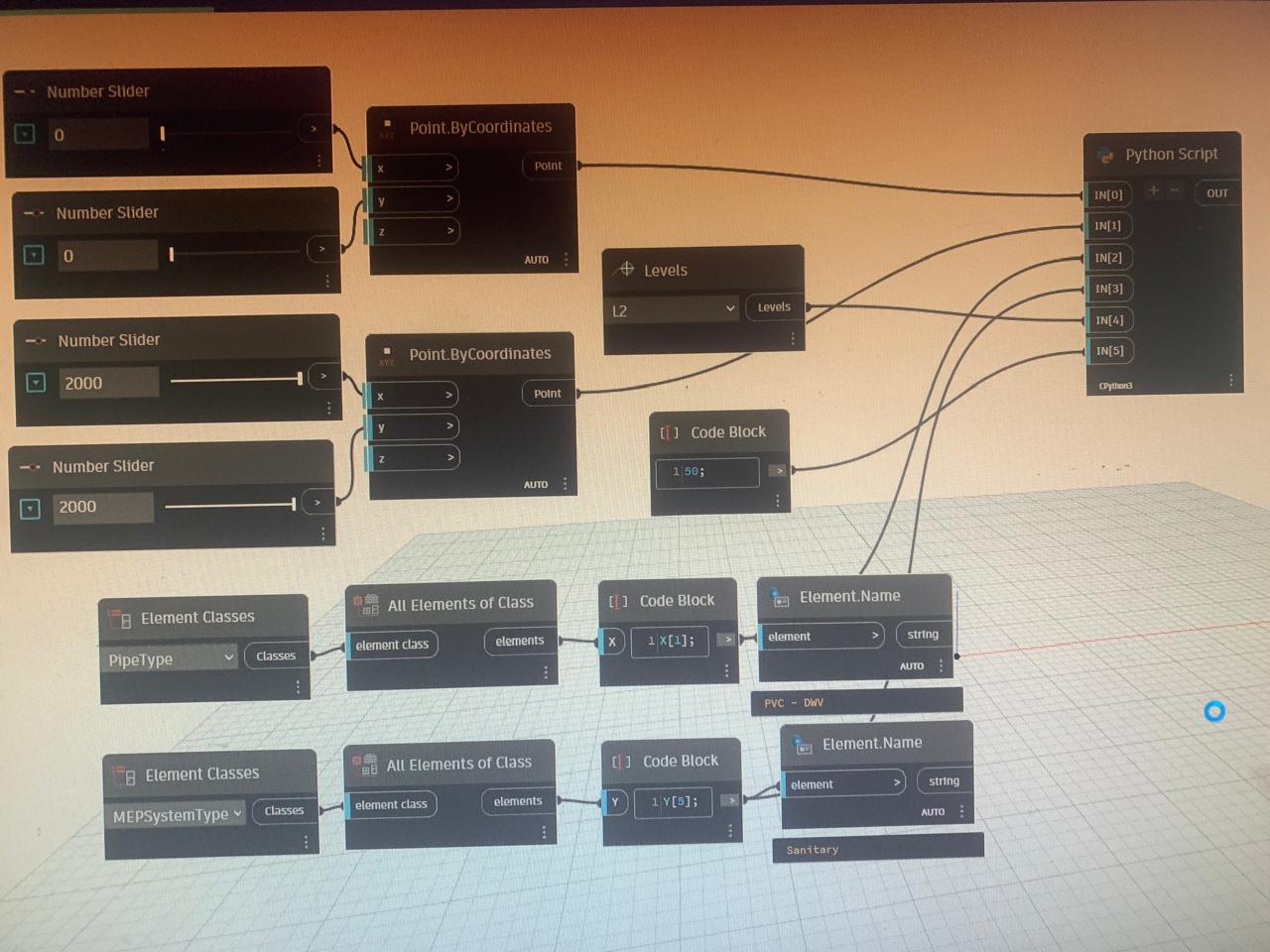
Th

at a glance, i can spot one thing at least:

element.Id gives u ElementId already. strip those ElementId() constructors.

You can remove the majority of the the tests as the errors will be picked up inside the main try function, further use the API to do conversion by loading in RevitNodes and using UnwrapElement. Move the transaction into the function so it only operates around the Pipe.Create. Lastly order the code imports, functions, inputs, actions. Note: code is untested

import clr

clr.AddReference("RevitAPI")
from Autodesk.Revit.DB import *
from Autodesk.Revit.DB.Plumbing import Pipe

clr.AddReference("RevitServices")
from RevitServices.Persistence import DocumentManager
from RevitServices.Transactions import TransactionManager

clr.AddReference("RevitNodes")
import Revit

clr.ImportExtensions(Revit.GeometryConversion)


# Create pipe function
def create_pipe(start_point, end_point, system_type, pipe_type, level, diameter):
    # Start the transaction in Revit
    TransactionManager.Instance.EnsureInTransaction(doc)

    # Create the pipe using the provided types and parameters
    pipe = Pipe.Create(
        doc, system_type.Id, pipe_type.Id, level.Id, start_point, end_point
    )

    # Set the diameter for the pipe
    parameter = pipe.get_Parameter(BuiltInParameter.RBS_PIPE_DIAMETER_PARAM)
    parameter.Set(diameter)

    # End the transaction in Revit
    TransactionManager.Instance.TransactionTaskDone()

    return pipe


# Assign Dynamo inputs
start_point = IN[0].ToXyz()  # Start point (Point.ByCoordinates)
end_point = IN[1].ToXyz()  # End point (Point.ByCoordinates)
pipe_type = UnwrapElement(IN[2])  # Pipe type
system_type = UnwrapElement(IN[3])  # System type
level = UnwrapElement(IN[4])  # Level
diameter = IN[5]  # Diameter

# Get current document
doc = DocumentManager.Instance.CurrentDBDocument

# Try to create the pipe
try:
    result = create_pipe(
        start_point, end_point, system_type, pipe_type,  level, diameter
    )
except Exception as e:
    result = str(e)

# Output the result (the created pipe)
OUT = result
Be careful when converting units. If the unit of the input value is the same as that of the project, you can use parameter.SetValueString() instead

3 Likes

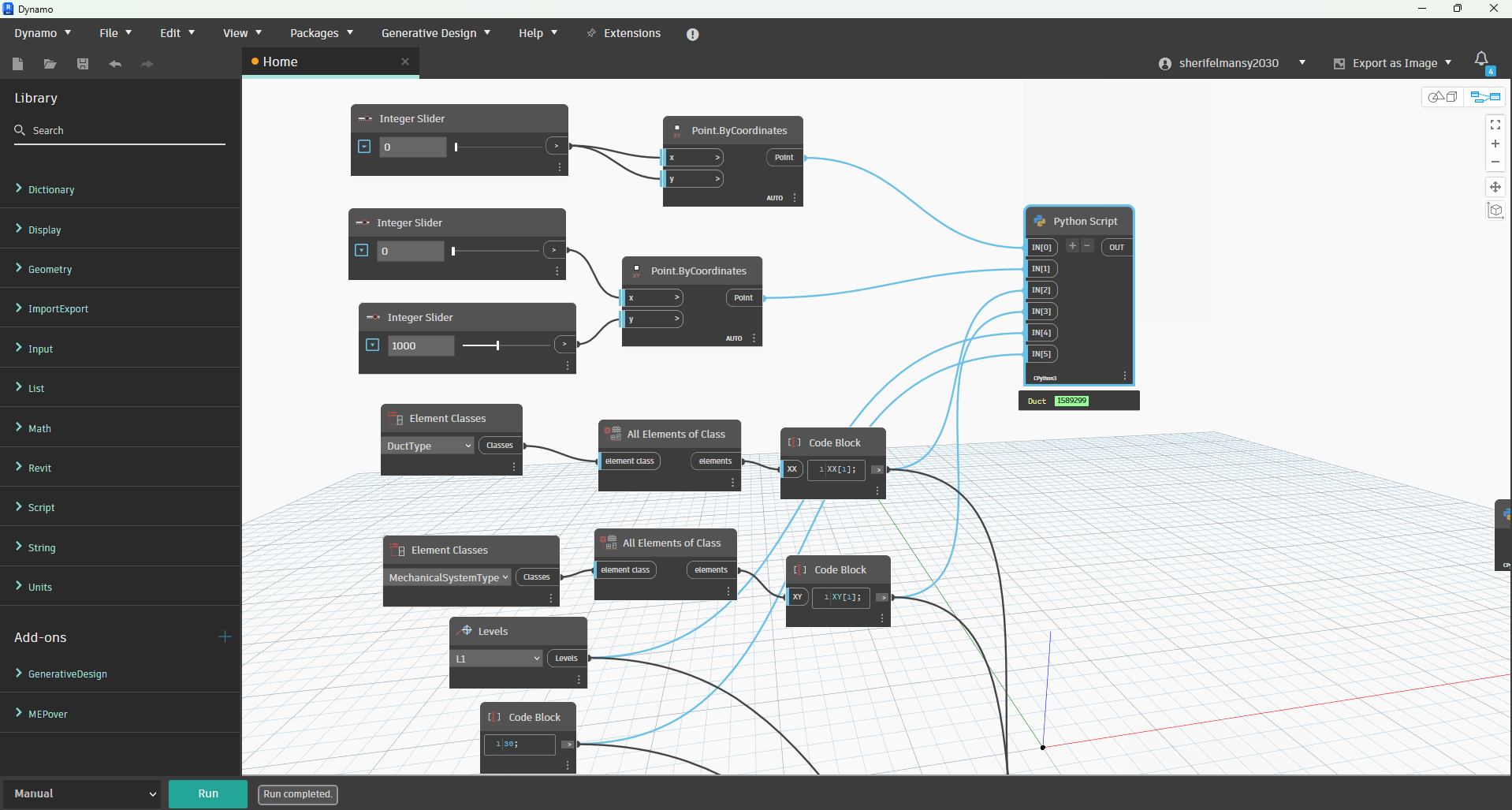
Thanks to your replies , and after some trials and Modifications the code is working now .

import clr
clr.AddReference(“RevitServices”)
from RevitServices.Persistence import DocumentManager
from RevitServices.Transactions import TransactionManager

clr.AddReference(“RevitAPI”)
from Autodesk.Revit.DB import XYZ, Line, BuiltInParameter
from Autodesk.Revit.DB.Mechanical import Duct

Get the current Revit document

doc = DocumentManager.Instance.CurrentDBDocument

========== Helper Function ==========

def mm_to_ft(value_mm):
“”“Converts millimeters to feet.”“”
return value_mm / 304.8

========== Inputs from Dynamo ==========

pt1 = IN[0] # Start point (in mm)
pt2 = IN[1] # End point (in mm)
ductType = UnwrapElement(IN[2]) # Duct type
systemType = UnwrapElement(IN[3]) # System type
level = UnwrapElement(IN[4]) # Level
diameter = IN[5] # Diameter in millimeters

========== Convert coordinates and diameter ==========

dia_feet = mm_to_ft(diameter)

start = XYZ(mm_to_ft(pt1.X), mm_to_ft(pt1.Y), mm_to_ft(pt1.Z))
end = XYZ(mm_to_ft(pt2.X), mm_to_ft(pt2.Y), mm_to_ft(pt2.Z))

Optional line for reference

line = Line.CreateBound(start, end)

========== Create the duct inside a transaction ==========

TransactionManager.Instance.EnsureInTransaction(doc)

duct = Duct.Create(doc, systemType.Id, ductType.Id, level.Id, start, end)

Set diameter

if duct:
param = duct.get_Parameter(BuiltInParameter.RBS_CURVE_DIAMETER_PARAM)
if param:
param.Set(dia_feet)

TransactionManager.Instance.TransactionTaskDone()

========== Output ==========

OUT = duct