I want to use Dynamo to create a floor by selecting the surrounding beams. I’ve already extracted the beam center lines, but I don’t know how to create a closed PolyCurve from these center lines (because in the Floor.ByOutlineTypeAndLevel node, the outline must be a polycurve).
Please help me create a polycurve from the existing lines shown in the image. Thank you!

PolyCurve.ByJoinedCurves (node).
And a Line is a Curve AFAIK.


That’s a different issue.
Also it is important that you give all necessary
information you can  .
.
I guess you need to create lines (Curves) from and to the points where the lines intersect (first).
Something like that.
Yes. It will work when it is a closed path. please show me how to create intersection points, then from those intersection points can create a PolyCurves. Please help me!!


This is why i like others chip in as well. I didn’t know that node  .
.
@hoangdv2304FBFY
ChatGPT can put you in the right direction if you have trouble finding a topic related to your
question on the forums.

great node, and if remember, its just build with ootb nodes, so just open the node and see how it can be done…great for learning
and another could maybe be intersect the beams solid intersect in a plane and get the inner perimeter curves from that surface the intersect gives
thank you very much. i did it. but when i create a floor, after doing it again in another position the newly created floor disappears and is replaced by a new floor. it doesn’t save the previously created floor.
in the node Select model elements. I select many objects (Beam, Column, Floor, Wall,…) is there any way I can filter and select only Frame objects?
sounds like element binding, try run it from player, or use a custom node [python] for create the floor so you could avoid binding…gues Crumple have one and support loops as well, so very sensitive how it get the list…
yeah if in newer version then try select elements by categori node or just filter them after selection with get categori
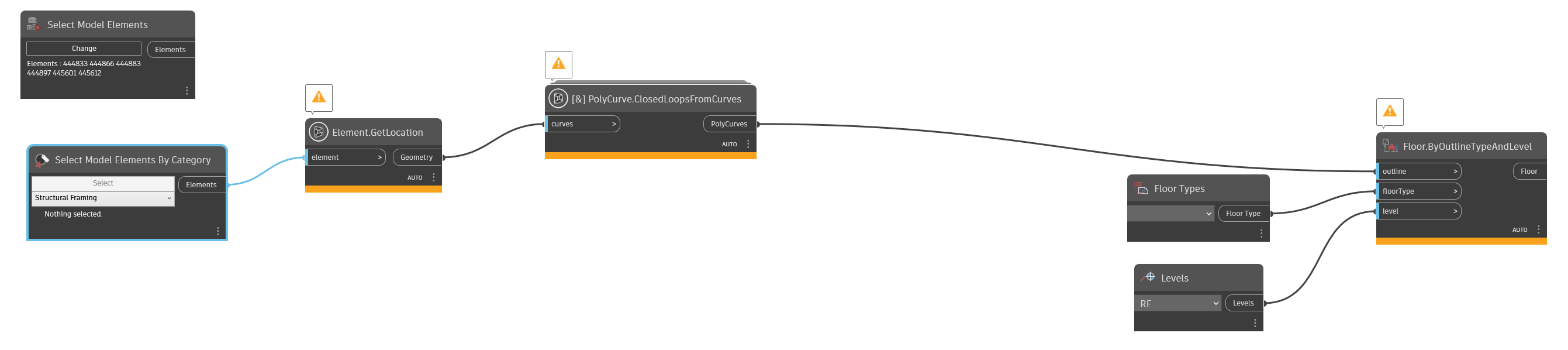
thats great, remember hit finish in revit ribbon after selection
you are awesome. i didnt press finish after selecting the object. thank you so much!. i finished the floor drawing tool after selecting the 4 beams surrounding it! awesome!