pyRevit has a smartbutton builtin. It’s a toggle button to start/stop a script.
color=orange: re-run a script continuesly in the background.
color=black: stops the script
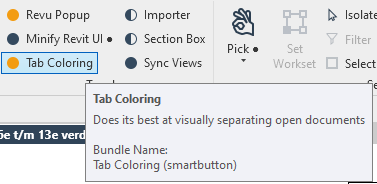
How can reproduce/create this for my created scripts?
pyRevit has a smartbutton builtin. It’s a toggle button to start/stop a script.
color=orange: re-run a script continuesly in the background.
color=black: stops the script
How can reproduce/create this for my created scripts?
In addition to the forums, you can see how all tools are authored by visiting them in the native toolbar files. It’s all there for the user to see.
OK. Thanks
Note that most things like this are not running continuously.
They are event driven. Such as ViewActivated. Running a program continuously is a lot of overhead for a script. Looking at the Revit DB continuously would slow Revit way, way down.
And there is a ton of info over at pyRevit. It rocks.