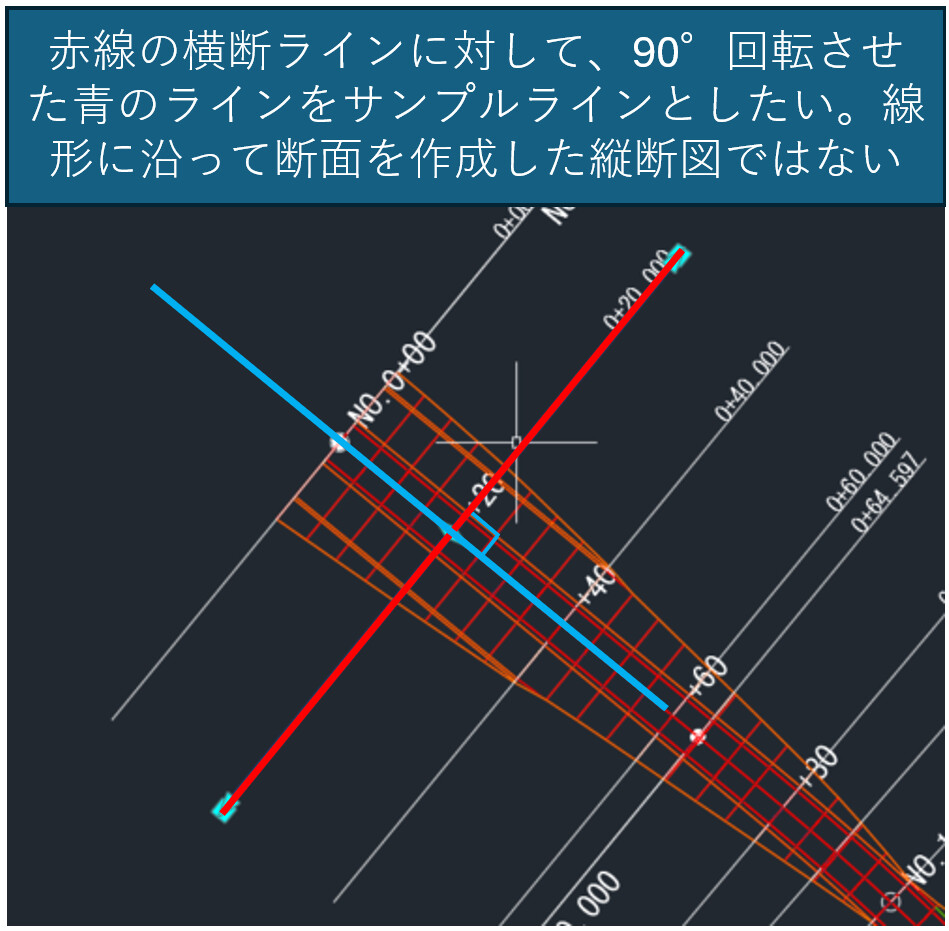
I have a question regarding sample line creation.
Currently, sample lines are created perpendicular to the alignment (centerline). However, I would like to create sample lines that are perpendicular to existing sample lines instead
If anyone has experience with this issue, I would really appreciate your guidance.
Thank you very much.
For your problem, it is key to remember following for sample lines:
Can only be straight lines geometry wise
Used to be perpendicular to the alignment of choice
One solution for linear alignments could be to create a perpendicular alignment to your current one at Station 0+00 and then create sample lines at set interval. Looking through your file it seems your alignment has multiple vertices for changes of direction so this would be not be best solution to capture all appropriate information.
Depending on what you want to achieve, have you looked into using ‘offset alignments’ which are linked to your original version etc.
Let me know what your wanting to show/achieve etc as dynamo could be used to bulk create alignments from geometry, profile views, and so forth…
Happy New Year.
Thank you very much for your time.
My goal is to be able to create Sample Line A that is perpendicular to Sample Line B of the alignment.
Then, using Sample Line A, I would like to extract the required sections in the tangent direction of the alignment at any given location.
I do not yet understand how to use Offset Alignments in this case, so I have not tried that approach.
I am not sure whether this is feasible or not, but I am considering the following steps:
Use the existing Sample Line B (perpendicular to the alignment).
Convert these Sample Line B into Alignment C.
From the created Alignment C, generate Sample Lines at the midpoint of each Alignment C.
Thank you very much.
I am very much looking forward to learning more from you.
I am trying to use the SampleLineByPoints node from the Camber package.
I created three points: the StartPoint, the intersection point between the Sample Line and the Alignment, and the EndPoint.
However, I am not able to create a Sample Line.
I think a Sample Line HAS to connect to the Alignment, as such it cannot be perpendicular to another straight Sample Line.
What are you trying to achieve? There might be other ways to achieve it with Civil 3Ds tools.
IF you actually need Sample Lines then you might just want to look into converting all existing Sample Lines to Alignments and then creating Sample Lines on those but that feels somewhat backwards. Although it would probably be achievable with Dynamo.
Had another look into this, currently have a script that creates alignments out of all the sample lines associated with the selected alignment. This in turn then turns these sample lines into independent alignments.
Sample lines are then created at chosen interval although seem to produce with no left/right widths(!).