I am trying to create an plugin that can annotate all the pipe in the view with there diameter and system type but while using the create tag form genius loci package it runs infinitely

Hello, in your screenshot you havent selected a view type, could that be the issue here?
no I have selected the view type and tried running the script but still its the same running continuously
How many views are you feeding into the node?
single floor view
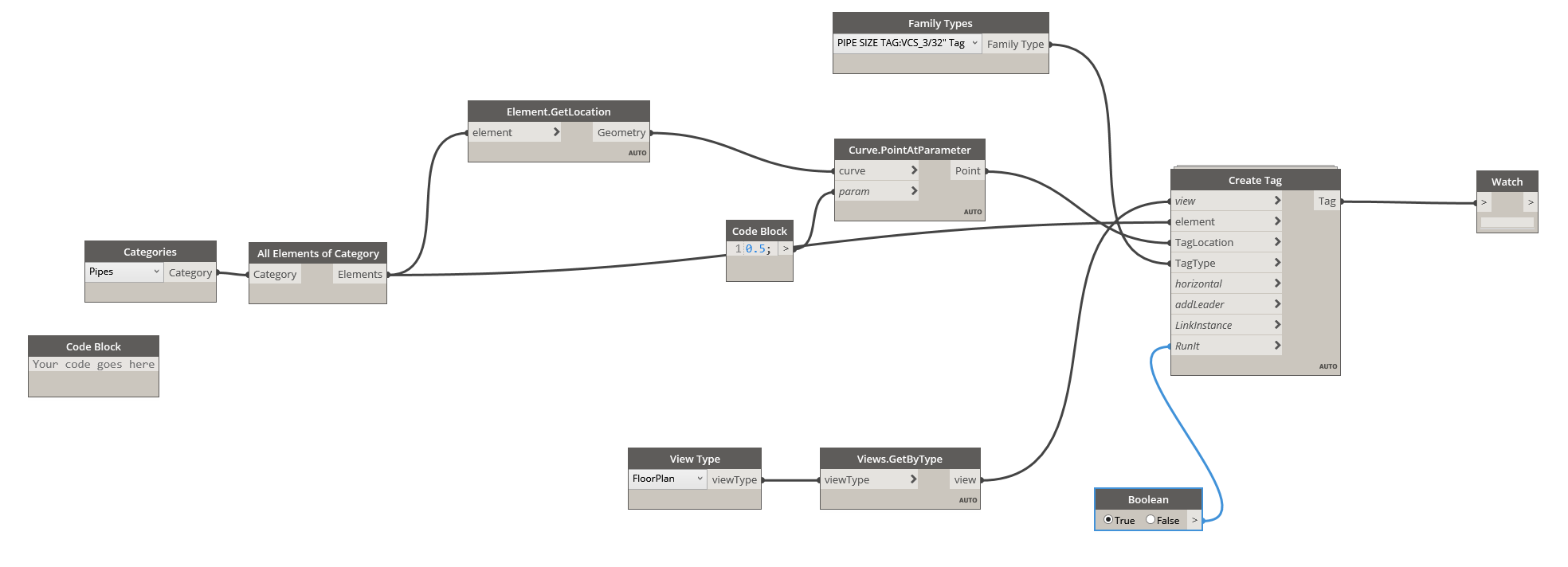
Could you show whats in the nodes by unfolding and pinning the screen below the nodes?
all nodes?
or any particular actually when i run the script the complete dynamo and revit application is stucked
Hi,
Are you using the automatic mode ? Change it to manual to create elements with Dynamo.
it is set to manual not in automated mode
My guess is that the issue lies in the scope of your tool. You’re trying to tag every single pipe in every single view, including pipes which cannot be seen in the view. Reduce the script to a single view as a starting point, and pull the pipes visible in that view.

That’s because the node only uses the Active view, you never have more than one active view.
Jacob suggested that to check if the other nodes function and it might have something to do with the size of your project. As Jacob said you are trying to tag every single pipe in every single view, even if the pipe isnt visible in the view, and this can cause your script to run indefinitely.


What have you tried so far? 
I am thinking of giving boundrybox to the individual tags is there any other way thanks