Hello everyone,
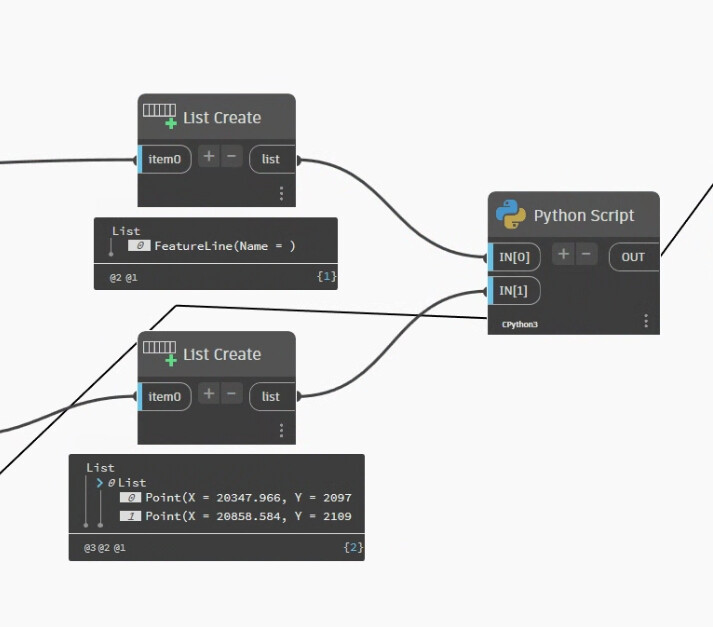
I have no knowledge about python or any language but i want to try a simple script which goal is to add Elevation points to a Feature Line with a python script: IN[0]= FL
IN [1] = Points
OUT = FL_edit
My sources are:
# Load the Python Standard and DesignScript Libraries import sys import clr
# Add Assemblies for AutoCAD and Civil3D clr.AddReference('AcMgd') clr.AddReference('AcCoreMgd') clr.AddReference('AcDbMgd') clr.AddReference('AecBaseMgd') clr.AddReference('AecPropDataMgd') clr.AddReference('AeccDbMgd')
# Import references from AutoCAD from Autodesk.AutoCAD.Runtime import * from Autodesk.AutoCAD.ApplicationServices import * from Autodesk.AutoCAD.EditorInput import * from Autodesk.AutoCAD.DatabaseServices import * from Autodesk.AutoCAD.Geometry import *
# Import references from Civil3D from Autodesk.Civil.ApplicationServices import * from Autodesk.Civil.DatabaseServices import *
import Autodesk.DesignScript.Geometry as DS
# The inputs to this node will be stored as a list in the IN variables. FeatL = IN[0] pts = IN[1]
with adoc.LockDocument(): with adoc.Databaseas db: with db.TransactionManager.StartTransaction()as t: for fl in FeatL: id = FeatL.InternalObjectId FL = t.GetObjectId(id, OpenMode.ForWrite) FL_edit = FL.InsertElevationPoints(pts) t.Commit() pass
# Assign your output to the OUT variable. OUT = FL_edit
This error shows up:
TypeError : No method matches given arguments for OnExit: (<class ‘Autodesk.AutoCAD.ApplicationServices.DocumentLock’>, <class ‘type’>, <class ‘TypeError’>, <class ‘traceback’>) [’ File “”, line 41, in \n’]
import sys
import clr
import System
# Add Assemblies for AutoCAD and Civil3D
clr.AddReference('AcMgd')
clr.AddReference('AcCoreMgd')
clr.AddReference('AcDbMgd')
clr.AddReference('AecBaseMgd')
clr.AddReference('AecPropDataMgd')
clr.AddReference('AeccDbMgd')

# Import references from AutoCAD
from Autodesk.AutoCAD.Runtime import *
from Autodesk.AutoCAD.ApplicationServices import *
from Autodesk.AutoCAD.EditorInput import *
from Autodesk.AutoCAD.DatabaseServices import *
from Autodesk.AutoCAD.Geometry import *

# Import references from Civil3D
from Autodesk.Civil.ApplicationServices import *
from Autodesk.Civil.DatabaseServices import *

# The inputs to this node will be stored as a list in the IN variables.
dataEnteringNode = IN

adoc = Application.DocumentManager.MdiActiveDocument
editor = adoc.Editor

import traceback

def toList(x):
    if isinstance(x, (list, dict)) or \
            (hasattr(x, "GetType") and x.GetType().GetInterface("ICollection") is not None):
        return x
    else : return [x]

lst_FeatL = toList(IN[0])
lst_pts = toList(IN[1])
out = []

acLckDoc  = adoc.LockDocument()
db = adoc.Database
t = db.TransactionManager.StartTransaction()
# Place your code below
try:
    for pts, FeatL in zip(lst_pts, lst_FeatL):
        id = FeatL.InternalObjectId
        array = System.Array[Point3d]([Point3d(p.X, p.Y, p.Z) for p in pts])
        locations = Point3dCollection(array)
        #
        FL = t.GetObject(id, OpenMode.ForWrite)
        FL.InsertElevationPoints(locations)
        out.append(locations)
#
except Exception as ex:
    OUT = traceback.format_exc()
else:
    OUT = out
    t.Commit()
finally:
    t.Dispose()
    db.Dispose()
    acLckDoc.Dispose()
A variant for the new PythonNet3 engine. (works with IronPython3 too)
import sys
import clr
import System
# Add Assemblies for AutoCAD and Civil3D
clr.AddReference('AcMgd')
clr.AddReference('AcCoreMgd')
clr.AddReference('AcDbMgd')
clr.AddReference('AecBaseMgd')
clr.AddReference('AecPropDataMgd')
clr.AddReference('AeccDbMgd')

# Import references from AutoCAD
from Autodesk.AutoCAD.Runtime import *
from Autodesk.AutoCAD.ApplicationServices import *
from Autodesk.AutoCAD.EditorInput import *
from Autodesk.AutoCAD.DatabaseServices import *
from Autodesk.AutoCAD.Geometry import *

# Import references from Civil3D
from Autodesk.Civil.ApplicationServices import *
from Autodesk.Civil.DatabaseServices import *

# The inputs to this node will be stored as a list in the IN variables.
dataEnteringNode = IN

adoc = Application.DocumentManager.MdiActiveDocument
editor = adoc.Editor

import traceback

def toList(x):
    if isinstance(x, (list, dict)) or \
            (hasattr(x, "GetType") and x.GetType().GetInterface("ICollection") is not None):
        return x
    else : return [x]

lst_FeatL = toList(IN[0])
lst_pts = toList(IN[1])
out = []

class CManager:
    """
    a custom context manager for Disposable Object
    """
    def __init__(self, obj):
        self.obj = obj

    def __enter__(self):
        return self.obj

    def __exit__(self, exc_type, exc_value, exc_tb):
        self.obj.Dispose()
        if exc_type:
            error = f"{exc_value} at line {exc_tb.tb_lineno}"
            raise ValueError(error)
        return self

with adoc.LockDocument():
    with CManager(adoc.Database) as db:
        print(db)
        with CManager(db.TransactionManager.StartTransaction()) as t:
            for pts, FeatL in zip(lst_pts, lst_FeatL):
                id = FeatL.InternalObjectId
                array = System.Array[Point3d]([Point3d(p.X, p.Y, p.Z) for p in pts])
                locations = Point3dCollection(array)
                #
                FL = t.GetObject(id, OpenMode.ForWrite)
                FL.InsertElevationPoints(locations)
                out.append(locations)

            t.Commit()
#
OUT = out
Thank you very much!!
I actually do not know how to use the API info as elements are called in C#, VBA and so, and I find quite a few examples for Revit but no for Civil3D. Any video or written source is also welcome as Im looking forward to learn.