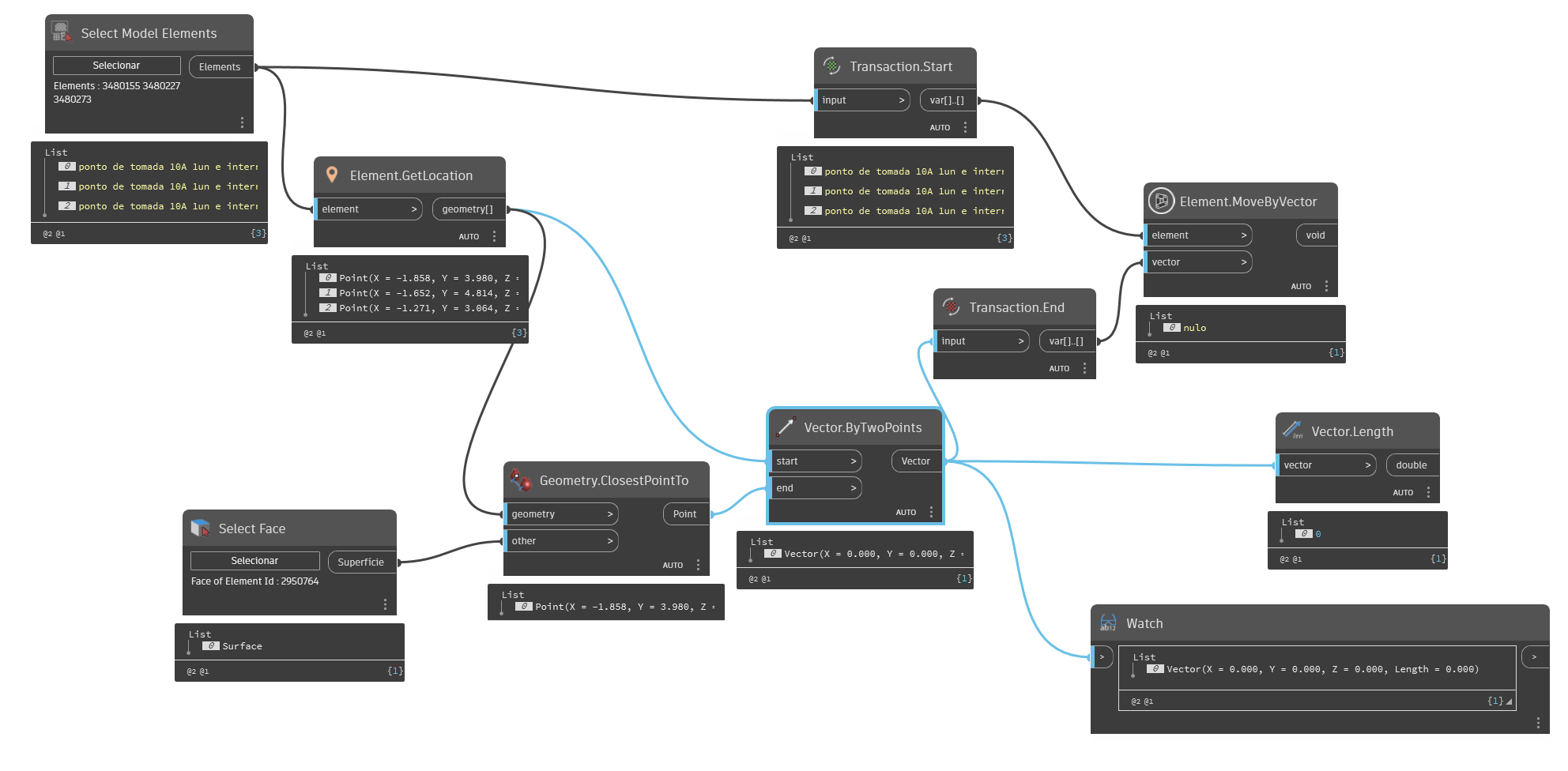
I am tryng to make a routine to move a element to a determinade point( that i click ), but its not working

WeQ.png)
ERRO MENSAGE: Element.MoveByVector operation failed. Attemp to modify the model outside of the transaaction
The image isn’t legible - follow the instructions here: How to export a graph image [Correctly]
Beyond that, we need to know what the warning message says - so grab an export of that too.
I updated the image, friend!
I dont think you need the start and end transaction nodes… but also
The error mensage:
“: Element.MoveByVector operation failed. Attemp to modify the model outside of the transaaction”
Even if I don’t put the transaction node, appears the same error mensage
Hi @biaa.dandes and welcome to the forum  try as here and see if it could work
Wow, this really works, thanks very much! If it’s not asking too much, how can i solate to move only in x direction? I try to put vector.bycoordinates but the arguments is not matching :\
You could scale the vector asymmetrically about the X, Y, and Z axis (0 for the Y and Z, 1 for the X), or generate a new vector using a Vector.ByCoordinates where the X value is the X component of the vector you currently have (Vector.X node) and the Y and Z components are 0.
Put a Vector.X in between the Vector.ByTwoPoints and the Vector.ByCoordinates.
The Vector.X extracts the X value from the initial Vector, so you’ll be feeding a double or integer (depending on the X value) which works for the ByCoordinates node.
The routine actually works, but the elements are not align to the pick point, this works exactly like the button move.
Sorry, i forgot to mention that i am trying to do this with more than one elements now.
If you think its better, i can make another post to ask how can i do this with more elements, in fact the doubt that i mention in the post its alreay aswer and working.
Sorry for the mess
Hard to understand how you would calculate the vector for two elements - are you trying to shift multiple elements a consistent direction?
No need for a new topic yet - might be a continuation of this one if it is a lacing / list level configuration issue. 
Yes, in this case im tryng to move somes wall socket to a face’s wall just picking a point
Ah.
Ok so for that we can’t have ’pick infinite points’ and hope the user picks a point for each wall socket, as they won’t. Nor can we does it make sense to move all the sockets to in less point as they would overlap.
My gut says you want to pick a face, and select some mode sockets to pull onto that face. So try ‘select model elements’ and ‘pick face’ nodes. Once you have the model elements, get their location, and find the point on the face that is nearest to each socket by using a Geometry.ClosestPointTo node. Then build a vector from the original points to the points on the face. Next use a MoveByVector node to shift each element by it’s vector. Give it a shot and if that doesn’t work, or if you are after something else start a new thread with what you have tried and a sketch + sample data set of what you are after.
arhh yeah now i think i understand try as Jacob suggest…it could probably be easyer just insert them again. or a setlocation…not sure
Hola amigos, this is interesting, Is not need end the transaction?? will not generate bugs if it rest open? or it close it automaticly? srry about the interruption i’ve start to learn more deep into programation!! 
In regular code, yes that would be problematic. However Dynamo’s built in transaction manager closes any hanging open transactions… well usually it does. Nothing is absolute.
Check your list levels and lacing. The ClosestPointTo node wants to be longest, perhaps others after it.
Also make sure the elements aren’t already on the face - the vector you are using has no length so the move likely will fail as you are seeing.
If that doesn’t work, post a sample dataset for review.
wise as always amigo Jacob, thanks for your reply!!