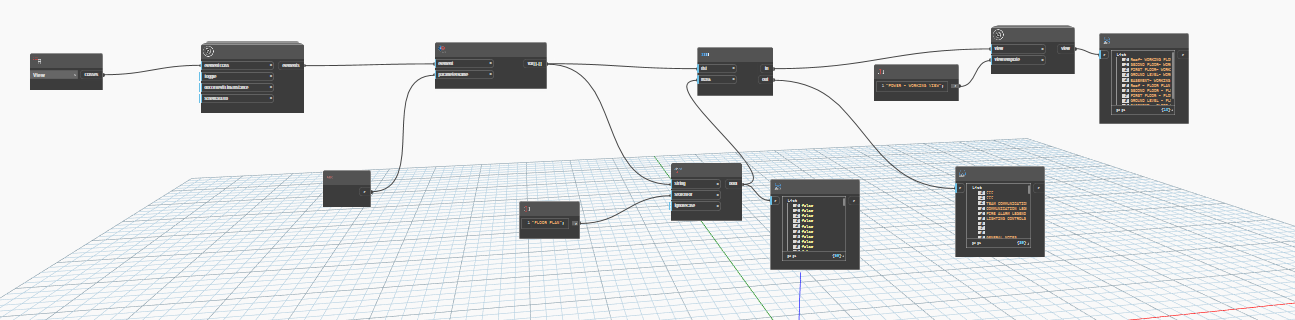
Hi Everyone! This is my first time posting on the forum. I am having trouble with my script that I want to automate view template application. If anyone can help, let me know! It is running with no errors, it just is not applying them.
Hi and welcome,
We cant see the node names in your screenshot.
Could you make another screenshot a little more zoomed in so the names are visible?
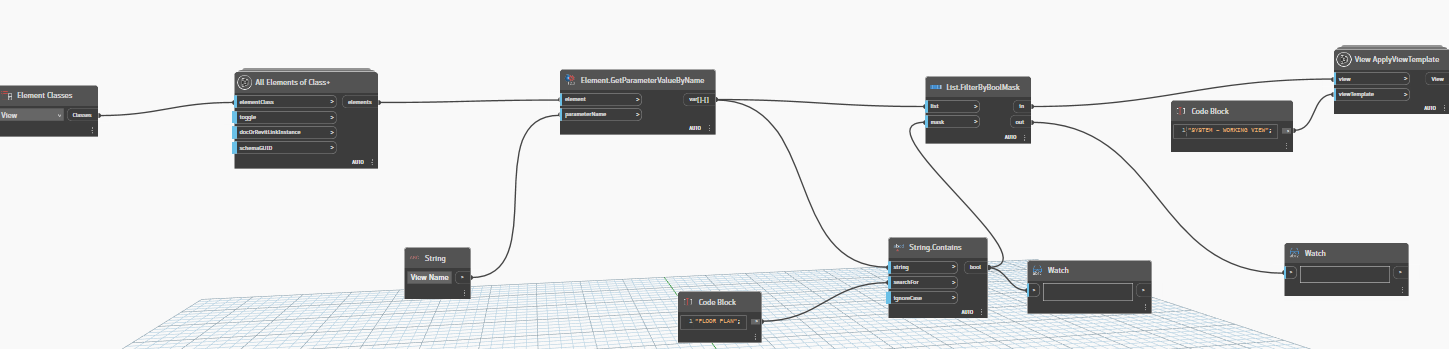

You are filtering the list of view names, but want to filter the list of views. Wire the views list from all elements of class + into the list input of the List.FilterByBoolMask and see if that corrects it.
The script still did not work with just the elements and list input change, I also had to then changed my View Apply View template node to a different kind of node, and now it is working! I do not understand the difference between the two nodes in the upper right, but it apparently plays a role in it operating correctly. Thank you so much for your help, Jacob! Here is the finished script that works, I am also looking to create an add-in at the top of the screen with buttons for each of my dynamo scripts if anyone has any experience with that!

I am also looking to create an add-in at the top of the screen with buttons for each of my dynamo scripts if anyone has any experience with that!
I don’t recommend this, but Relay is a great tool from @john_pierson for this. My preference is to leverage Dynamo Player as it allows better user input, has more support, and can be configured by individual users to automate more than what is prepared for deployment in the toolbar.
The View Template parameter takes the actual view (template) element, not just a string, so you need to make sure you have the template selected to apply. View templates are a type of view, so you can actually get them and filter them pretty much just like you did your floor plans - just use the View.IsTemplate node.