You’re going to struggle when your family has a location point and I think it might be good to go back to first principles.
Views have a sketch plane this defines the coordinate system with the Z axis being the view depth direction, the X axis the right hand direction and the Y axis being the up direction.
You can use your left hand to assist.
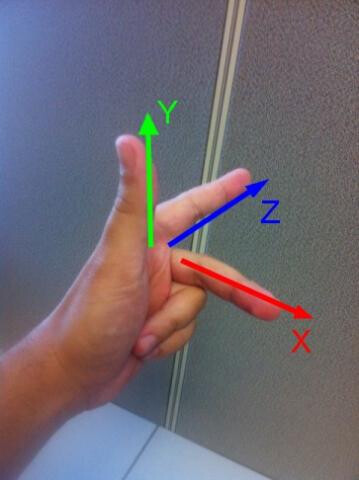
So when we are creating a typical section view the Y axis is the conical world coordinates Z vector, The XY plane is the view sketch plane with view Z being the normal.
When you create a section the ‘bounding box’ is created relative to the view’s coordinate system with the bounding box origin [0, 0, 0] placed at the origin of the view and the max Z ‘height’ is the section depth, the min Z the section view plane and the X & Y define the size of the crop on the view plane.
One way to tackle this is to use a bounding box, grab the geometry cuboid and surfaces and use that to create the section view. A cuboid’s surface’s normal always faces externally so this can be consistently use to define the view Z direction (i.e. reverse it). The right hand axis can be done with a vector cross product. Use individual surface dimensions to get the bounding box X and Y, and lower left point for the coordinate system origin. With this you can consistently get an accurate section view.
I have used BoundingBox.ByMinimumVolume node, however BoundingBox.ByGeometry may suit your purposes, depending on your use case

Edit: P.S. This should work with rotated bounding boxes
Edit 2: Clarity & grammer
