Greeting,
I would like to create section views for each family.
This is what I got so far. A section view is created but without the family. I am thinking maybe coordinateSystem.By OriginVectors needs to be adjusted or min/max point.
The article below was used as a reference to create the script.
Create Section Views in Revit Dynamo! | by Han | Medium
You’re going to struggle when your family has a location point and I think it might be good to go back to first principles.
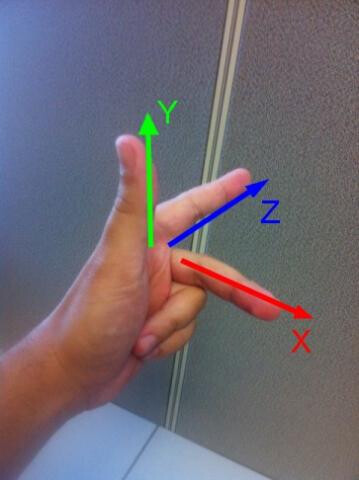
Views have a sketch plane this defines the coordinate system with the Z axis being the view depth direction, the X axis the right hand direction and the Y axis being the up direction.
You can use your left hand to assist.
So when we are creating a typical section view the Y axis is the conical world coordinates Z vector, The XY plane is the view sketch plane with view Z being the normal.
When you create a section the ‘bounding box’ is created relative
to the view’s coordinate system with the bounding box origin [0, 0, 0] placed at the origin of the view and the max Z ‘height’ is the section depth, the min Z the section view plane and the X & Y define the size of the crop on the view plane.
One way to tackle this is to use a bounding box, grab the geometry cuboid and surfaces and use that to create the section view. A cuboid’s surface’s normal always faces externally so this can be consistently use to define the view Z direction (i.e. reverse it). The right hand axis can be done with a vector cross product. Use individual surface dimensions to get the bounding box X and Y, and lower left point for the coordinate system origin. With this you can consistently get an accurate section view.
I have used BoundingBox.ByMinimumVolume node, however BoundingBox.ByGeometry may suit your purposes, depending on your use case
Edit: P.S. This should work with rotated bounding boxes
Edit 2: Clarity & grammer

Assemblies?
OR
Place a copy of each Family somewhere next
to your building first (maybe on a different Workeset or Phase) to make things easier?
The last approach is what i use to make a drawing for all (unique) Door and Window Types i have in my project.
Thank you very much Mike. One question, do you have any suggestions if the node “BoundingBox.ByMinimumVolume” and “Scale Cuboid”. I think because I am using Revit 2022 that’s why those nodes couldn’t be found.
Revit 2022 uses Dynamo 2 so a lot of the newer nodes may not be available, even if you were to use Python to get the view parameters you are looking at packages that haven’t been revised for two to three years.
An alternative would be to use the FamilyInstance.GetTotalTransform() and use the basis vectors to generate the view parameters