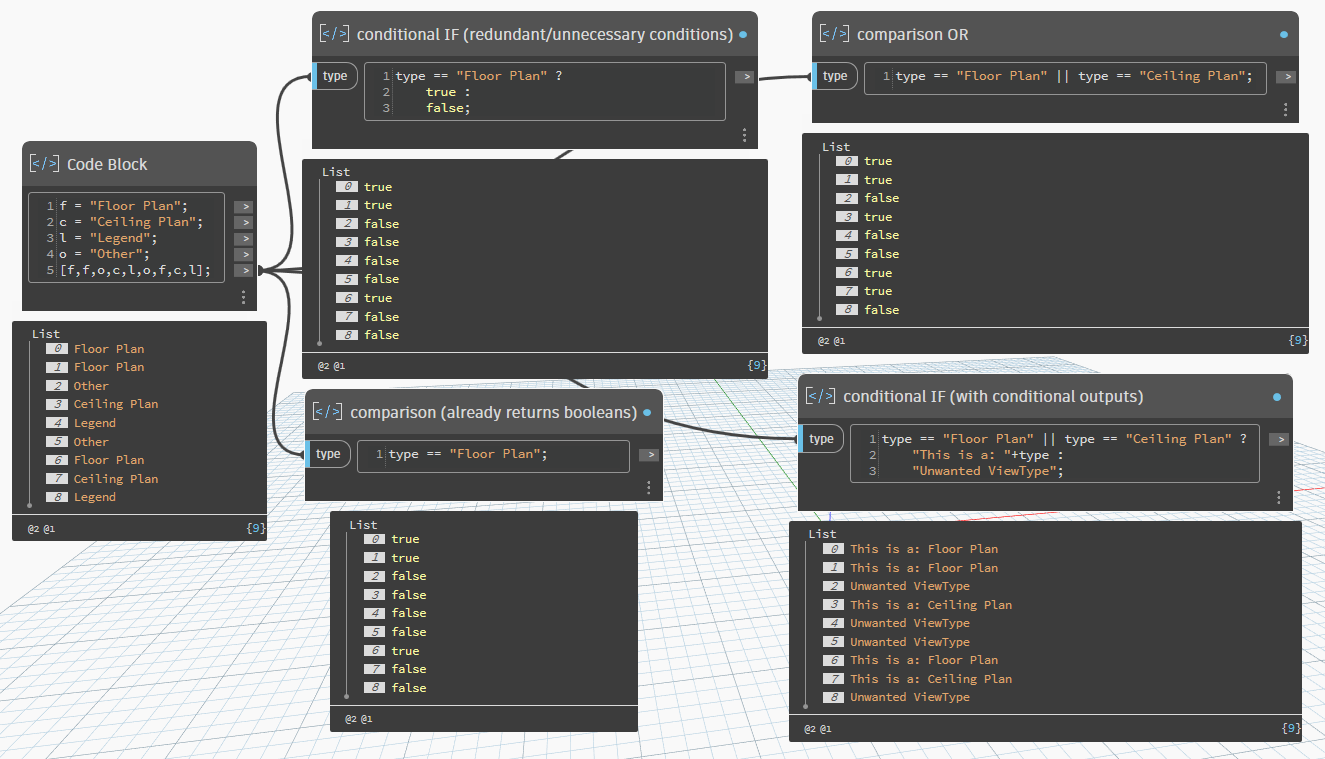
Hey everyone. I am using the Code Block shorthands as a stepping stone into understanding programming syntax better. I think most of us would understand excel formulas and that’s how I am seeing them for now as well.
But I am curious about using the If statement shorthand to extract outputs. Can I only apply boolean logic?
Something like these two lines should get you close to the answer you seek (not in Revit so I can’t test) and they should remove the Archi-Lab dependency which will save some headaches. It’s using the List.FilterByBoolMask node to filter the list.
For some additional context: you can do more than boolean outputs within an if statement (and you really should), however, you must have a functional output for both true and false conditions. Unlike some other environments, you can’t have an if true without an if false. This means you can’t filter out objects with just the if statement itself - you can still do it all in a single line (like both examples above), but you do have to include a separate function for filtering.
The if node itself also reflects this. You have to provide a boolean list test (from a previous condition) and the output you expect based on whether the result was true or false for each item in that conditional. Both output conditions are required, so you can’t do any filtering here.
This also means you don’t need to use true and false outputs in a DesignScript if statement (that’s the entire purpose of the conditional). You just need to determine what output you want under those conditions. If you just want to compare values, you would use a direct comparison, which is essentially a conditional statement without the conditions.
Hopefully this helps explain how DesignScript handles if statements, how you would typically use one, and why you would need to include a filtering function on top of one to remove values.
Only gonna point this out because it’s the exact topic we’re discussing… but myCondition ? true : false is unnecessary. I see it a lot, and though it’s not technically wrong, I think it can be confusing to new users who don’t understand how to use a conditional statement.
A conditional if statement in Dynamo has three parts:
test: boolean value representing a passed or failed condition
true: the value returned if the test passed
false: the value returned if the test failed
The test function itself already returns a boolean (or in the case of the node, is the boolean value). Which means test ? true : false is like saying if true, be true, if false, be false. If you only need true/false values then what you really have is a comparison between values, not a conditional. You don’t have any conditional operations in that case, you’re just executing the initial check. The conditional portion comes after, based on the results of the comparison (this is the addition of the ? trueResult : falseResult notation to the check.
No - they’re the same thing. DesignScript is the language of Dynamo. Dynamo uses this language as a wrapper and way to handle Revit objects and functionality within the Dynamo environment. In Revit, elements have a property Name that can be called as myElement.Name. Dynamo recreates this method as a wrapper function (Elements.Element.Name()) so that Dynamo Revit objects can be passed on to the function and have their name returned when the code actually executes. DesignScript also surfaces some Revit properties “directly”, like Name, through its wrapper function. Using myElement.Name in a DesignScript node is just telling Dynamo to use the function that returns that property in the API, which of course is Elements.Element.Name.
As for your current workflow, I think it would be beneficial to see what your data looks like. Although you’ve gotten your conditionals working properly, it seems like you’re actually taking extra steps to filter now. If the original goal was to not have to use a FilterByBoolMask node (at least not outside of a single-line function) and you’re now having to check your conditionals for empty lists just to use FilterByBoolMask, then I think we can clean this up better and not have so much redundancy.
So my entire workflow is like this:
Grab all sheets
Clean empty Sheets
A) Grab viewports and check if Type is Floorplan / Ceiling plan.
B) Grab viewports and check if Type is Legend.
Check if the Sheet only has 1 of A or B each
Set A to top left corner + margin (By creating a vector between Viewport top left and Titleblock top left)
Set B to top right corner - margin (By creating a vector between Viewport top left and Titleblock top left)
That’s helpful. We can definitely get there. Your overall screenshot is illegible though (too small). Can you post a new one (with all node preview bubbles pinned) so we can see what your data looks like and work through an example? Always use the Export as Image button at the top right of the Dynamo window when taking screenshots. It will always export the entirety of your workspace (no need to make sure you get everything in your visible window) so all you have to do is make sure you’re zoomed in enough that node titles are visible.
The issue is that the screenshot you posted is too small and too far zoomed out. We can’t read anything in it. Please follow the directions I suggested in my previous response so that you get a legible image that we can read. We also don’t have the RVT file that you’re testing on to recreate your conditions and may not recognize what you’re actually wanting from your graph outputs versus what you’re currently getting from them. A screenshot and example output is much more helpful.
Yes. Without parenthesis I believe Dynamo evaluates these formulas left to right. However, it’s always best to group combined logic with parenthesis for control as well as visibility.
List.Clean() would still require the same syntax you used before. The function requires a list to clean and the argument to preserve indices or not (List.Clean(myList,preserveIndices) returns myCleanedList). To make this simpler, I suggest you work on getting each piece working before moving onto the next. It’s easier to string together multiple code blocks and understand your structure and order of operations before condensing them all back into a single node.
I could use some more help. How can I make sure the lacing of SetParameterByName is set to Longest?
This has to do with an angle I am setting that I am measuring by drawing a line between points from PointsAtChordLengthFromPoint
This means that I have less directions than I have points. So I want the familyinstance placed on the last point to copy the angle from the previous one in the list.
It appears to be set already, but by calling the function on the instance you’re limiting your lacing options.
Element.SetparameterByName( elements<lacing>, "Hellingshoek", values<lacing>); is likely what you’re after. Swapping elements for (Revit.Elements.FamilyInstance.ByPoint(type, points[index]).SetRotation(0.853)) might prevent the extra output that I imagine you’re trying to avoid.
That said, this is a fair bit of design script without any means of a debugging exit, so you might want to allow the intermediate outputs even if they won’t be used.
One thing to keep in mind is that converting nodes to code blocks is always an option, and likely would help find the ‘right’ syntax readily. Place the 3 or 4 nodes for each statement you have now, select them, right click on canvas, and select “Node to code”. Result should get you what you need.
Oke wow, I didn’t realize (or forgot) that you could select multiple and put them into 1 code block. That’s pretty nifty. But usually not in the structure I would like. But I got it to work. Good to know that lacing remains tricky in the shorthand format
Lacing is tricky with plain nodes, list levels enabled nodes, design script replication guides, or textural loops. Of the options list levels is likely the easiest and fastest to configure, textural loops offers the most explicit control, and replication guides have the simplest syntax compared to the capabilities (swapping one number gives you completely different results).
If you feel like you’re getting more comfortable (or wanting to) with code blocks and list levels, I highly recommend you start getting familiar with and work towards replication guides. They open up a lot of flexibility once you get into more complex list structures and input combinations.