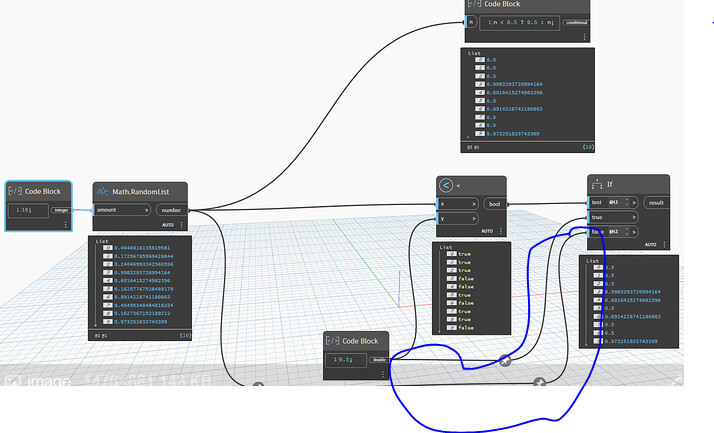
Hi everyone, I’m trying to work with the “if” node for lists, but when I input the list, in the cases it would be false the output is the list itself, and not the item that is returning false.
I understand this is the intended behaviour but is there a workaround to get the actual value? Searching a little bit I’ve seen people recomend the “if” node from zebra or similar packages but I wanted to avoid too many custom nodes.
There is some jiggery pokery going on with your If node as there are some nested lists
Try and get you lists flat and then use a design script comparator - or - nodes
Thanks for all the replies. Indeed this is what I’m looking to acomplish, filter and replace, not just filter. So I’ll try to follow this workflow, thanks!
PS: I tried to flatten the lists to get them to work with the “if” node as mentioned by @Mike.Buttery but seems it’s still not working and I hoped.




 , but yeah, it works, thanks!