Hi, my practice has a pretty complex numbering standards when it comes to sheets. Each sheet number contains a series of syllabes indicating what will be shown in them, and a number at the end. Also, they need to be in an specyfic order, this comes from another parameter called Order.
So, for example, we have a sheet with the number GA-PLN-001 and order 2.1. Then a GA-CEI-001 at 2.2. All the sheets with the number starting with the same syllabes will have the same order number, so all GA-PLN sheets will be 2.1, all the GA-CEI 2.2 and so on.
Because all of these parameters have to be entered manually (wich is super tedious btw), I wanted to come up with a Dynamo script that would take the first characters from the sheet number parameter, and complete the Order field based on that.
I´m VERY new to Dynamo tho, and so far I could only do this. I don´t exactly know how to continue or if this is ritght even. I could really use some help.
Thanks!
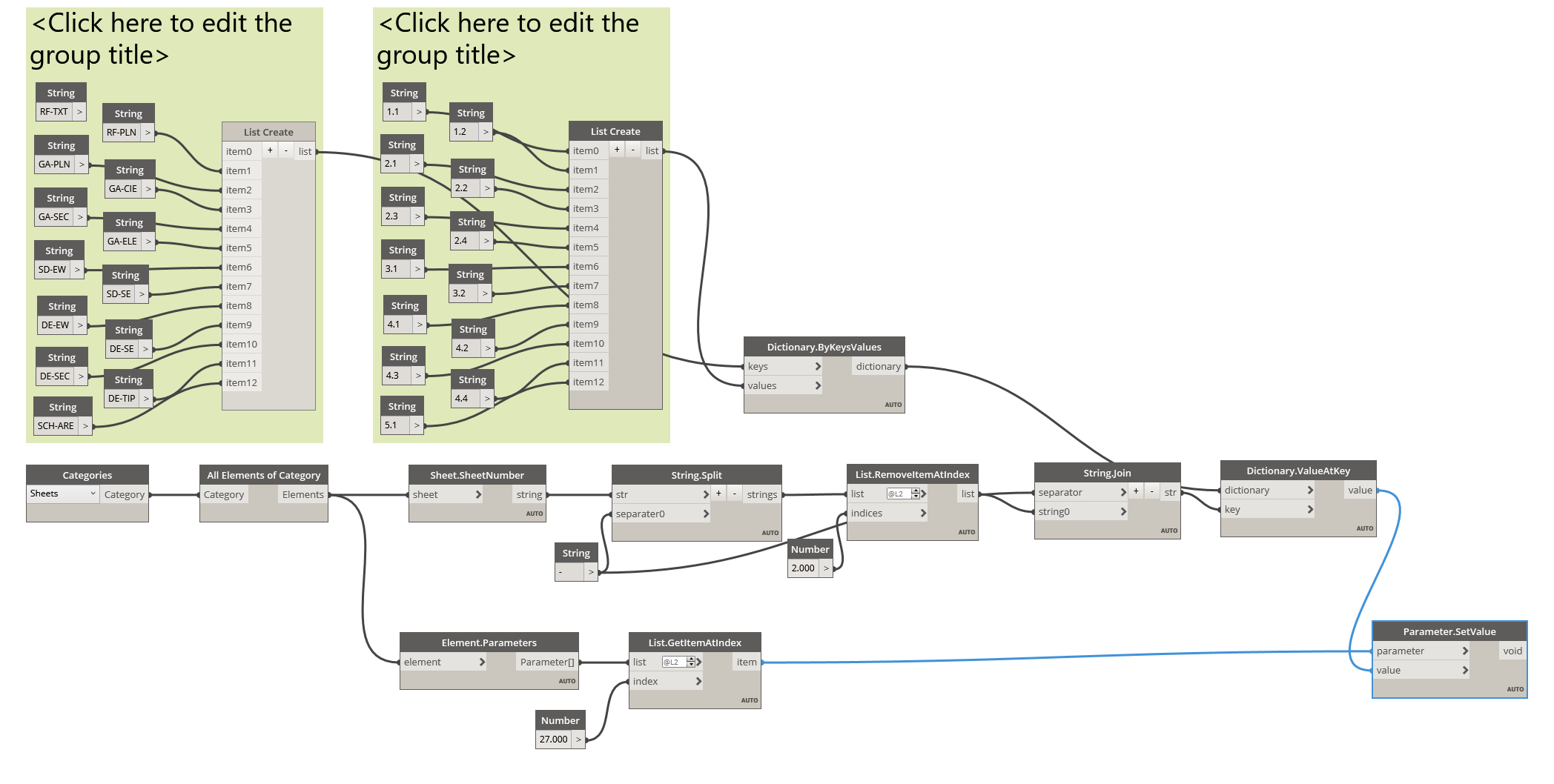
I think what you’re looking for here is a dictionary:
Dictionary Example.dyn (23.6 KB)
First, I split each of the strings using a hyphen which turns each sheet name into a list. I then remove the last item and join the first two items back together using a hyphen as well. Since I have associated each two-part code with a number (e.g. GA-PLN : 2.1) I am able to use the same value I extracted from the sheet name as a key. So, it will look for GA-PLN in the dictionary and return its corresponding value.
Thanks! That´s genius! After that I only need to add a change parameter value node and done, right?
Yes, just make sure to either not sort your data, or sort your sheets using the SortByKey node so that the right order code will be assigned to its corresponding sheet.
It didn’t present errors, but it didn’t change my sheet’s order number. I believe the problem is the sheet number has two hyphens, and maybe the script fails to recognize that as the same value. OR, (most probably) it’s that I’m doing something wrong?
Can you show the output of each of the nodes as you did with the first post?
Another thing: Revit won’t allow any two sheets to be numbered the same, maybe this script is making the number at the end dissapear, and thus all my GA-PLN, etc. sheets would end up with the same number?
@manuelmunoz87
we must flatten the list of results
Akli is right, your Dictionary.ValueAtKey is returning a list at L3 whereas your parameters are at L2. Flatten the list from Dictionary.ValueAtKey by 1 level and it should work.
It worked! Thank you guys so much!