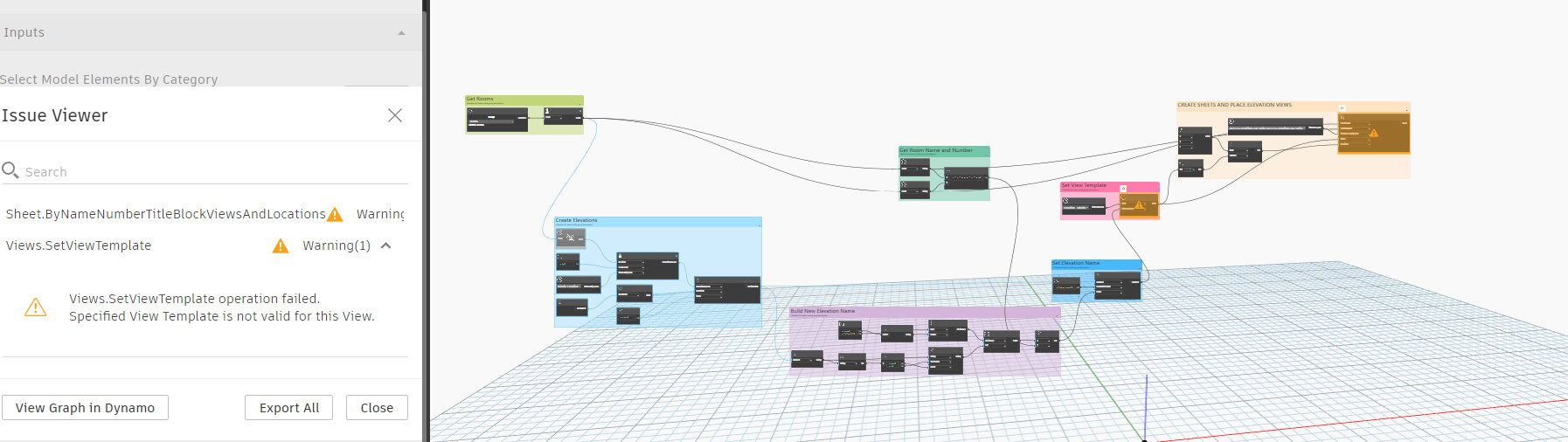
Does anyone have any recommendations for either writing my own Dynamo script or downloadable Revit add-ins for Revit 2025? I would really appreciate some help!
**(TwentyTwo has a great tool for creating and naming elevations, but pairing down hundreds of views to consolidate 4 views onto 1 sheet is so tedious) **
The tasks I am ultimately responsible for completing are
- Create 4 elevation views for each room with 1 corresponding sheet
- Create a callout view for each room with a corresponding sheet
- Automating title blocks so that the views are scaled and consistently placed
My recommendation is take it one step at a time. Figure out how to automate a floor plan, then a viewport and finally elevations.
Some of this is not possible with ootb nodes only, particularly elevation setup. Look into custom packages that use python to achieve those steps such as my own, Crumple, where you find missing steps in ootb nodes.
All those things are possible in dynamo.
If youre new to dynamo, focus on simpler workflows and the dynamo primer as that it is a complex workflow.
I know these are 3 different workflows. I was hoping for any insights on completing the outcomes.
Here is a screenshot of the Elevations to Sheet project based on an outdated tool from rdstudio in DYNAMO v.3.3.0 and an issue that I am having. If anyone has a better idea or tool I am all ears.
This is doable, and a good intermediate skill level graph. It isn’t a ‘my first graph’ example though - so if you’re new to Dynamo then you likely want to think about reducing the scope or up skilling yourself first.
The first step is always to outline what you need to do. Write down the steps which the code has to take. You have some good ‘big’ steps which should be intermediate graphs/automations for someone getting started, but I’ll expand with some stuff to think about here.
From one selected room:
- A graph to create and name a plan view
- Get the bounding box of the room
- Generate a new plan view of the appropriate type
- Use the bounding box to crop the view
- Apply a view template to the plan view
- Set the scale
- Set the name
- A graph to create and name the four elevations
- Get the center of the room
- Create an elevation marker
- Enable all four views on the marker
- Adjust the views crop and depth
- Set the view template
- Set the view scale
- Set the view name
- A graph to place views related into a new sheet
- Get the views to place
- Gather the views into one list
- Use the
Sheet.ByNameNumberTitleBlockAndViews node to generate the sheets
Remember that doing any one of these steps is a win, so building any one of these is a good first step.
A two things to keep in mind.
- I started with ‘a room’. Yes, you could make these work across all rooms in the model and maybe that is the end goal. How you need to make it work with one room, then three rooms, then all rooms. Do this with the intermediate graphs instead of the combined single graph.
- Not all rooms want four elevations (a room with an open side to the adjacent room), and some won’t want any. Look into the logic of what you elevate in your projects before you try anything around all rooms.
- Be sure to not double up on elevations with this. There is some review on this.
- Be sure that all rooms are bound and none are duplicate before you start as that will otherwise be detrimental.
- Users need to review this type of output not just see that it ran. Every sheet needs some degree of QA/QC, and bulk creation and automation like this can actually be detrimental to project production; just because you can document everything doesn’t mean you should. Consciously deciding where to put the time into this stuff is a HUGE part of design and far too often automation like this is used in such a way that results in worse outcomes for everyone.
Could you expand all of your outputs, zoom in as close as possible to the canvas and then export an image of the workspace with Dynamo? It’s a little difficult to see what could be causing issues with your view template setting; my first thought is that it might not be the right “view” to receive the view template or not the right view template type.
I am picking rooms to create the elevations from an overhead floor plan.
It does create 1 view and 1 sheet in the browser. However, the elevations marker is not visible on the floor plan, and it did not place the view onto the sheet that it created