Hi,
i have some problems to work with family istance in revit 2023 and dynamo core 2.16.2.5624 and dynamo revit 2.16.2.9354 , when i load the script i have this message:
Do anyone have the same problem?
When i run the script it doesn’t get any errors…but i can’t get any element in revit project (obviously geometry in dynamo averything is correct)

Install the springs package from the package manager. Get the version that is for your revit version.
Also install the IronPython2 package version 2.5.
Hi,
i updated all but problem still remains, anyway i workaround the problem exporting sat file then i imported but i can’t define volume parameter related to the imported file, do someone knows a way to find this parameter?
Thanks
Can’t see what you are doing or what the issue is, but my guess is that you’re going to have to generate the geometry in the native Revit API instead of doing an import method.
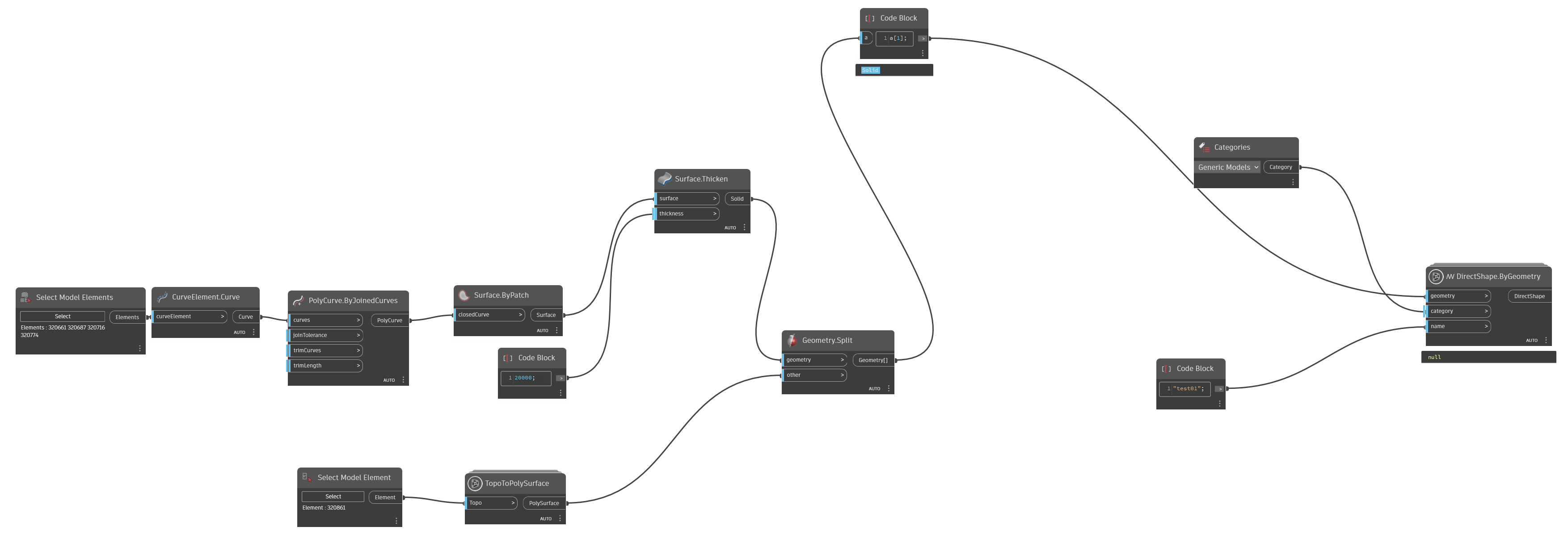

Need the source model as well. or rather the model with only elements [320661, 320687, 320716, 320774, 320861] (the elements you extract the curves from and the topo).
My gut says that the topo intersection is generating something which is degenerate, or the coordinates aren’t scaling cleaning during conversion (floating point error).
Project1_test.rvt (5.9 MB)
i tested with this very simple model to avoid self intersect problems of the topo.
The model is composed of 5 elements… 
What package is Topo.ToPolySurface from?
Built my own.
Feels like the issue is with the Surface.Thicken node, which kind of makes sense as the surfaces might not be pointing in the right direction from a Revit perspective as a result of the process. Using a Curve.ExtrudeAsSolid node makes this work for me.
Working for me.dyn (51.6 KB)
Jacob…you give me a great gift 
at this point i ask you if you have any idea for introduce a volume parameter to this solid?
Thanks again
Don’t use an import - build the solid directly using the Revit API. Imports, no matter how you build them, will lose data in order to ‘make things work’ between the formats. This is true of any import in any application.
A Point in application X isn’t the same as a Point in [Dynamo, Revit, Civil 3D, Blender, IFC, Excel, MatLab, etc.]. As such each importer has to ‘fudge’ something along the way, and doing so is trade off between speed and accuracy. At a certain point Revit’s importer ‘gives up’ maintaining a volume calculation in order to maintain geometry fidelity. To avoid this, you must build your data natively, or forego the built in volume parameter.