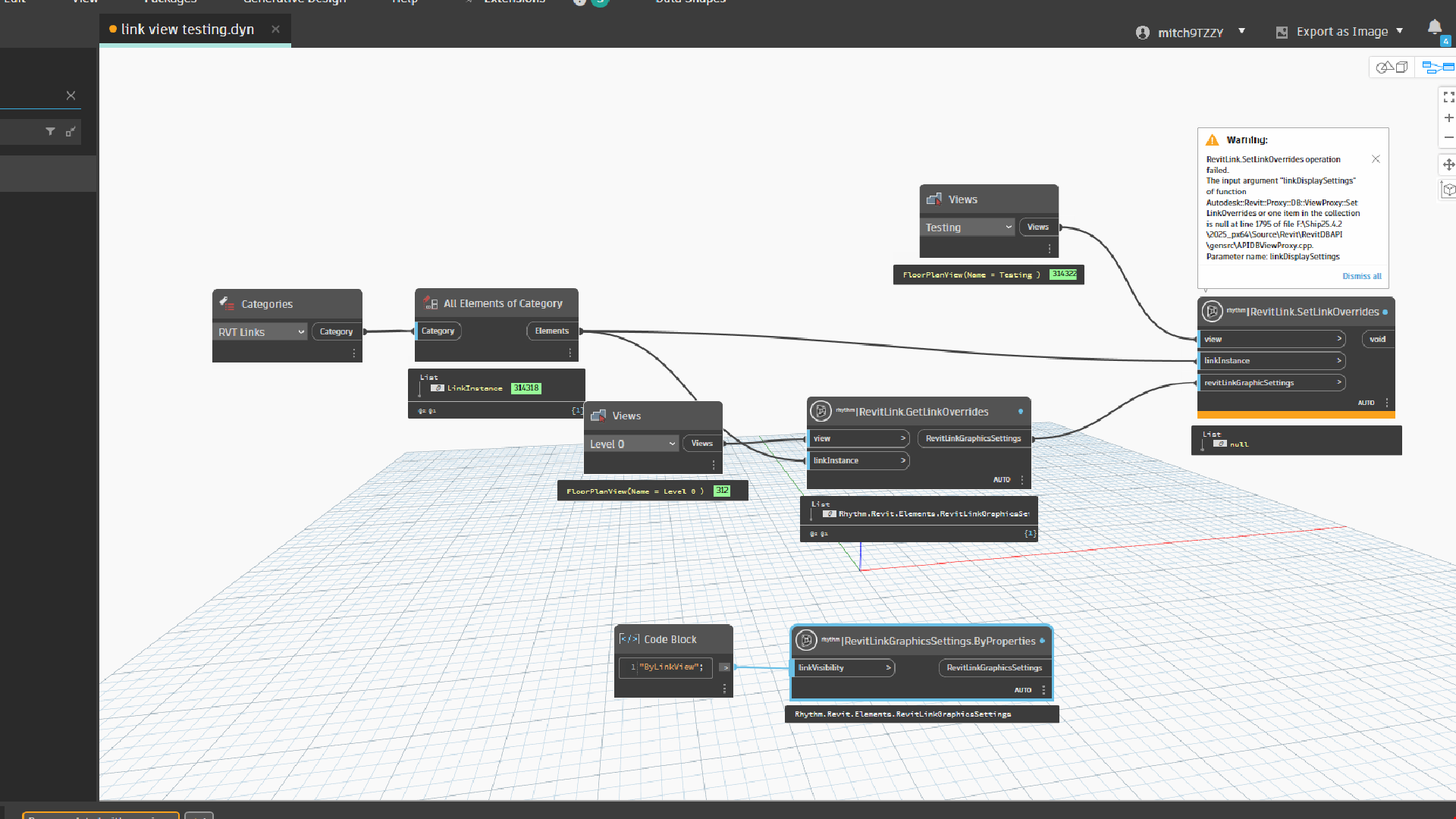
Hi all,
I am looking for some guidance with regards to RVT link Display settings.
Is it possible to change the Radio button toggle from “By host view” to “By linked view” and select the view to apply?
I have stumbled across nodes from the Rhythm package, but I have been unsuccessful with it thus far.
I have tried to just simply get the properties from one view and apply it to another view, although I am not sure I am using the nodes correctly and also cant find documentation on how the nodes operate. Ideally, I need to scale this process up (If it is possible), to go through and set this parameter for literally hundreds of views.
Any opinions or methods would be greatly appreciated.
Thanks so much
Hi,
In your case, perhaps the RevitLinkGraphicsSettings is being applied to the RevitLinkType rather than the RevitLinkInstance.
an example with Python
import clr
import sys
import System
#import net library
from System import Array
from System.Collections.Generic import List, IList, Dictionary, HashSet

#import Revit API
clr.AddReference('RevitAPI')
import Autodesk
from Autodesk.Revit.DB import *
import Autodesk.Revit.DB as DB

#import transactionManager and DocumentManager (RevitServices is specific to Dynamo)
clr.AddReference('RevitServices')
import RevitServices
from RevitServices.Persistence import DocumentManager
from RevitServices.Transactions import TransactionManager
doc = DocumentManager.Instance.CurrentDBDocument


toList = lambda x : x if hasattr(x, "__iter__") and not isinstance(x, (str, System.String)) else [x]

#Preparing input from dynamo to revit
linkInstance = UnwrapElement(IN[0])
linkType = doc.GetElement(linkInstance.GetTypeId())
link_doc = linkInstance.GetLinkDocument()
lst_copy_views = toList(UnwrapElement(IN[1]))
lst_paste_views = toList(UnwrapElement(IN[2]))
out = []

#Do some action in a Transaction
TransactionManager.Instance.EnsureInTransaction(doc)

for c_view, p_view in zip(lst_copy_views, lst_paste_views):
    ro = c_view.GetLinkOverrides(linkInstance.Id)
    # if there is no RevitLinkGraphicsSettings with the RevitLinkInstance try with the RevitLinkType
    if ro is None:
        ro = c_view.GetLinkOverrides(linkType.Id)
    #
    try:
        p_view.SetLinkOverrides(linkType.Id, ro)
        # OR
        #host_view.SetLinkOverrides(linkInstance.Id, ro)
        out.append(p_view)
    except Exception as ex:
        out.append(str(ex))

TransactionManager.Instance.TransactionTaskDone()

OUT = out
Hi,
Thanks so much for the feedback, this works perfectly.
Do you have any suggestions for how I would do this on mass, but be able to specify the linked view that gets applied? The above example copies the existing linked view and pastes it to the new view, which works great. But I’m not sure how I would specify the linked view for each plan view.
I guess my question is, is it possible to toggle the setting to “By linked View” AND specify the linked view to assign to that view, perhaps with the use of a string? I would probably have an Excel file with a list of view names that I can pull into Dynamo and sort, to make sure that I can feed all those options into the view assigning mechanism.
Again, any assistance or direction would be very appreciated. And thanks for the code so far, that works great 
Here is an example with name of linked views as input
python code (compatible with IronPython3 or PythonNet3)
import clr
import sys
import System
#import net library
from System import Array
from System.Collections.Generic import List, IList, Dictionary, HashSet

#import Revit API
clr.AddReference('RevitAPI')
import Autodesk
from Autodesk.Revit.DB import *
import Autodesk.Revit.DB as DB

#import transactionManager and DocumentManager (RevitServices is specific to Dynamo)
clr.AddReference('RevitServices')
import RevitServices
from RevitServices.Persistence import DocumentManager
from RevitServices.Transactions import TransactionManager
doc = DocumentManager.Instance.CurrentDBDocument

clr.AddReference("System.Core")
clr.ImportExtensions(System.Linq)

toList = lambda x : x if hasattr(x, "__iter__") and not isinstance(x, (str, System.String)) else [x]

#Preparing input from dynamo to revit
linkInstance = UnwrapElement(IN[0])
linkType = doc.GetElement(linkInstance.GetTypeId())
link_doc = linkInstance.GetLinkDocument()
lst_host_views = toList(UnwrapElement(IN[1]))
lst_name_linkViews = toList(IN[2])

#Do some action in a Transaction
TransactionManager.Instance.EnsureInTransaction(doc)

for host_view, linked_view_name in zip(lst_host_views, lst_name_linkViews):
    link_view = FilteredElementCollector(link_doc).OfClass(View)\
            .FirstOrDefault(System.Func[DB.Element, System.Boolean](lambda v : not v.IsTemplate and v.Name == linked_view_name))
    if link_view:
        ro = RevitLinkGraphicsSettings()
        ro.LinkVisibilityType = LinkVisibility.ByLinkView
        ro.LinkedViewId = link_view.Id
        host_view.SetLinkOverrides(linkType.Id, ro)
        # OR
        #host_view.SetLinkOverrides(linkInstance.Id, ro)

TransactionManager.Instance.TransactionTaskDone()

OUT = lst_host_views
Hi,
Thank you so much once again for the guidance. I have assembled the inputs and tried to change some of the code that is giving an issue, but I am not getting it right, I’m not sure what this line of code is actually doing.
I’ve never seen the “FirstOrDefault” line before, could you explain what this is doing?
Hi, @mitch9TZZY
As I mentioned, the code is not compatible with CPython3 (it is not possible to use the Linq Extension feature).
try this version
import clr
import sys
import System
#import net library
from System import Array
from System.Collections.Generic import List, IList, Dictionary, HashSet

#import Revit API
clr.AddReference('RevitAPI')
import Autodesk
from Autodesk.Revit.DB import *
import Autodesk.Revit.DB as DB

#import transactionManager and DocumentManager (RevitServices is specific to Dynamo)
clr.AddReference('RevitServices')
import RevitServices
from RevitServices.Persistence import DocumentManager
from RevitServices.Transactions import TransactionManager
doc = DocumentManager.Instance.CurrentDBDocument

clr.AddReference("System.Core")
clr.ImportExtensions(System.Linq)

toList = lambda x : x if hasattr(x, "__iter__") and not isinstance(x, (str, System.String)) else [x]

#Preparing input from dynamo to revit
linkInstance = UnwrapElement(IN[0])
linkType = doc.GetElement(linkInstance.GetTypeId())
link_doc = linkInstance.GetLinkDocument()
lst_host_views = toList(UnwrapElement(IN[1]))
lst_name_linkViews = toList(IN[2])

#Do some action in a Transaction
TransactionManager.Instance.EnsureInTransaction(doc)

all_link_views = FilteredElementCollector(link_doc).OfClass(View).ToElements()

for host_view, linked_view_name in zip(lst_host_views, lst_name_linkViews):
    link_view = next((v for v in all_link_views if not v.IsTemplate and v.Name == linked_view_name), None)
    if link_view:
        ro = RevitLinkGraphicsSettings()
        ro.LinkVisibilityType = LinkVisibility.ByLinkView
        ro.LinkedViewId = link_view.Id
        host_view.SetLinkOverrides(linkType.Id, ro)
        # OR
        #host_view.SetLinkOverrides(linkInstance.Id, ro)

TransactionManager.Instance.TransactionTaskDone()

OUT = lst_host_views
Hi @c.poupin ,
Cant thank you enough, this works perfectly. I am going to do my best to understand everything in this Python code (As I am not well versed at all) and make some modifications, but I really appreciate your help
All the best!