Hello dear Dynamo users,
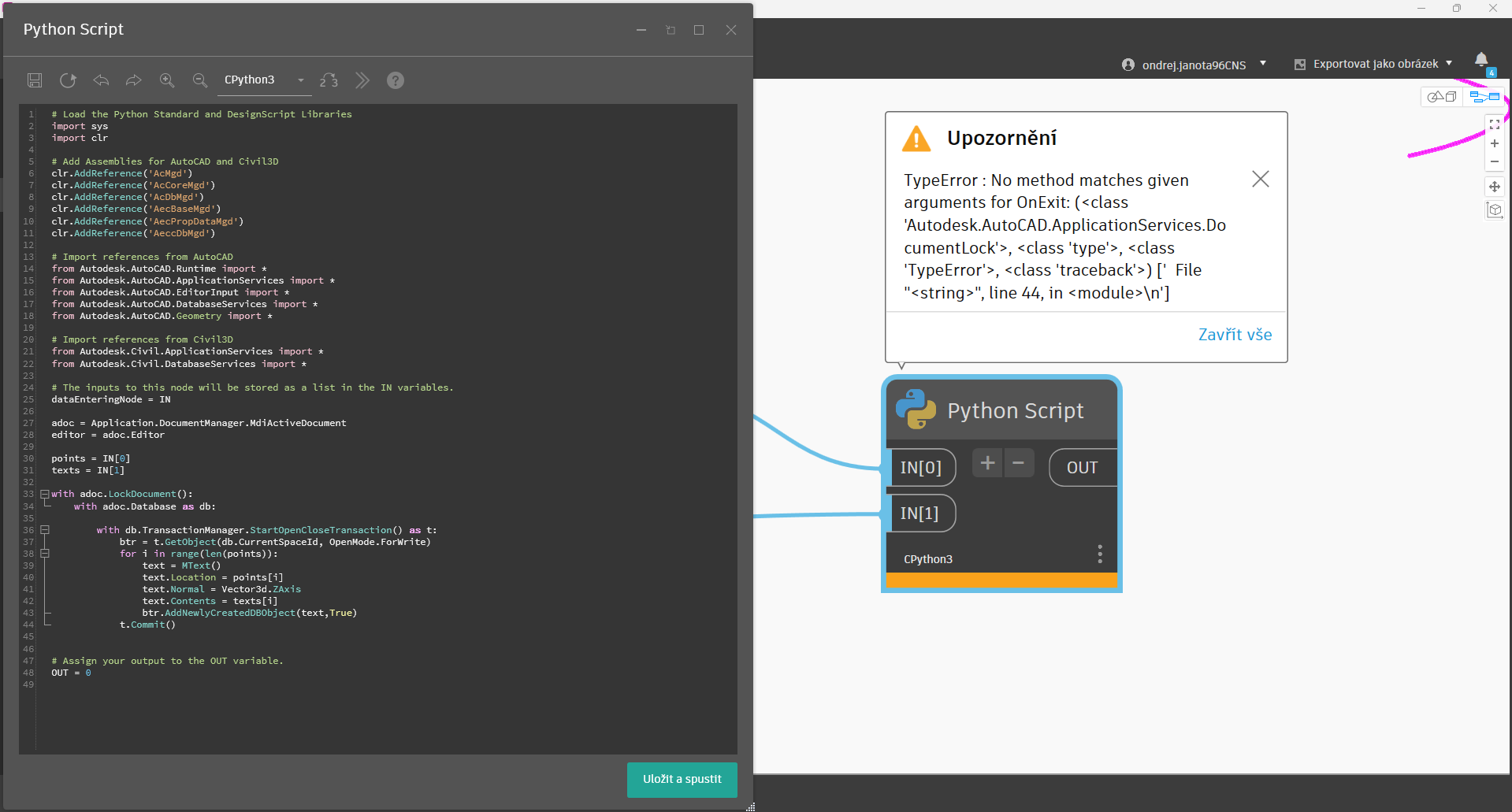
I am trying to generate some MTexts into .dwg file using Python in Dynamo. It shouldn’t be hard to do so, but all I get is errors. If I do the same with the Lines it works. I work with dynamo for Civil3D.
After some investigation it looks like Python has a problem with transaction and raises an error. I have tried multiple Python code variations but no success (see images below). I am able to use same approach in custom node written in C#.
Sometimes I gave following error and time to time Civil3d crashes totally.
Am I doing sometihng wrong or is there any solution to these errors? I followed initial Python script with the same error.
Thanks for any reply, advice or help.
Best
Ondřej Janota
Hi @ondrej.janota
Here are 2 solutions
CPython3 code
import sys
import clr
import System
# Add Assemblies for AutoCAD and Civil3D
clr.AddReference('AcMgd')
clr.AddReference('AcCoreMgd')
clr.AddReference('AcDbMgd')
clr.AddReference('AecBaseMgd')
clr.AddReference('AecPropDataMgd')
clr.AddReference('AeccDbMgd')

# Import references from AutoCAD
from Autodesk.AutoCAD.Runtime import *
from Autodesk.AutoCAD.ApplicationServices import *
from Autodesk.AutoCAD.EditorInput import *
from Autodesk.AutoCAD.DatabaseServices import *
from Autodesk.AutoCAD.Geometry import *

# Import references from Civil3D
from Autodesk.Civil.ApplicationServices import *
from Autodesk.Civil.DatabaseServices import *

adoc = Application.DocumentManager.MdiActiveDocument
editor = adoc.Editor

import traceback

def toList(x):
    if isinstance(x, (list, dict)) or \
            (hasattr(x, "GetType") and x.GetType().GetInterface("ICollection") is not None):
        return x
    else : return [x]

lst_pts = toList(IN[0])
lst_texts = toList(IN[1])
out = []

acLckDoc  = adoc.LockDocument()
db = adoc.Database
t = db.TransactionManager.StartTransaction()
# Place your code below
try:
    bt = t.GetObject(db.BlockTableId, OpenMode.ForRead)
    btr = t.GetObject(bt.get_Item(BlockTableRecord.ModelSpace), OpenMode.ForWrite)
    for pt, text in zip(lst_pts, lst_texts):
        mtext = MText()
        mtext.Location = Point3d(pt.X, pt.Y, pt.Z)
        mtext.Contents = text
        btr.AppendEntity(mtext)
        t.AddNewlyCreatedDBObject(mtext, True)
        out.append(mtext)
#
except Exception as ex:
    OUT = traceback.format_exc()
else:
    OUT = out
    t.Commit()
finally:
    t.Dispose()
    db.Dispose()
    acLckDoc.Dispose()
PythonNet3 code (new python engine)
import sys
import clr
import System
# Add Assemblies for AutoCAD and Civil3D
clr.AddReference('AcMgd')
clr.AddReference('AcCoreMgd')
clr.AddReference('AcDbMgd')
clr.AddReference('AecBaseMgd')
clr.AddReference('AecPropDataMgd')
clr.AddReference('AeccDbMgd')

# Import references from AutoCAD
from Autodesk.AutoCAD.Runtime import *
from Autodesk.AutoCAD.ApplicationServices import *
from Autodesk.AutoCAD.EditorInput import *
from Autodesk.AutoCAD.DatabaseServices import *
from Autodesk.AutoCAD.Geometry import *

# Import references from Civil3D
from Autodesk.Civil.ApplicationServices import *
from Autodesk.Civil.DatabaseServices import *

adoc = Application.DocumentManager.MdiActiveDocument
editor = adoc.Editor

import traceback

def toList(x):
    if isinstance(x, (list, dict)) or \
            (hasattr(x, "GetType") and x.GetType().GetInterface("ICollection") is not None):
        return x
    else : return [x]

lst_pts = toList(IN[0])
lst_texts = toList(IN[1])
out = []

class CManager:
    """
    a custom context manager for Disposable Object
    """
    def __init__(self, obj):
        self.obj = obj

    def __enter__(self):
        return self.obj

    def __exit__(self, exc_type, exc_value, exc_tb):
        self.obj.Dispose()
        if exc_type:
            error = f"{exc_value} at line {exc_tb.tb_lineno}"
            raise ValueError(error)
        return self

with adoc.LockDocument():
    with CManager(adoc.Database) as db:
        print(db)
        with CManager(db.TransactionManager.StartTransaction()) as t:
            bt = t.GetObject(db.BlockTableId, OpenMode.ForRead)
            btr = t.GetObject(bt[BlockTableRecord.ModelSpace], OpenMode.ForWrite)
            for pt, text in zip(lst_pts, lst_texts):
                mtext = MText()
                mtext.Location = Point3d(pt.X, pt.Y, pt.Z)
                mtext.Contents = text
                btr.AppendEntity(mtext)
                t.AddNewlyCreatedDBObject(mtext, True)
                out.append(mtext)
            t.Commit()

OUT = out
Thanks for quick reply. First option works (tried for one text).
I am not sure where is the problem (what causes it). Is that you manually dispose all necessarities? It should be handled by With keyword (Same as python script default code gives you).
Thanks for help.
Best
Ondřej
It should, if the target application were written for native Python access, which isn’t the case as Civil 3D and AutoCAD are written for .NET not C which is where Python operates. As a result errors which arise cause wholesale problems like this. The old IronPython2 engine managed this better by having a tighter tie in to .NET (the benefit of Microsoft building out the Iron languages is that they owned both sides of the equation; sadly they stopped investing there around 2011).
Other engines might make your method functional again, but I find that manual transaction, DB, and document control is best for initial authoring/exploration; shift to the with statement after you get it working.
There was a long-standing issue where .NET resources were not properly disposed in the case of an exception, which caused resource leaks. We have a fix coming soon. You can test in the Civil 3D 2026.2 beta if you want.
@zachri.jensen and @jacob.small,
thanks again for you support and explanations.
Best
Ondřej