Goodday,
Revit 2026.2
Dynamo 3.5.2
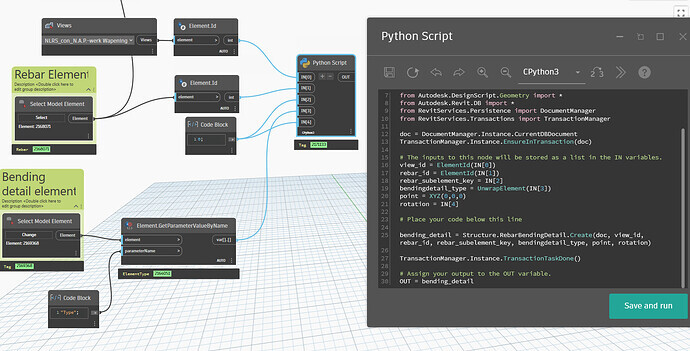
We recently started using bending details in Revit see image below, it is an option within the annotations to fold out your rebar in views or sections.
Now we have to manually place each bending detail on a view which is a little time consuming. I tried to find a option to place them using dynamo but i cannot seem to find the node to do so, neither could i find a package which might contain this option.
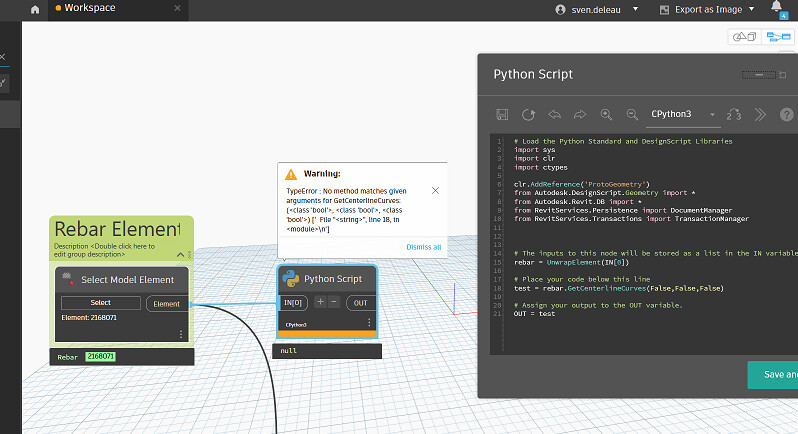
In dynamo i found out that the bending detail is a tag (red element in image). But when i try to place a tag on the rebar i get the following error.
Has anyone dealt with this before?
You’re going to have to dig into the API and use RebarBendingDetail.Create method
Unfortunately none of the Rebar packages for Dynamo have been recently updated to include this functionality
Thanks! I thought so.. I will give it a shot. Not to familiar though with using the API. Thanks for providing the API call 
The element is recognized as a Tag (which it is if i’m correct) but this way the python code doesn’t recognize the tag as a bending detail, what can i do differently?
My mistake, i had to unwrap the element ofcourse
And it is working!
# Load the Python Standard and DesignScript Libraries
import sys
import clr
import ctypes

clr.AddReference('ProtoGeometry')
from Autodesk.DesignScript.Geometry import *
from Autodesk.Revit.DB import *
from RevitServices.Persistence import DocumentManager
from RevitServices.Transactions import TransactionManager

doc = DocumentManager.Instance.CurrentDBDocument
TransactionManager.Instance.EnsureInTransaction(doc)

# The inputs to this node will be stored as a list in the IN variables.
view_id = ElementId(IN[0])
all_rebar = IN[1]
rebar_subelement_key = IN[2]
bendingdetail_type = UnwrapElement(IN[3])
rotation = IN[4]
points = IN[5]

new_points = []
for point in points:
    new_points.append(XYZ(point.X, point.Y, 0))

# Place your code below this line
def create_bending_detail(doc, view_id, rebar_id, rebar_subelement_key, bendingdetail_type, npoint, rotation):
    bending_detail = Structure.RebarBendingDetail.Create(doc, view_id, rebar_id, rebar_subelement_key, bendingdetail_type, npoint, rotation)

    return bending_detail

for rebar_str, npoint in zip(all_rebar, new_points):
    rebar_id = ElementId(rebar_str)
    bending_detail = create_bending_detail(doc, view_id, rebar_id, rebar_subelement_key, bendingdetail_type, npoint, rotation)

TransactionManager.Instance.TransactionTaskDone()
# Assign your output to the OUT variable.
OUT = bending_detail, new_points
One more question, i now used the XYZ(0,0,0) But i preferably want to use something relative to the original rebar element position. I tried using the following method to retrieve the CenterLineCurves but i cannot get it to work.. Any ideas why?
ApiDocs.co · Revit · RebarInSystem.GetCenterlineCurves Method
Actually found a solution for this matter on the forum:
Get rebar geometry in Dynamo - Geometry - Dynamo
Hello, you need to add the domain where the desired classes are located.
from Autodesk.Revit.DB.Structure import *
cordially
christian.stan
A couple of notes
RebarBendingDetail.Create is not working in Revit 2025 / Dynamo 3.3 - all flavours of Python - as it has an issue with the viewId in my testing- You can get the
Line which defines the rebar set by getting the geometry - however you have to set IncludeNonVisibleObjects property to True
Example code
options = Options()
options.IncludeNonVisibleObjects = True

geom = next(iter(rebar_element.get_Geometry(options)))
mid_point = geom.Evaluate(0.5, True)
Any ideas how the geometry for these type of elements work?
I tried to place them using your method but somehow the coordinate system is doing something very differently. The view is on the scale 1:20, but that doesn’t match up as well.
EDIT: I just found out that the Revit API works in feet..
Updated script:
# Load the Python Standard and DesignScript Libraries
import sys
import clr
import ctypes

clr.AddReference('ProtoGeometry')
from Autodesk.DesignScript.Geometry import *
from Autodesk.Revit.DB import *
from RevitServices.Persistence import DocumentManager
from RevitServices.Transactions import TransactionManager

doc = DocumentManager.Instance.CurrentDBDocument
TransactionManager.Instance.EnsureInTransaction(doc)

# The inputs to this node will be stored as a list in the IN variables.
view_id = ElementId(IN[0])
all_rebar = IN[1]
rebar_subelement_key = IN[2]
bendingdetail_type = UnwrapElement(IN[3])
rotation = IN[4]
points = IN[5]

new_points = []
for point in points:
    new_points.append(XYZ((point.X/1000)*3.28084, (point.Y/1000)*3.28084, 0))

# Place your code below this line
def create_bending_detail(doc, view_id, rebar_id, rebar_subelement_key, bendingdetail_type, npoint, rotation):
    bending_detail = Structure.RebarBendingDetail.Create(doc, view_id, rebar_id, rebar_subelement_key, bendingdetail_type, XYZ(0,0,0), rotation)

    position = Structure.RebarBendingDetail.SetPosition(bending_detail,npoint)

    return bending_detail

for rebar_str, npoint in zip(all_rebar, new_points):
    rebar_id = ElementId(rebar_str)
    bending_detail = create_bending_detail(doc, view_id, rebar_id, rebar_subelement_key, bendingdetail_type, npoint, rotation)

TransactionManager.Instance.TransactionTaskDone()
# Assign your output to the OUT variable.
OUT = bending_detail, new_points