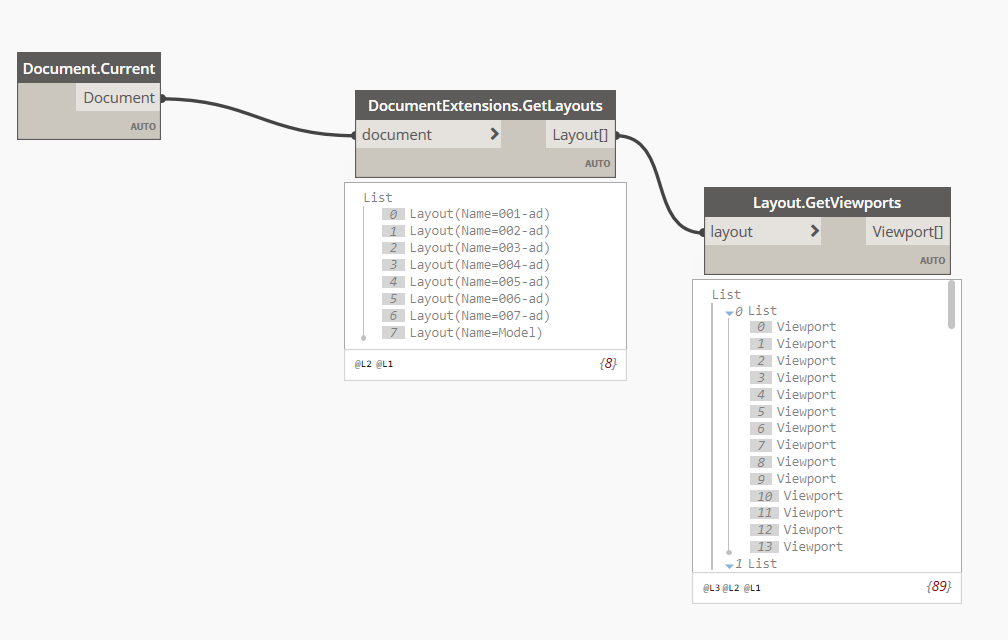
I am trying to retrieve the blockreferences inside a specific layout (or inside the viewports inside that layout) but I am not able to do it.
I have multiple layouts and in each layout there are multiple viewports. The viewports are in the same position in the modelspace but with different layers turned on.
Thanks in advance!
1 Like
You can get the viewport properties (centre point, height, width, scale), create extents in modelspace, then grab your block references and check their insertion points against the extents of your viewports.
Perhabs you have an example graph
Something like this perhaps:
Civil3DToolkit and Camber
I am not sure if there is a node for that, but you can iterate all block reference layers through all viewports to check if it is vpfrozen or not using this:
https://help.autodesk.com/view/OARX/2023/ENU/?guid=OARX-ManagedRefGuide-Autodesk_AutoCAD_DatabaseServices_Viewport_IsLayerFrozenInViewport_ObjectId
After that you can create selection in modelspace for each needed viewport-layer combination as shown above.
The Arkance Systems Node Collection contains nodes to get the VP Frozen property of each layer per viewport. Then in a loop of the modelspace objects, the layer can be compared to this list.
1 Like