I’m trying to create a surface patch here but im getting error because of curve loops.
SAMPLE RVT.rvt (7.4 MB)

below image is my expected result


Is there any custom node to remove such intersecting lines
I’m trying to create a surface patch here but im getting error because of curve loops.
SAMPLE RVT.rvt (7.4 MB)
below image is my expected result
Is there any custom node to remove such intersecting lines
Since your automation relies on users selecting lines, why not have them select just the external lines rather than whatever those openings in the interior are?
@jacob, that’s a valid question. But unfortunately, we were working in script to club the rooms in respective floors to get a union boundary based on zone values. We won’t be selecting the rooms manually, instead we were collecting all rooms in that project & segregating it based on levels. The scenario shown above is that, assuming some columns were closer to the room boundary, in that cases we were experiencing the challenge of skipping the inner curves, as the exterior curves were in a loop along with the inner one.
hi,
i’m still stammering in python here is
a possibility, provided that an interior segment does not start on an exterior vertex
import sys
import clr
clr.AddReference('ProtoGeometry')
from Autodesk.DesignScript.Geometry import *
stock_begin=IN[0]
sb=stock_begin
loop_ext=[sb[0]]
sb.pop(0)

for idx,l in enumerate(sb):
    if (loop_ext[0].StartPoint).DoesIntersect(l.StartPoint) or (loop_ext[0].StartPoint).DoesIntersect(l.EndPoint):
        sb.pop(idx)
        loop_ext.append(l)

ind=1
c=0
while c<=len(stock_begin):
    for idx,l in enumerate(sb):
        if loop_ext[ind].StartPoint.DoesIntersect(l.StartPoint) or loop_ext[ind].StartPoint.DoesIntersect(l.EndPoint) or loop_ext[ind].EndPoint.DoesIntersect(l.StartPoint) or loop_ext[ind].EndPoint.DoesIntersect(l.EndPoint) :
            loop_ext.append(l)
            sb.pop(idx)
            ind+=1
    c+=1

OUT = loop_ext
cordially
christian.stan
So something like:
If you used the centerline of the room all rooms should abut the adjacent room.
That said, I don’t know if the original poster @vishalghuge2500 is after the same thing as you.
nice…have you tried that on the shared sample file and does it work there??
hi,
i will try and let you know
edit:
will not work these lines overlap on some parts (arced areas)
unfortunately not yet competent enough to raise these exceptions
cordially
christian.stan
yeah it was my issue to0 when i try thats why i build it up by separation lines…but i will give it take again when have some time, and probably find another way …maybe 
try closed loops from ampersand and probably some shatter as well…maybe  but absolutly not sure in that situation…im not at dyn more today for try
hi
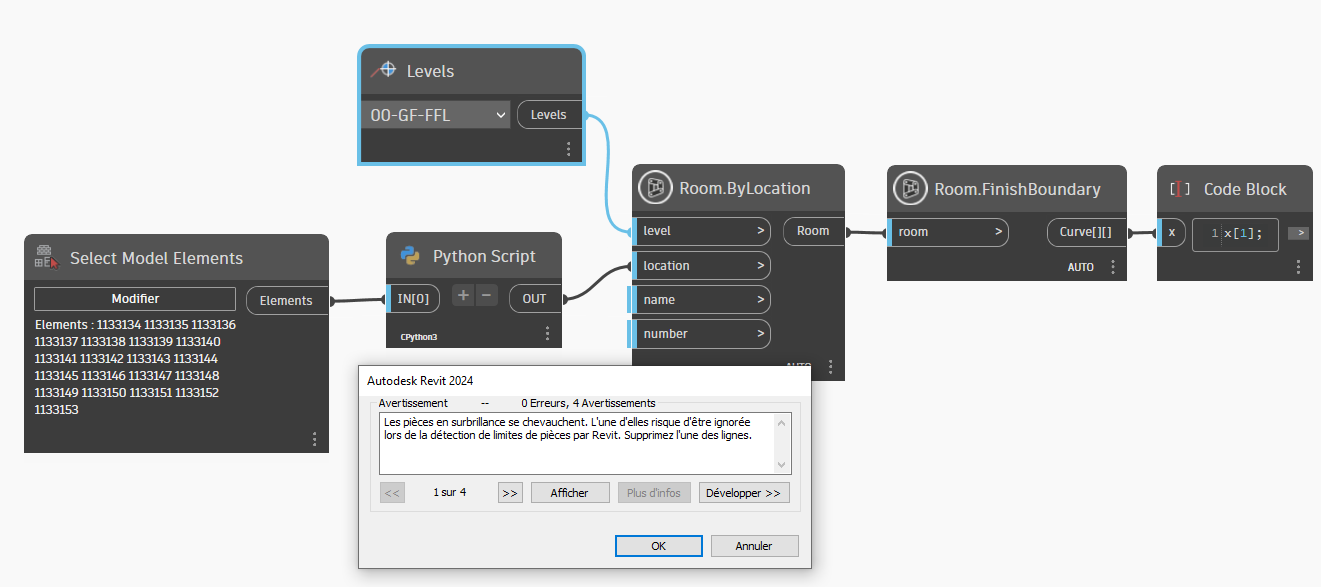
Did you also get an alert message when creating a fictitious room for the roomseparators?
import sys
import clr
clr.AddReference("RevitAPI")
import Autodesk
from Autodesk.Revit.DB import Location,Outline,Line,XYZ,Plane,SketchPlane,Transaction,CurveArray,Level

clr.AddReference("RevitNodes")
import Revit
clr.ImportExtensions(Revit.GeometryConversion)

elts=UnwrapElement(IN[0])
doc=elts[0].Document
view=doc.ActiveView


lines=[e.Location.Curve for e in elts]
outl=Outline(lines[0].GetEndPoint(0),lines[0].GetEndPoint(1))
for i in range(1,len(lines)):
    outl.AddPoint(lines[i].GetEndPoint(0))
    outl.AddPoint(lines[i].GetEndPoint(1))
outl.Scale(1.1)
pb=outl.MinimumPoint
ph=outl.MaximumPoint
l1=Line.CreateBound(pb,XYZ(ph.X,pb.Y,pb.Z))
l2=Line.CreateBound(XYZ(ph.X,pb.Y,pb.Z),ph)
l3=Line.CreateBound(ph,XYZ(pb.X,ph.Y,pb.Z))
l4=Line.CreateBound(XYZ(pb.X,ph.Y,pb.Z),pb)
lcont=[l1,l2,l3,l4]
ploc=XYZ(pb.X+1,pb.Y+1,pb.Z)
lines.extend(lcont)
carray=CurveArray()
for l in lines:
    carray.Append(l)
plane=Plane.CreateByNormalAndOrigin(XYZ(0,0,1),pb)
t=Transaction(doc,"Create sp and rb")
t.Start()
sp=SketchPlane.Create(doc,plane)
doc.Regenerate()
mca=doc.Create.NewRoomBoundaryLines(sp,carray,view)
doc.Regenerate()
t.Commit()
OUT =ploc.ToPoint()
Sincerely
christian.stan
Nope but guess you room need number and name