Is it possible for Dynamo to customize the layer and then export the CAD
When exporting CAD from Revit, is it possible to customize the layer
Not that I am aware of, at least not easily without dealing with Autocad more directly. There is some layer mapping tools available natively in revit if they help at all. Most deals with subcategories and layers of compound elements and which layers they map to.
The only package I knew that dove into this space more deeply are Bimorph and Linkdwg, but typically working the other way into revit.
I hope i am mistaken, as we still get all sorts of layering requests from clients that revit isnt natively capable of such as putting different wall types on different layers etc.
i am looking nodes can create layer in dynamo but i cant find it
My only thinking there is look into civil3d and its own dynamo implementation. Not sure dynamo has a natural autocad integration currently.
Youre going to need to do some research here i suspect unless someone comes to the table with a silver bullet thread.
ths a lot, i am study linkDWG ,hope can find it
As Gavin suggested, i’d look for using Dynamo in Civil3D so you can alter the DWGs directly.
yes but my boss ask me to use dynamo of revit to change the layer 
Sadly LinkDWG hasn’t been well maintained over the years - it might be working again, but it isn’t consistently reliable and I am not sure if it works at all in 3.0 and up (so half of the supported environments). Fortunately there are new geometry interop tools in Dynamof or Revit 2024 or 2025 (I forget which). These tools are likely worth reviewing, as they allow reading in DWGs without 3rd party packages or linking things into Revit, as well as exporting to dwg (albeit with minimal options on the content):
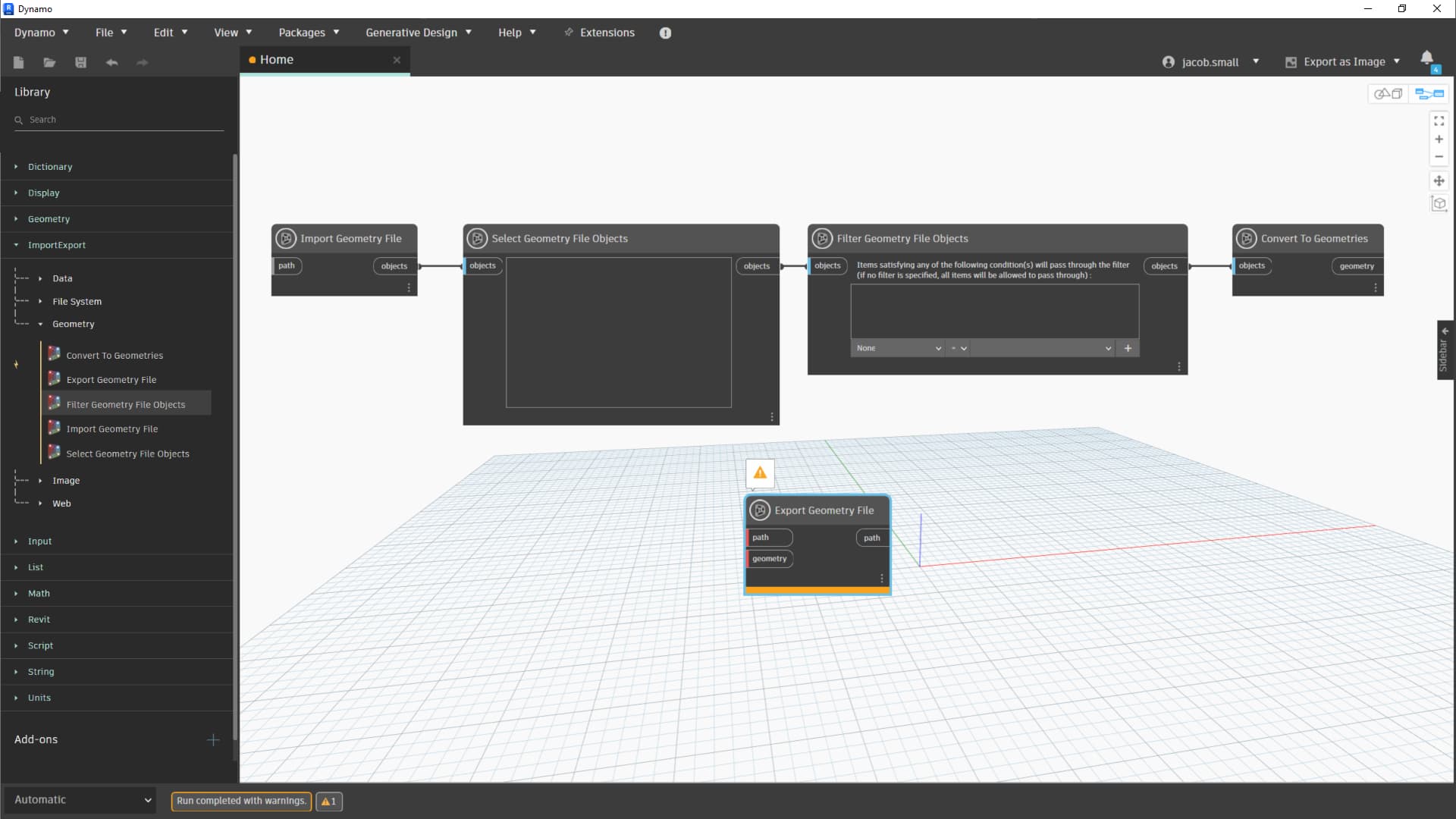
Beyond that, custom write out is possible, but pricey to build as you have to rely on undocumented public APIs which the various Python engines don’t like, and loading them into a C# node is difficult to hack as they can only be called in the right context. That context also changes on any given release and licensing situation so what works for user A at firm 1 might not work for user B at firm 1, and likely won’t work for user C at firm 2. As such I recommend exporting individually (objects > layer), and then post processing in an AutoCAD automation flavor of your choosing (Dynamo, a macro, add-in, lisp, etc.).
Tell your boss that the firms who have this have spent significant sums of money on custom development fees to get this type of feature, and most (all?) of them don’t recommend Dynamo for Revit as the driver due to the difficulties in loading in the required APIs.
Another idea is to create a DXF export, and then use the libraries to rename the layers and/or set the colors.
Example of libraries:
I have experience using the AcMgdDb.dll that is shipped with Revit and can side load an exported DWG and make changes, however, since 2024 onwards this operability in Python is tenuous at best. I have engaged the Autodesk AutoCAD and Revit dev teams as well to get assistance and it is not workable at this time.
It has taken a lot of time to develop the code in Dynamo, firstly in Civil3D and then in Revit
Our current workflow is to export from Revit and process in Civil3D