Greeting,
I have a simplified family and would like to get the bottom 4 corners’ coordinate. Is there any ways to do it?
Thank you for your help
Hi,
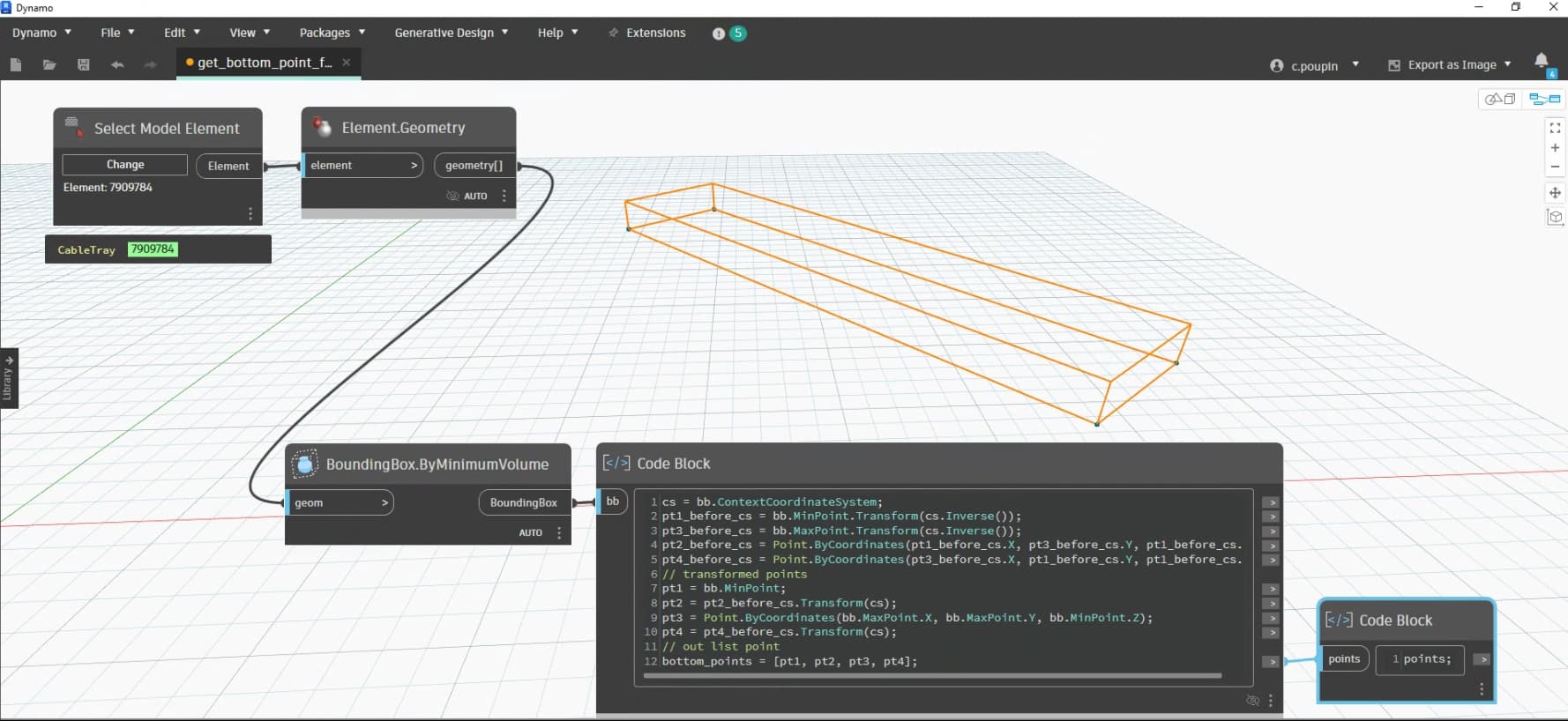
Here is an alternative with an aligned BoundingBox.
cs = bb.ContextCoordinateSystem;
pt1_before_cs = bb.MinPoint.Transform(cs.Inverse());
pt3_before_cs = bb.MaxPoint.Transform(cs.Inverse());
pt2_before_cs = Point.ByCoordinates(pt1_before_cs.X, pt3_before_cs.Y, pt1_before_cs.Z);
pt4_before_cs = Point.ByCoordinates(pt3_before_cs.X, pt1_before_cs.Y, pt1_before_cs.Z);
// transformed points
pt1 = bb.MinPoint;
pt2 = pt2_before_cs.Transform(cs);
pt3 = Point.ByCoordinates(bb.MaxPoint.X, bb.MaxPoint.Y, bb.MinPoint.Z);
pt4 = pt4_before_cs.Transform(cs);
// out list point
bottom_points = \[pt1, pt2, pt3, pt4\];
Won’t that fail if the object isn’t orthogonal to the axis?
Hi @Alien ,
No, because I get and use the transformation of the Dynamo (Align) BoundingBox using the boundingBox.ContextCoordinateSystem property, and then apply it to the points.
BoundingBox.ByMinimumValue is really useful (probably one of my top 10 favorite features of the Dynamo API).
To me the geometry library is the top 10 benefits - any degree of automation within Revit / Civil 3D / Forma has at least one alternative way which can get the job done. But that Geometry library is lightyears above and beyond what the others have either in scope (Forma comes up short here as everything is a mesh), capability (Revit comes up short here as there are things which aren’t included so you have to build your own) or navigability (Civil 3D come up short here as you have to know which of the duplicate classes you want for any given geometry type and nothing shows up until it’s part of an object which means you need two of them in most cases…).
It’s great. Just wondering how can I download the node for boundingbox.byminunvolume? I am using Revit 2022, it doesn’t seem to have this node. Maybe it is available for Revit 2024 and later?
Thank you very much for sharing @sovitek I found out that levels should be selected to avoid warming. In addition, just wondering how would you suggest to only keep 4 bottom points? Thanks for your help.
BoundingBox.ByMinimumVolume requires Dynamo 2.16+ (Revit 2023+)
Thanks for the help. I was able to define 4 corners points using copolit.
The code is as below
min.X = boundingBox.Min;
max.Y = boundingBox.Max;
corner1 = Point.ByCoordinates(min.X, min.Y, min.Z);
corner2 = Point.ByCoordinates(max.X, min.Y, min.Z);
corner3 = Point.ByCoordinates(max.X, max.Y, min.Z);
corner4 = Point.ByCoordinates(min.X, max.Y, min.Z);
bottomCorners = [corner1, corner2, corner3, corner4];
I have a down questions. For the watch, it is what I want (the point orders)expect I would like to only keep the coordinates in excel. Do you know how to do that?
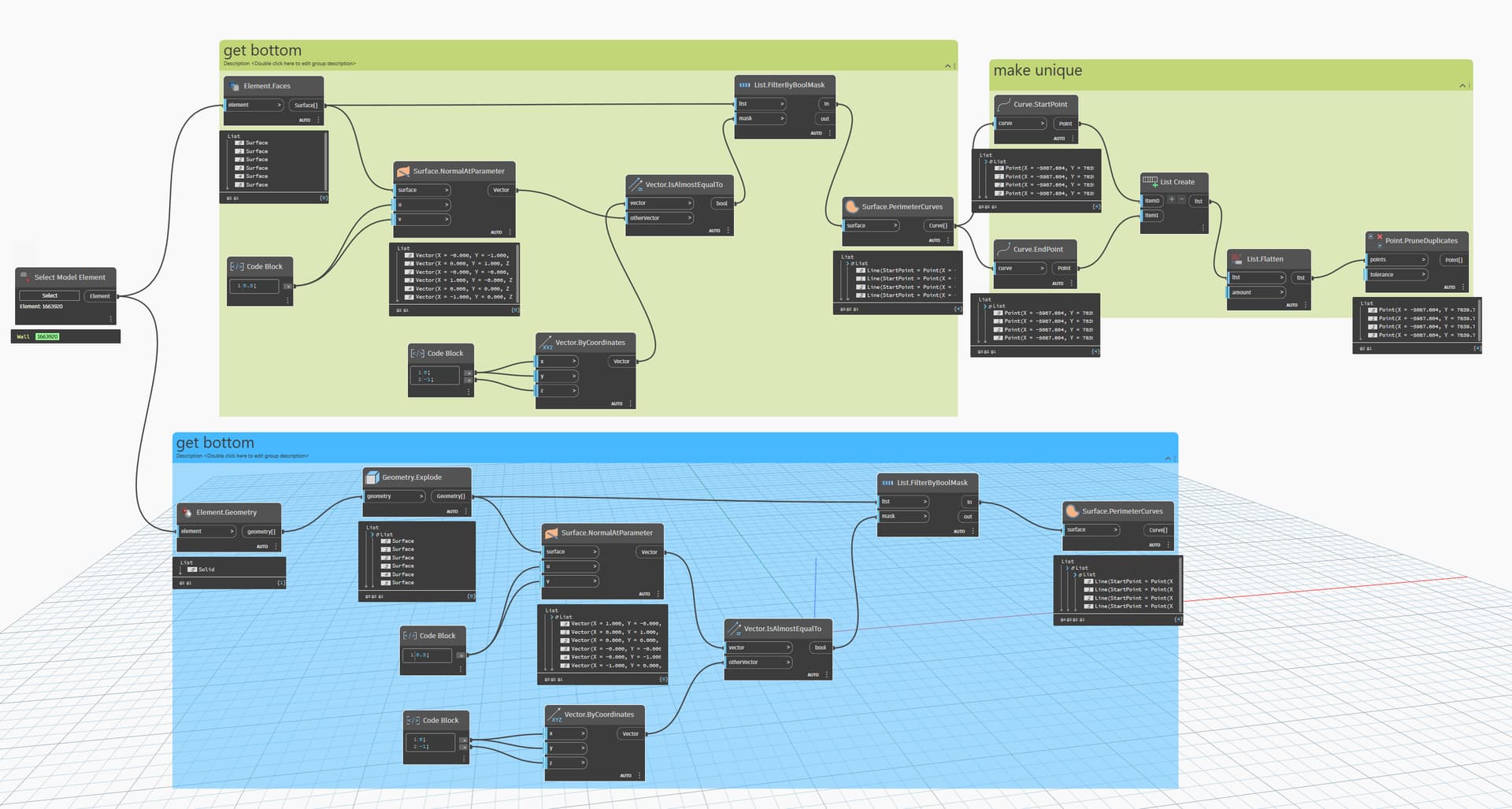
@Steven2026 I would avoid BoundingBox unless it’s the specific node that @c.poupin mentions as the previous nodes only work orthogonally (You can test easily by using the same graph, and rotating your geometry) to see how it works.
In older versions, it’s safer to find the bottom surface and pull the corner points as mentioned by a couple of solutions above. For Dynamo 2.16+ then Cyril’s approach is best 
For all versions, the method @sovitek posted is likely the best path.
Element.Solids > Solid.ByUnion (to ensure only one solid per element) > Topology.Vertices > Vertex.PointGeometry > List.SortByKey where the points are the list and the key is a Point.Z node > List.GetItemAtIndex to pull indices 0-3.
RESTRICTED
Yes, you are right. Thanks for this