I have scoured the Dynamo Primer site documentation as well as the Civil 3D 2026 API, and I cannot find an answer to the following question.
How can I use the “All Objects of Type” node within python?
The screenshot below shows what I would like to do if I were performing this operation graphically. In my example I am attempting to select all Corridors within model space. I chose not to use the “Autodesk.Civil.DynamoNodes.Corridors” node because Dynamo offers a warning that this node will be removed in future versions.
My code is as follows:
# Import Modules & Add Assemblies For AutoCAD & Civil 3D
import clr
clr.AddReference('AutoCADNodes')
clr.AddReference('Civil3DNodes')
import Autodesk.AutoCAD.DynamoNodes as DA
import Autodesk.Civil.DynamoNodes as DC
clr.AddReference('AcMgd')
clr.AddReference('AcCoreMgd')
clr.AddReference('AcDbMgd')
clr.AddReference('AecBaseMgd')
clr.AddReference('AecPropDataMgd')
clr.AddReference('AeccDbMgd')
clr.AddReference('DSCoreNodes')
clr.AddReference('ProtoGeometry')
import DSCore
clr.AddReference('Camber')
import Camber
import Autodesk.DesignScript.Geometry as GEOM

# Test
doc = DA.Document.Current
model_space = DA.Document.get_ModelSpace(doc)
test = DA.AcObjectsOfType("Corridor",model_space)

# Output
OUT = test
This code yields the following output.
I know that within “Autodesk.AutoCAD.Dynamonodes.AcObjectsOfType…” there are more options as shown in the screenshot below.
My question is which function do I select from here, or am I already off on the wrong foot?
Thanks for your help in advance! The forum has proven quite helpful to me in the past. 
Question… why are you doing this in Python with the Dynamo calls to the AutoCAD API instead of using the AutoCAD API directly?
Typically in the past, I have found that for me when I can use the Dynamo node functions within a Python script, it is much simpler than using the AutoCAD API directly.
Is there a specific Corridors node you’re referring to that’s not the All Objects of Type node in your example? Why not use the All Objects of Type workflow? If that’s the node that’s being deprecated I can almost guarantee it’s just getting a replacement.
Either way, if you just call the node in python it’s still not going to function once the node is deprecated. That’s the whole point of using the API directly like Jacob is suggesting. The API won’t change (and if it does, you’d have to change everything anyway) so that’s the option with the most stability and longevity.
In the past, I have gathered all my corridors in a drawing using the node shown below. However, as you can see in the image, Dynamo kindly asks that I use the “All Objects Of Type” node instead. Therefore no, I am going to assume that this node is not getting a replacement after deprecation.
I can appreciate your point about using the API. However, my personal preference is to use the Dynamo node functions within Python. I know I can pass the data as an Input into the python script, but I prefer to do as much within Python as possible in order to avoid graphical clutter. I usually gather the data I need using Dynamo node functions within a Python script. Then I will leverage Python’s built-in functions (or any tasty third-party packages) to perform additional operations. Typically, in the past, I have found this method much simpler.
If the node exists graphically, I don’t see why I can’t just use it within Python.
Personally, I tend to align with these lines from the Zen of Python (by Tim Peters).
“Beautiful is better than ugly…
Simple is better than complex”
It’s fine if you disagree with my approach. I get that to some they prefer the API. And perhaps what I find simple and appealing is not universally acknowledged, but what can I say? The heart wants what the heart wants.
My confusion was around these two nodes. I’m not a user of C3D so I don’t know the nodes you’re referencing. It was unclear why you mentioned one node but used a different one in your example is all. This clears that up.
You absolutely can call the node rather than the actual API method if you’d like, it just makes troubleshooting a little more complicated because you now have to troubleshoot the functionality and the python representation (as you’re doing now). I’d suggest using Node to Code to see what this method looks like in DesignScript. What do the arguments look like? What is the default value for block? Can you recreate a working DesignScript example in python? It might be helpful to see a working example using (pretty much) the same syntax.
Hi @austin_perigee,
The All Objects of Type node is different than many others that you’re probably used to. It’s a class and cannot be “called” directly. You need the underlying function that it invokes when all the ports are wired up, which is not inspectable via Dynamo.
You’ll want to call the SelectionByQuery.GetAllObjectsOfType() method in your Python script.
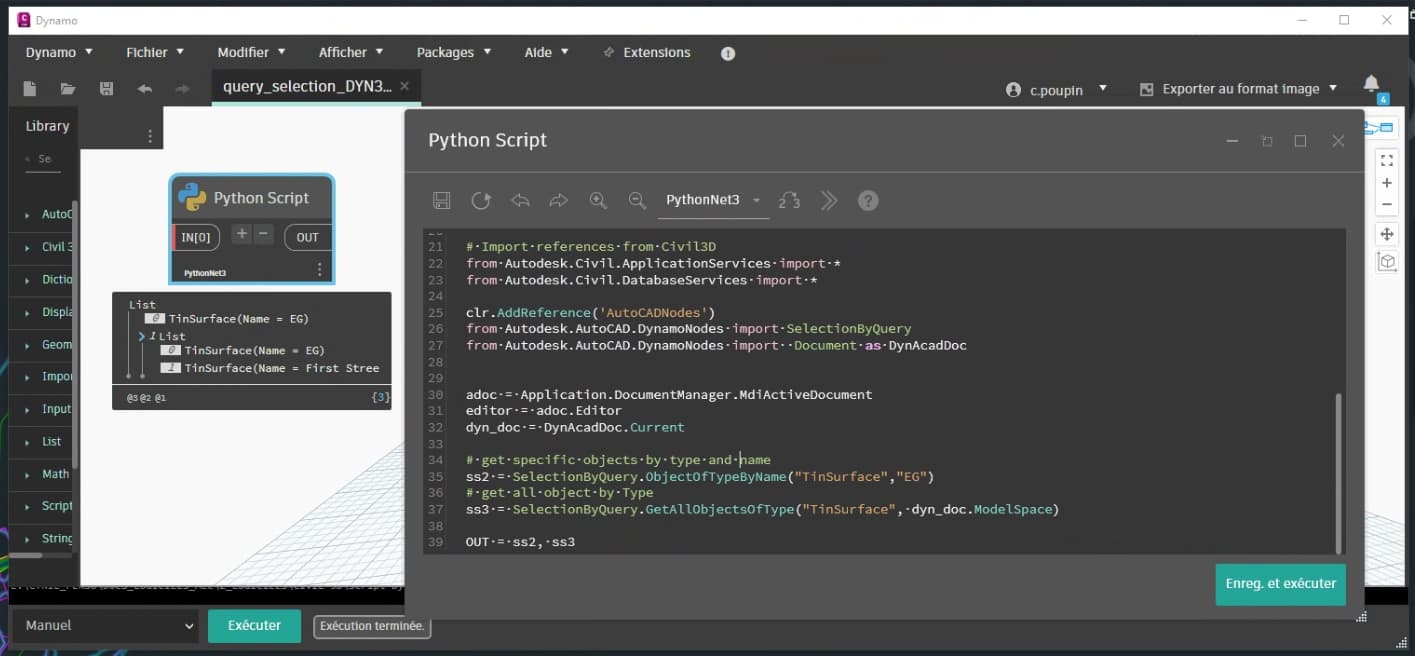
Here is an example using SelectionByQuery.GetAllObjectsOfType, as mentioned @zachri.jensen
# Load the Python Standard and DesignScript Libraries
import sys
import clr


# Add Assemblies for AutoCAD and Civil3D
clr.AddReference('AcMgd')
clr.AddReference('AcCoreMgd')
clr.AddReference('AcDbMgd')
clr.AddReference('AecBaseMgd')
clr.AddReference('AecPropDataMgd')
clr.AddReference('AeccDbMgd')

# Import references from AutoCAD
from Autodesk.AutoCAD.Runtime import *
from Autodesk.AutoCAD.ApplicationServices import *
from Autodesk.AutoCAD.EditorInput import *
from Autodesk.AutoCAD.DatabaseServices import *
from Autodesk.AutoCAD.Geometry import *

# Import references from Civil3D
from Autodesk.Civil.ApplicationServices import *
from Autodesk.Civil.DatabaseServices import *

clr.AddReference('AutoCADNodes')
from Autodesk.AutoCAD.DynamoNodes import SelectionByQuery
from Autodesk.AutoCAD.DynamoNodes import  Document as DynAcadDoc


adoc = Application.DocumentManager.MdiActiveDocument
editor = adoc.Editor
dyn_doc = DynAcadDoc.Current

# get specific objects by type and name
ss2 = SelectionByQuery.ObjectOfTypeByName("TinSurface","EG")
# get all object by Type
ss3 = SelectionByQuery.GetAllObjectsOfType("TinSurface", dyn_doc.ModelSpace)
# OR
ss3 = SelectionByQuery.GetAllObjectsOfType("TinSurface")

OUT = ss2, ss3
Thank You for providing the Python implementation! This works.
Thank you for providing your help. I appreciate your attention on this. For future reference, if I wanted to use “Node To Code” how would I do that? I tried right-clicking on a node but did not see that as an option. Is there a particular node or Dynamo package you are referring to?
You would select the node and then right-click on the open workspace. It’s a little confusing because the Node to Code functionality works on a selection (including more than one node) so it’s actually not visible on a given node, like you might think it would be. You also have to have all required input ports filled for a node to be converted.
Coincidentally, you probably wouldn’t have had much success with this particular node anyway, since, as Zach mentioned, it doesn’t have a DesignScript equivalent. However, that would have told us that there was likely a different method or even class (like in this case) that would need to be called in Python.
I see. That makes sense. That does seem like a useful tool for nodes that do have a DesignScript equivalent. Thanks!!
Glad you are squared away.
I would encourage you to try and step past the use of the Dynamo nodes in Python and get directly into the API as this will enable you to do light years more, and remove most of the restrictions users have with ‘there is no node for…’ or ‘these two nodes are incompatible…’ and so much more. If you already know Python doing so shouldn’t be too big of a lift - just getting into some of the AutoCAD API which while a little daunting at first is immensely powerful.
Thank you for your help. Besides this forum and the AutoCAD API documentation on Autodesk’s website, are there other resources you would recommend for familiarizing myself with best practices and techniques when programming using the API within Python Dynamo nodes?
That’s a great question.
There is the Dynamo Primer - a lot of good stuff there but I am not sure how much Python based Civil3D stuff there is.
Sadly there aren’t many Python specific examples out there, so you’ll have to use your own Python expertise here. Many of the AI tools out there are VERY good at .NET to Python conversion.
For API specific tools, any post you can find on the Through The Interface blog from @keanw is gold. The Swamp is also really good and has a Python section, though I usually rely on the NET section.
The first thing I recommend learning is documents (in particularly locking them), then accessing the database, and then starting a transaction. The ‘with’ section of the Python template will demonstrate that for you, but I recommend learning how I do it without the ‘with’ statement so you learn the manual control.
From there it is getting objects from DB using the transaction, fairly straightforward as well, but you may have questions when you get there.
After that you can learn to work with the objects (read, create, modify, delete) and expand into the Civil 3D or even Map 3D APIs (something Dynamo doesn’t support today even though it is included with Civil 3D).
I also recommend to save early (before each Python node goes on canvas) and often. Both the Python code and the Dynamo graph. It also helps to work in small discrete datasets for authoring - build it for one object, then three objects, then a project.
You’ll certainly have questions as you go, so ask them here or in other locations. The community will always step in the help out.
Edit: Though the interface has moved to https://keanw.com/
I’ll be sure to check out those websites. I can see now how accessing the API would endow you with additional programming power beyond the available Dynamo nodes and help future-proof any creations. Thanks to you and everyone who has helped me on this thread and other forum discussions in the past.
Apparently Typepad has been discontinued and the site no longer works. It’s just completely gone, so Through the Interface no longer exists.
It certainly does exist still, just on a new host. 
Thanks for that. Might want to update your link in the reply above then.