Hi all.
Is there any way to retrieve the geometry of multiple elements (here nails) that are nested in adaptive generic model?
I get a list of solids, but they are not visible in the geometry space of Dynamo and they don’t work for my purpose (find eventually intersections with other geometries). The basic elements are a generic model nested in an adaptive generic model that are nested in the final one.
Do you think the problem is correlated with nested families or adaptive generic models or both? How would you solve it?
How to do this will be heavily influenced by how your family is built; can you post a sample .rvt with just one family instance with the nested families?
Thanks for the reply.
I would like to do it, but I can’t since I am new user. Should I do something in particular to unlock this status?
I bumped your trust level so you should be able to post files now. If not use a 3rd party open access file sharing service (OneDrive, Box, GoogleDrive, DropBox, WeTransfer, etc.).
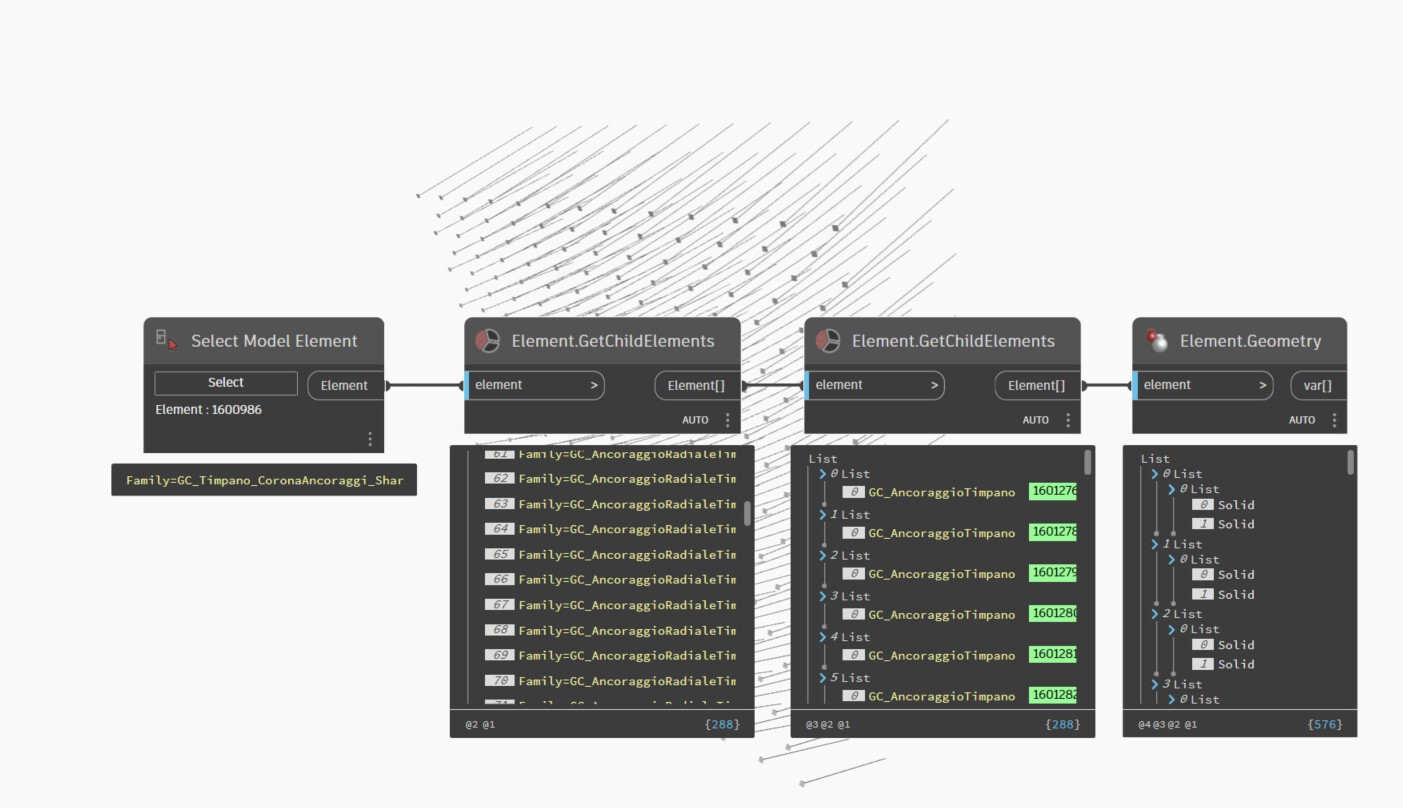
Step 1 is to get the ‘container’ family instance. Select Model Element does that well enough in this sample, but you’ll need to implement your own selection method based on your project.
Step 2 is to get the ‘nested’ families from the container. Element.GetChildElements does this well enough.
Step 3 is to use another Element.GetChildElements as in your case the family contains an adaptive family which contains a generic model family so you have to repeat the process.
Step 4 is to get the geometry from the generic model families with Element.Geometry.
Looks like this:
2 Likes
Thanks a lot! It worked.
So for my goal of filtering part of the nested nails it worked perfectly. I’ll keep in mind to use this node for nested families.
I just don’t understand why it the 3d-space of Dynamo is not showing them as preview. Not a big deal, but I can’t see as you do. Do you have any idea why?
For me they showed up - see the elements behind the nodes in my screenshot. It may be that you have geometry preview disabled, that the geometry is offscreen, or something else is off. Try selecting the node which returns solids, going to the background preview (ctrl+b keyboard shortcut or press the circle/triangle/cuboid icon in the top right of the workspace) and then zoom extents. If that doesn’t work check your preview is enabled (View menu, Background 3d preview, Available Previews, Background Preview). If they still don’t show up send a screenshot of your entire Dynamo window showing the background preview checked in the view menu.