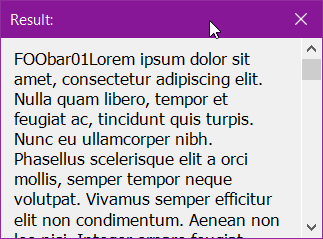
Found this great form to pull from and developing my own forms in python. Didn’t realize Python also did classes- pouring more gas on the fire as I learn!
…
import clr
import sys
import math


clr.AddReference("System.Windows.Forms")
clr.AddReference("System.Drawing")

import System.Drawing
import System.Windows.Forms

from System.Drawing import *
from System.Windows.Forms import *

##https://forum.dynamobim.com/t/reporting-to-user-at-the-end-of-dynamo-player-script/37421/6
from System.Windows.Forms import Form,Label,Button,FormBorderStyle,FormStartPosition

##https://forum.dynamobim.com/t/winform-python-with-sharpdevelop/75872/2
class ShortForm(Form):
    def __init__(self, strtext):               ##Class initialize on new or call
        self.out = []                       ##Empty output field
        self.InitializeComponent(strtext)      ##Passs text to Initialize

    def InitializeComponent(self, strtext):    ##

        form = Form()
        form.Width = 300                    #Width
        form.Height = 200                   ##Height
        form.Text = "Script Result:"        ##Form Title

        form.FormBorderStyle  = FormBorderStyle.FixedDialog ##Remove the maximize box.
        form.MaximizeBox = False            ## Set the MinimizeBox to false to remove the minimize box.
        form.MinimizeBox = False            ## Set the accept button of the form to button1.
        form.StartPosition = FormStartPosition.CenterScreen
        form.AutoScroll = True

        label = System.Windows.Forms.Label()
        label.Parent = form
        label.Text = strtext
        label.Width = form.Width - 55
        ##https://stackoverflow.com/questions/388937/determine-label-size-based-upon-amount-of-text-and-font-size-in-winforms-c
        DynamicHt = System.Drawing.Graphics.MeasureString(str(strtext), label.Font, (int)(form.Width-55) )
        label.Height =  math.ceil(DynamicHt)
        label.AutoSize=False
        #label.Size = System.Drawing.Size(Form.Width - 55,0)    ##<<<<<<<<<<DEBUG
        label.Left=10
        label.Top= 10
        form.ShowDialog()

#################################################################

Text="".join(IN[0])
form = ShortForm(Text)          ##INITIALIZE SHORT FORM
Application.Run(form())

OUT=form.out
Ok found the means to wrap text and scroll vertically only in a fixed size dialog. This wraps the text to the form width -40px allowing the auto-wrap to be constrained to that width with unlimited height for a scroll…
I maybe wasn’t clear before. @c.poupin - I had seen the class wrapper here in the youtube python net tutorials but the spokesperson is just following the examples; yours was quite helpful with the basic class wrapper to use for comparison!
forms are sooo much easier editing graphically!
import clr
import sys

clr.AddReference("System.Windows.Forms")
clr.AddReference("System.Drawing")

import System
from System import Drawing
import System.Drawing
import System.Windows.Forms

from System.Drawing import *
from System.Windows.Forms import *
import math

##https://forum.dynamobim.com/t/reporting-to-user-at-the-end-of-dynamo-player-script/37421/6
from System.Windows.Forms import Form,Label,Button,FormBorderStyle,FormStartPosition

#################################################################################
class popup(Form):
    ##
    def __init__(self,text):
        self.InitializeComponent(text)

    def InitializeComponent(self,text):
        #form = Form()
        self.ClientSize = System.Drawing.Size(300, 200)                 ##Height
        self.Text = "Result:"        ##Form Title

        self.FormBorderStyle  = FormBorderStyle.FixedDialog ##Remove the maximize box.
        self.MaximizeBox = False            ## Set the MinimizeBox to false to remove the minimize box.
        self.MinimizeBox = False            ## Set the accept button of the form to button1.
        self.StartPosition = FormStartPosition.CenterScreen
        self.AutoScroll = True
        self.ScrollBars = ScrollBars.Vertical

        ########Label for text#####

        self.label = Label()
        self.label.Parent = self
        self.label.Text = text
        self.label.TextAlign = ContentAlignment.TopLeft
        self.label.Font = System.Drawing.Font("Tahoma", 10, System.Drawing.FontStyle.Regular, System.Drawing.GraphicsUnit.Point, 0)

        self.label.AutoSize = True

        ##https://stackoverflow.com/questions/1204804/word-wrap-for-a-label-in-windows-forms
        ##This was the key to the wrapping inside the label in the form...
        self.label.MaximumSize  = System.Drawing.Size(self.Width-40,0)
        self.label.WordWrap=True

        self.label.Left=10
        self.label.Top=10
        self.ResumeLayout(False)

text="".join(IN[0])

oForm=popup("FOO" + text)   ##Set the form with the text value
oForm.ShowDialog()          ##Show the form