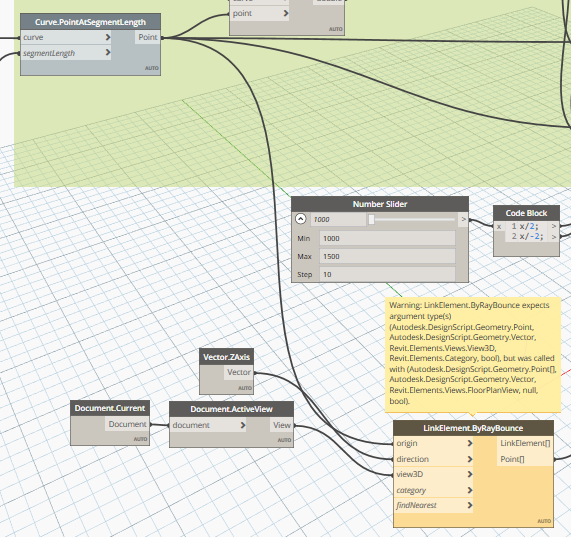
I have warning error in my node from Bimorphnode (ByRayBounce node),if i connect node from Curve.PointAtSegmentLength point to LinkElement.ByRayBounce Origin will show the warning (Warning: LinkElement.ByRayBounce expects argument type(s) (Autodesk.DesignScript.Geometry.Point, Autodesk.DesignScript.Geometry.Vector, Revit.Elements.Views.View3D, Revit.Elements.Category, bool), but was called with (Autodesk.DesignScript.Geometry.Point, Autodesk.DesignScript.Geometry.Vector, Revit.Elements.Views.FloorPlanView, null, bool).
Anyone can have same issue like this and know how to fix this?
please help me,thanks
Hello @awaludinyanuar23 and welcome  think you need feed in the category you will hit, and a bool for nearest…
i try to make this script from the video on youtube,in the video node Byraybounce only have 3 option which is (Origin,Direction and geometry).
i dont know what version package they use for the video,when i try my node have 5 option.
and the warning error appear when i connect point to origin
It looks like your current view might not be a 3d view. Try using the views node to select a 3d view instead maybe.
Bimorph nodes has changed since my video was uploaded, this is quite common for custom nodes.
Sounds like they use ootb raybounce or a older bimorph but dont think ootb support links…other option is dashapes or sparrow and as Gavin say raybounce expect 3D views