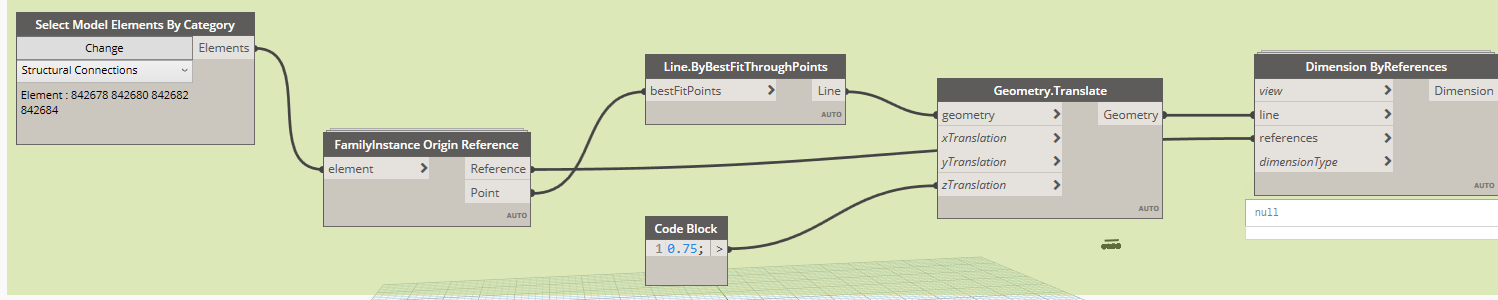
Hi team,
I want to automate the dimension by element to element using dynamo. Kindly help me how to resolve this. Manual method takes too much time so i need a help.
Hi @cmrlircon.bim what kind of element are you try dimension ? you could share a small rvt sample,
IRCN_CIV_SFC_Baseplate.rfa (3.5 MB)sure its a point based structural connection family. Here i uploaded the rvt file for your reference
Warning: Dimension.ByReferences expects argument type(s) (Revit.Elements.Views.View, Revit.GeometryReferences.ElementGeometryReference, Autodesk.DesignScript.Geometry.Line, string, string), but was called with (Revit.Elements.Views.FloorPlanView, Autodesk.Revit.DB.Reference, Autodesk.DesignScript.Geometry.Line, string, string).
Same i tried but getting this above error. Will you please share me your DYN file ?
use dimension by references from genius loci it expect Autodesk.Revit.DB.Reference
yes you use the OOTB try with dimension by reference from genius loci
Thank you so much for your time. Now its working well
great 
I dont know why its not reflecting me. Will you please share me your dyn file?
no not sure, im not a dynamo right but i will take a look in the week…can you share a rvt for try on ?
SECTION 05.rvt (7.6 MB)
Sure