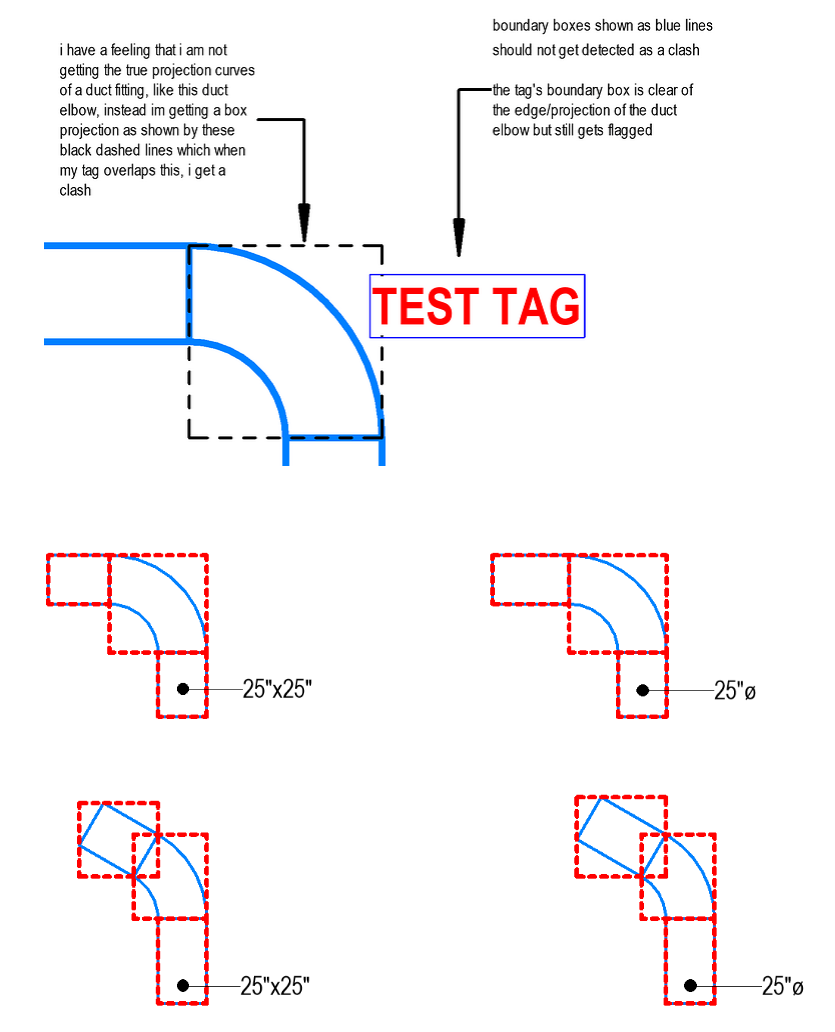
Hello Dynamo Community. I am trying to work on developing a 2d elements vs 3d elements clash detection tool. This was a task I took on to see how I could go about this. I have come across several post about the use of bounding boxes and for the most part, this works. Clash detection between tags and 3D elements has had positive results. The challenge I now face is dealing with curved objects, for example rectangular and round elbows. Bounding boxes for straight segments works great, not for curved though. I was hoping the Dynamo community could provide some guidance with how this would be approached using Dynamo. I am trying to develop this as a pyRevit extension. I figured with all the geometric functionality that Dynamo has there could be someone that could provide guidance on this.
my current results yield this bounding boxes around curved elements. I already fixed the orientation of angles elements. It is just the curved elements. Any help would be really great. I’m hoping this is something i can push to the extension for all Revit users.
Hi,
here is a solution that does not involve extracting the geometry. The workaround involves computing the approximate curve axis using the CoordinateSystem of the connectors and the Dynamo function Arc.ByStartPointEndPointStartTangent().
import clr
import sys
import System

clr.AddReference('ProtoGeometry')
from Autodesk.DesignScript.Geometry import *
import Autodesk.DesignScript.Geometry as DS

#import Revit API
clr.AddReference('RevitAPI')
import Autodesk
from Autodesk.Revit.DB import *
import Autodesk.Revit.DB as DB

clr.AddReference('RevitNodes')
import Revit
clr.ImportExtensions(Revit.GeometryConversion)
clr.ImportExtensions(Revit.Elements)

#import transactionManager and DocumentManager (RevitServices is specific to Dynamo)
clr.AddReference('RevitServices')
import RevitServices
from RevitServices.Persistence import DocumentManager
doc = DocumentManager.Instance.CurrentDBDocument

def convertunitfrom(length):
    UIunit = Document.GetUnits(doc).GetFormatOptions(SpecTypeId.Length).GetUnitTypeId()
    convertfrom = UnitUtils.ConvertFromInternalUnits(length, UIunit)
    return convertfrom

def get_boorder_curves_fitting(elem):
    """
    return the arc geometry an the length
    """
    if hasattr(elem, "MEPModel"):
        conSet = elem.MEPModel.ConnectorManager.Connectors
        if conSet.Size == 2:
            width = list(conSet)[0].Width
            width_unit = convertunitfrom(width)
            pair_sys_origin = [[con.CoordinateSystem, con.Origin] for con in conSet]
            pta = pair_sys_origin[0][1].ToPoint()
            ptb = pair_sys_origin[1][1].ToPoint()
            vector = pair_sys_origin[0][0].BasisZ.Negate().ToVector()
            center_arc = DS.Arc.ByStartPointEndPointStartTangent(pta, ptb, vector)
            outerA_arc = center_arc.Offset(width_unit / 2)
            outerB_arc = center_arc.Offset(-width_unit / 2)
            return center_arc, outerA_arc, outerB_arc
        else:
            return "The fitting have more than 2 connectors", None
    return "The Element is not a fitting", None

toList = lambda x : x if hasattr(x, '__iter__') else [x]

#Preparing input from dynamo to revit
fitting = UnwrapElement(IN[0])

OUT = get_boorder_curves_fitting(fitting)