Dynamo script issue: no 3D solids generated from section and 3D polyline

Hello everyone,
I’ve been trying for a while to create a Dynamo script for Civil 3D 2026 that generates 3D solids from a typical cross section (for example, a hydraulic channel section) extruded along a path defined by a 3D polyline.

Here’s the general workflow of my graph:

  1. I define or import the section as a closed list of XY coordinates, e.g.:

    sectionXY = [
      [-0.25,0.00],
      [0.25,0.00],
      [0.25,0.40],
      [0.15,0.40],
      [0.15,0.10],
      [-0.15,0.10],
      [-0.15,0.40],
      [-0.25,0.40],
      [-0.25,0.00]
    ];
    
    
  2. I create the points with Point.ByCoordinates and then build the closed profile using PolyCurve.ByPoints.

  3. I select one or more Polyline3D objects from the DWG to use as paths.

  4. I use Curve.SweepAsSolid or alternatively Solid.BySweep.

  5. Finally, I try to import the result into AutoCAD using AutoCAD.Object.ByGeometry (connected to Document.Current and ModelSpace).

The problem is:

  • When I connect a Watch node to Curve.SweepAsSolid, I see outputs listed, but no geometry appears in either Dynamo (no 3D preview) or AutoCAD.

  • When I feed those outputs into Solid.ByGeometry, I only get null.

  • So far, no solids are actually created in the DWG or visible in Dynamo’s 3D background preview.

I have already checked:

  • The section is closed and planar.

  • Lacing is set to Cross Product.

  • The 3D background preview is enabled.

  • I’m working in Model Space and on a visible layer.

Has anyone run into the same issue with Dynamo 2026 + Civil 3D?
Could it be related to how Curve.SweepAsSolid outputs AutoCAD DBObjects that can’t be read by Dynamo’s geometry nodes, or is there a specific node required to “bake” them into the DWG?

Thanks in advance for any help or suggestions!
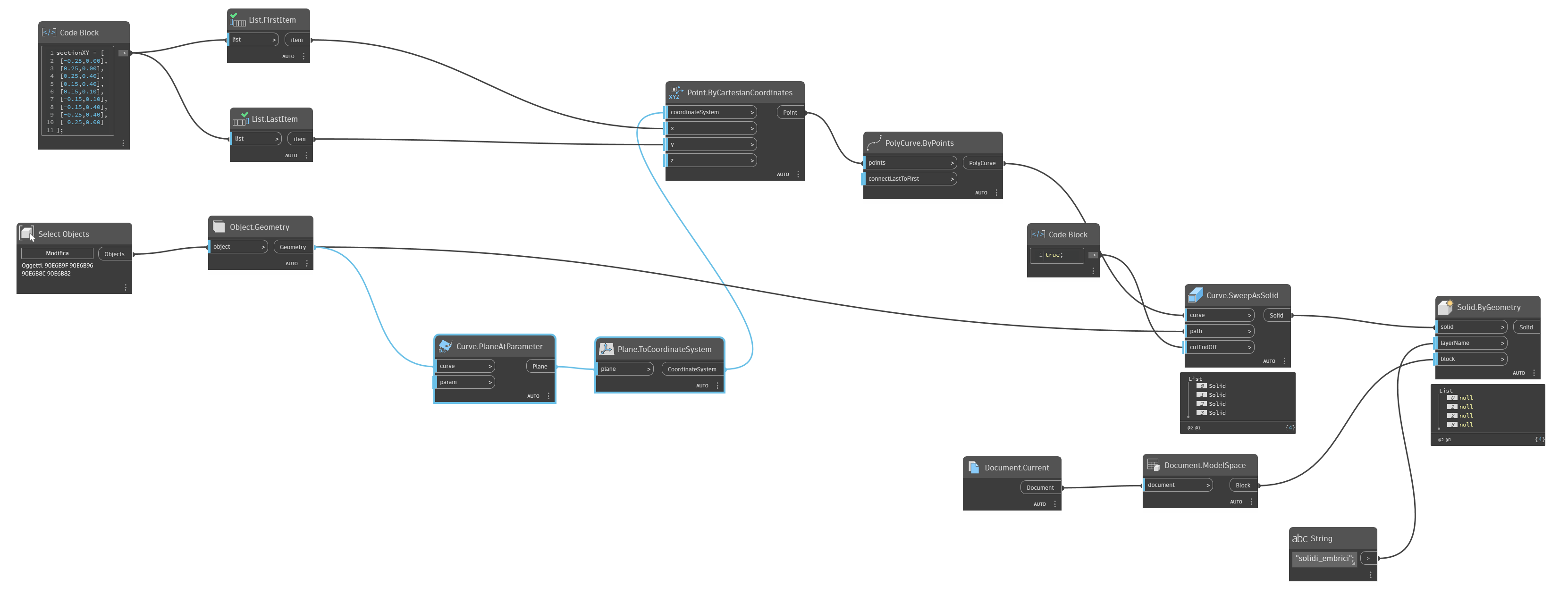
You could check the output of every node to see if it matches your expectations. I have the feeling that your point list is not processed as you want, if you refer to level @L2, you get a result:

Like this:

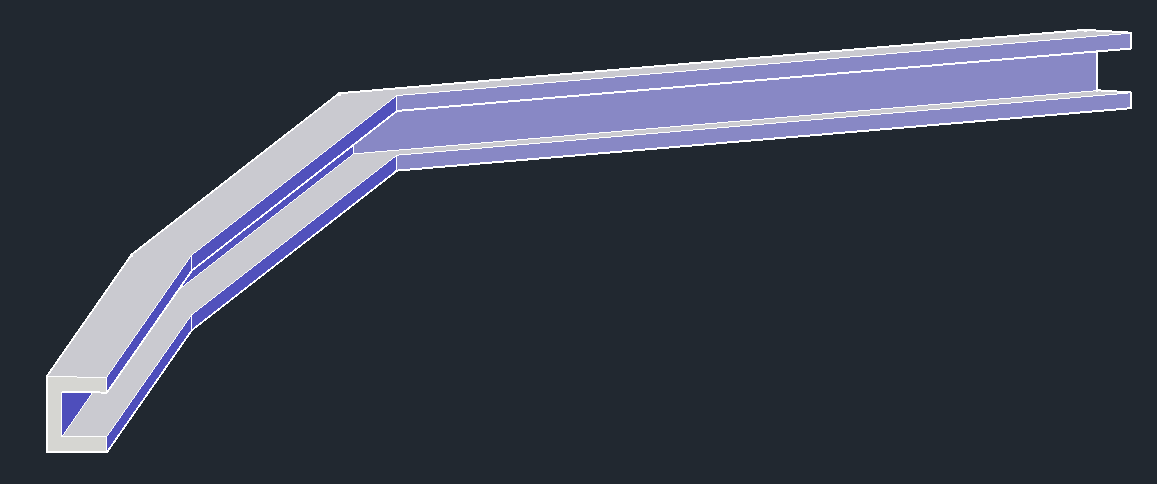
In Civil 3D you’ll see the Solid as a result:

2 Likes

First of all, thank you again for the help you’re giving me.
You’re absolutely right — the cross-section shouldn’t look like that.
I’m attaching below the cross-section I actually want to use.

My problem is that no solid is being generated at all. Could the issue be related to the type of 3D polylines I’m using?
Because I really can’t figure out what’s causing it.

Have you tried setting the list level of the X and Y values?

Included is a test graph and drawing, which generates the 3D Solid in Dynamo and in Civil 3D.

home.DYN (22.4 KB)

drawing1.dwg (442.4 KB)

2 Likes

I’ve just tried your graph — it works, and it actually creates the solid, which is already a huge step forward!
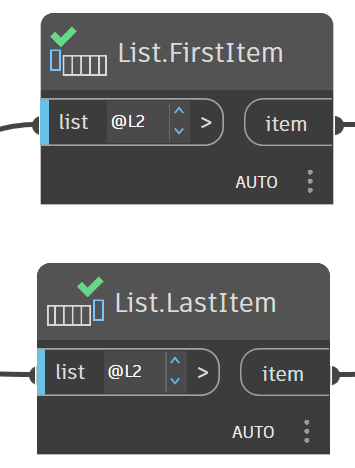
I noticed that you used levels in the “List.FirstItem” and “List.LastItem” nodes, which I hadn’t used before.
I also see that you’re using the “Select Object” node, whereas I was using “Select Objects.”

For me, it would be very important to be able to select multiple 3D polylines at the same time, since I need to create about 1,000 solids of this type.
However, when I use “Select Objects” and select, for example, four 3D polylines, no solids are generated.

As @Anton_Huizinga indicated in his previous post, this is a lacing and list levels thing.

You’re going to have to set the list levels and lacing for each step of the nodes as you go, ensuring that 8 points are placed at each curve. If you only get one point per curve, the lacing is off.

As an alternative, you could build a polycurve of the points at the origin, and then use Geometry.Transform to move that polycurve into position on each line. I personally prefer that method as it allows using the same workflow for both polygons (in Dynamo a polygon is a polycurve made of only lines) but all polycurves (meaning you can have arc segments in your shape).

1 Like

I’ll advise to always look at the result of the nodes, then you can see if it works as expected. For example, the levels:

If you don’t set the level, in your case the First Item and Last Item just picks the first and the last lists (with the names 0List and 8List) from the long list in the Code Block, so it returns [-0.25,0.00]. By coincidence they are the same, but that is because the first coordinate pair is the same as the last coordinate pair.

If you refer to level 2 at the list in the Code Block, it will take all first items and last items of the list items in the long list. If you set the level to 3, it will behave like you didn’t set the level, because most nodes just look at the most top level if you don’t set the level.

When you select only one 3D Polyline, you will see that the Point.ByCartesianCoordinates returns 9 values. You combine 9 X and Y values with 1 CoordinateSystem, and in that case that 1 CoordinateSystem will be combined with all 9 X and Y values.

As soon as you select three 3D Polylines, you will see that the Point.ByCartesianCoordinates only returns 3 values, because now Dynamo will follow the List rule: first item of list one combines with first item of list two, second with the second, etcetera until the shortest list has ended. If you want to combine all three 3D Polylines separately, you have to set the list level to @1 for the CoordinateSystem, then you get three lists of 9 points. Then you get indeed three solids along the three Polylines.

Btw, the List Levels are explained in my book :wink:

I agree with Jacob, it is way to complex to start with this, get stranded in lists within lists, only to get out with list levels. It is much better to reduce every larger construction to somewhat smaller. A PolyCurve can be made too in a Code Block, which can be transformed easily.

On the other hand, just messing around a bit does increase your knowledge :wink:

2 Likes

I’ve just tried it the way you suggested, and it works!
By setting the @L1L1 levels in Point.ByCartesianCoordinates, it now runs perfectly and creates multiple solids at the same time.
You honestly can’t imagine how happy I am right now — I’ve been trying for many days to make this graph work with no success until now.
Thank you truly from the bottom of my heart.

I’m reading your book, but I’m only around page 100, and I saw that you talk about levels on page 120 — I’m almost there!
Anyway, I’ll also try what @jacob.small suggested to make my workflow easier.
I’m really, really grateful to you all for your help and kindness.

3 Likes