Hey!
I have made a script which exports some data to excel, when i run the data-shapes MultipleInputForm interface. My problem is that if I close the interface and DONT run it, it will still run. Does anyone know how to make it not run when closing the interface?

What interface are you closing and what is still running? If you’re closing the Data-Shapes UI then the node already has inputs and defaults to run. If you want an option to not execute the rest of the script then you need to provide the optional Cancel input and use that. The node only checks whether the input UI was canceled or not.
When I run the script with the settings above I can “Export” my data. If I “x” and close the interface window the script still run. If I add a “Cancel” button to the “CancelButtonText_optional” it will still run if I press “Cancel”. Maybe it is something with the output of the MultipleInputForm, but I am not sure…? 
Set up the Cancel Button option and use the “Was Cancelled” output to control the information with an if statement. If the “Was Cancelled” output returns true, then pass an empty to next nodes instead of the “User Inputs” output. Or you can do the same with the “Was Run” output.
EDIT: Correct as @Nick_Boyts states and I failed to mention. The script will still run, but it will throw an error instead executing the data like normal.
What @staylor is saying. Cancelling the Data-Shapes node only cancels the inputs. Your graph will still fully execute because that’s how Dynamo works. If you want to prevent any other downstream nodes from executing you have to handle them separately.
I am not totally sure what you mean. I have set up this now. When i “cancel/X” the UI the if statement show true. Very nice. But the script still exports the excel file. How will I get from a If-node which has the result=true to a message showing up which says “Cancelled”?
It does not work when the “script” is placed in “Was Run”, so I guess it has to be in the “User Inputs” for it to work properly.

The setup would be similar to shown below. The If test input is the result coming from the “Was Run” output. If that is false, then " " is passed along and the rest of the script will fail (run with errors). If “Was Run” is true, then the user inputs are passed along and the rest of the script will execute correctly. Or you could use the “Was Cancelled” output for the test input, but you would need to swap the true and false inputs going into the If node.

If you want the script to run without errors either way, you will need to handle the rest of the downstream nodes individually as @Nick_Boyts suggested.
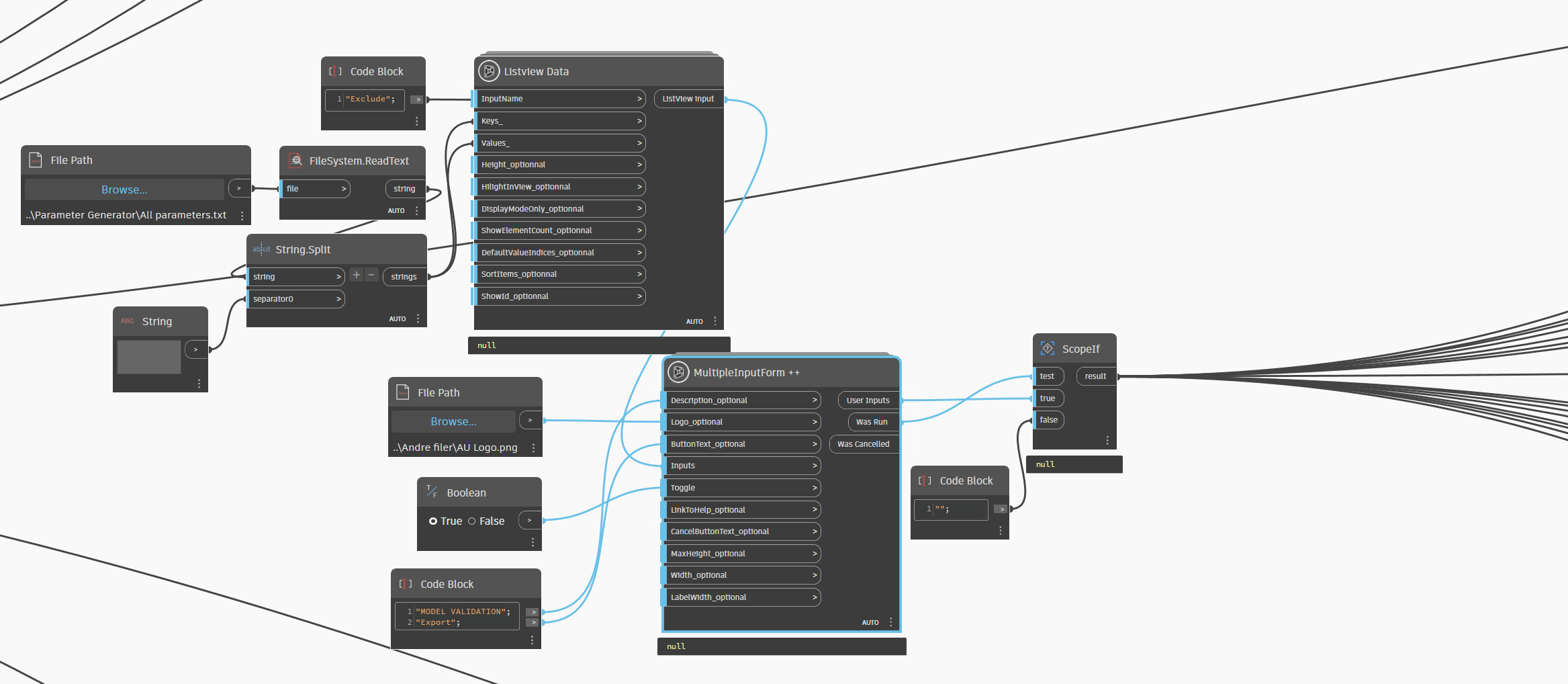
That’s weird. The position of the scope node shouldn’t have anything to do with the Data-Shapes executing and showing the initial popup form. I have had issues with that ScopeIf node. Try using the ScopeIf+ node from clockwork. If that doesn’t work then maybe attach your script for us to test to make sure it’s not something else. BTW, if you input text for the cancelbuttontext option, you will get a true cancel button.
EDIT: turns out the “Was Run” will always return true no matter if you close out the form or not. So you will need to use the “Was Cancelled” option instead and swap your scope true/false inputs.
hi Lukas…not sure have tried with empty list instead of empty string
You can’t have a circular reference with the ScopeIf node. The true and false input branches won’t run until test has been checked and test is coming from the true input branch. ScopeIf is also going to control the upstream nodes, not the downstream nodes like you’re after.
Again, you need to check whether each previous UI node has been run or canceled in order to tell the next node to execute or not.
Would someone be able to tell me how to fix it in “nodes”? 
So this is the setup now, which wont run or show the interface. My problem is that if I remove the “ScopeIf+” node, the script will run no matter if I “Export” or close the interface showing up when I run it. In the interface I will have to select some parameters, which are then sent through and later REMOVED from another list of parameters. I hope it makes sense because the script is quite big and with a lot of local files connected, so I dont think I can send it

We just need to see the overall structure of the script, so the errors with the local files won’t matter. We may can also help you restructure for efficiency.
For some reason the files dont show anymore, when i add the “ScopeIf+”. I mean the File Path doesnt seem to find the data in the files anymore and therefore just returns “FileSystem.ReadText” as “null”
Dynamo - Modelvalidering 2.dyn (1.4 MB)
And this is the exact same script without the “ScopeIf+” node. Here the FilePath nodes work as intended
Dynamo - Modelvalidering.dyn (1.4 MB)
Try hard coding the file paths instead of using the browse node.
The ScopeIf node isn’t really meant for the graph workspace, it’s intended for custom nodes. It’s likely going to cause you more trouble than is worth. Right now you’re trying to tackle two separate issues with one fix and that’s complicating things.
- You need consecutive UI nodes to execute based on the run/cancellation of previous UI nodes.
- You need downstream nodes to not give warnings when cancelled.
The first issue is solved by determining when a UI node has been cancelled, run, or closed and whether that should continue execution or not. Something like the following conditional should work:
wasCancelled ? false :
	wasRun ? true :
		false;
If the node was cancelled then don’t continue. If the node was run normally then continue. Else the node was closed and shouldn’t continue. The output of this node should then be connected to the run input of the next UI node.
The second issue just requires you do handle each node individually, based on what inputs it gets during a cancelled run. Most likely you’ll have a bunch of empty lists and null values. You need to determine whether you want to handle all those exceptions just so that a cancelled run doesn’t return any warnings.