i have model with 10 sites i insert it by shared coordinates to site “C” ok i run the below graph it copy element to site “A” so what i want to copy element in same place without looking to site
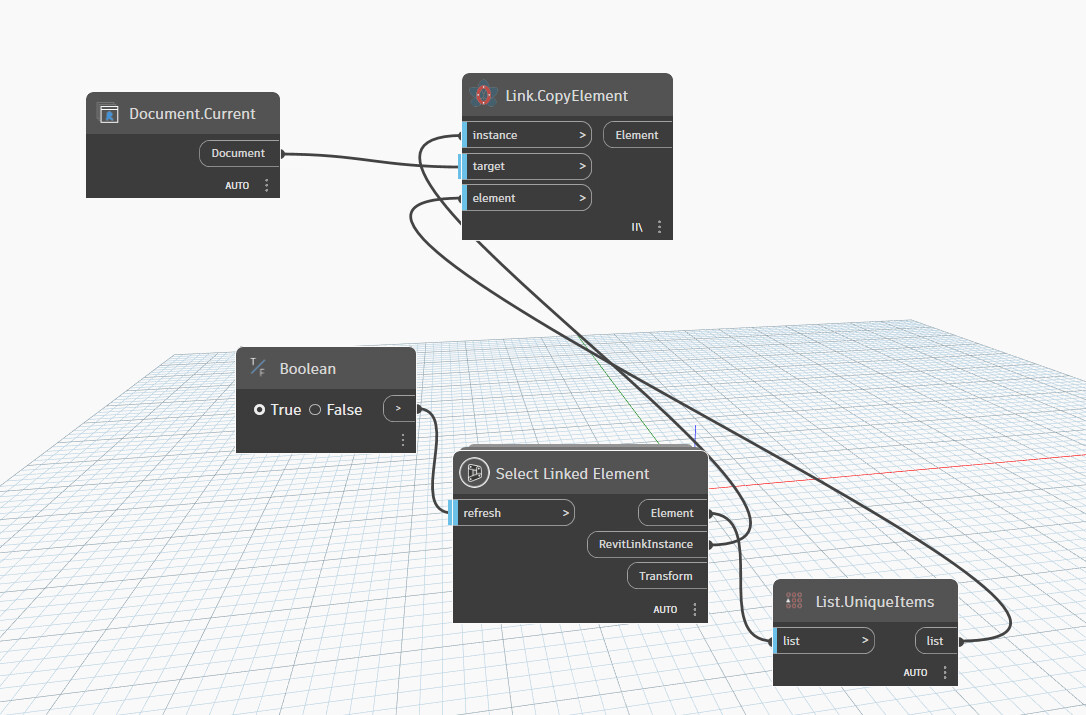
as i understand you have 10 llinked sites, and now just insert in the current as you show…right ? you will need all linked document with that node i gues and some lacing, list levels, as well…but not sure…hard to say…but guees all these elements…isnt the same place as current…so maybe place them and move by vector or whatever…maybe 
I really like binding links when transferring elements across different models. Simple and effective.

i have many of elements bind not working
It’s a bit of strange to me since I only think about binding when there is a huge amount of things pending copy. I wouldn’t bother to adjust those visibility settings for just a few elements.
For copying link elements, I think you need to apply the transformation of that link instance as well.

Hm, I’m not sure if there’s a node for that out of the box. But when you copy them via an api call, you get a chance to put a transform there.
CopyElements Method (Document, ICollection(ElementId), Document, Transform, CopyPasteOptions)
You get that transform from that link instance itself.
link_trans = link_inst.GetTotalTransform();
here an example with PythonNet3
import clr
import sys
import System
from System import Array
from System.Collections.Generic import List
clr.AddReference('ProtoGeometry')
from Autodesk.DesignScript.Geometry import *

clr.AddReference('RevitAPI')
import Autodesk
from Autodesk.Revit.DB import *
import Autodesk.Revit.DB as DB
from Autodesk.Revit.DB.Structure import StructuralType

clr.AddReference('RevitServices')
import RevitServices
from RevitServices.Persistence import DocumentManager
from RevitServices.Transactions import TransactionManager
doc = DocumentManager.Instance.CurrentDBDocument
uiapp = DocumentManager.Instance.CurrentUIApplication
uidoc = uiapp.ActiveUIDocument

clr.AddReference("RevitAPIUI")
from Autodesk.Revit.UI import *
import Autodesk.Revit.UI as RUI
from Autodesk.Revit.UI.Selection import *

class CustomCopyHandler(IDuplicateTypeNamesHandler):
    __namespace__ = "CustomCopyHandler_rqeyo8Gm"
    def OnDuplicateTypeNamesFound(self, args):
        return DuplicateTypeAction.UseDestinationTypes

def copy_Linked_CDC():
    dict_copy = {}

    copyOptions = CopyPasteOptions()
    copyOptions.SetDuplicateTypeNamesHandler(CustomCopyHandler())
    TransactionManager.Instance.EnsureInTransaction(doc)
    refsElems = uidoc.Selection.PickObjects(ObjectType.LinkedElement, "Select link Elements")
    for refElem in refsElems:
        rvtLinkInst = doc.GetElement(refElem)
        transform_instance = rvtLinkInst.GetTotalTransform()
        lnkDoc = rvtLinkInst.GetLinkDocument()
        elemLink = lnkDoc.GetElement(refElem.LinkedElementId)
        #
        if rvtLinkInst.Id not in dict_copy:
            dict_copy[rvtLinkInst.Id] = {"Ids" : List[ElementId]([elemLink.Id]),
                                         "lnkDoc" : lnkDoc,
                                         "transform" : transform_instance,
                                         "rvtLinkInst" : rvtLinkInst,
                                         "copyElements" : []}
        else:
            dict_copy[rvtLinkInst.Id]["Ids"].Add(elemLink.Id)
    #
    for link_instanceId, sub_dict in dict_copy.items():
        lnkDoc = sub_dict["lnkDoc"]
        tmpIlst = sub_dict["Ids"]
        tf = sub_dict["transform"]
        new_copyElemIds = ElementTransformUtils.CopyElements(lnkDoc, tmpIlst, doc, tf , copyOptions)
        sub_dict["copyElements"] = [doc.GetElement(xid) for xid in new_copyElemIds]
    TransactionManager.Instance.TransactionTaskDone()

    return dict_copy

result_dict = copy_Linked_CDC()

OUT = [d["copyElements"] for _, d in result_dict.items()]
thank you, it is work as i want