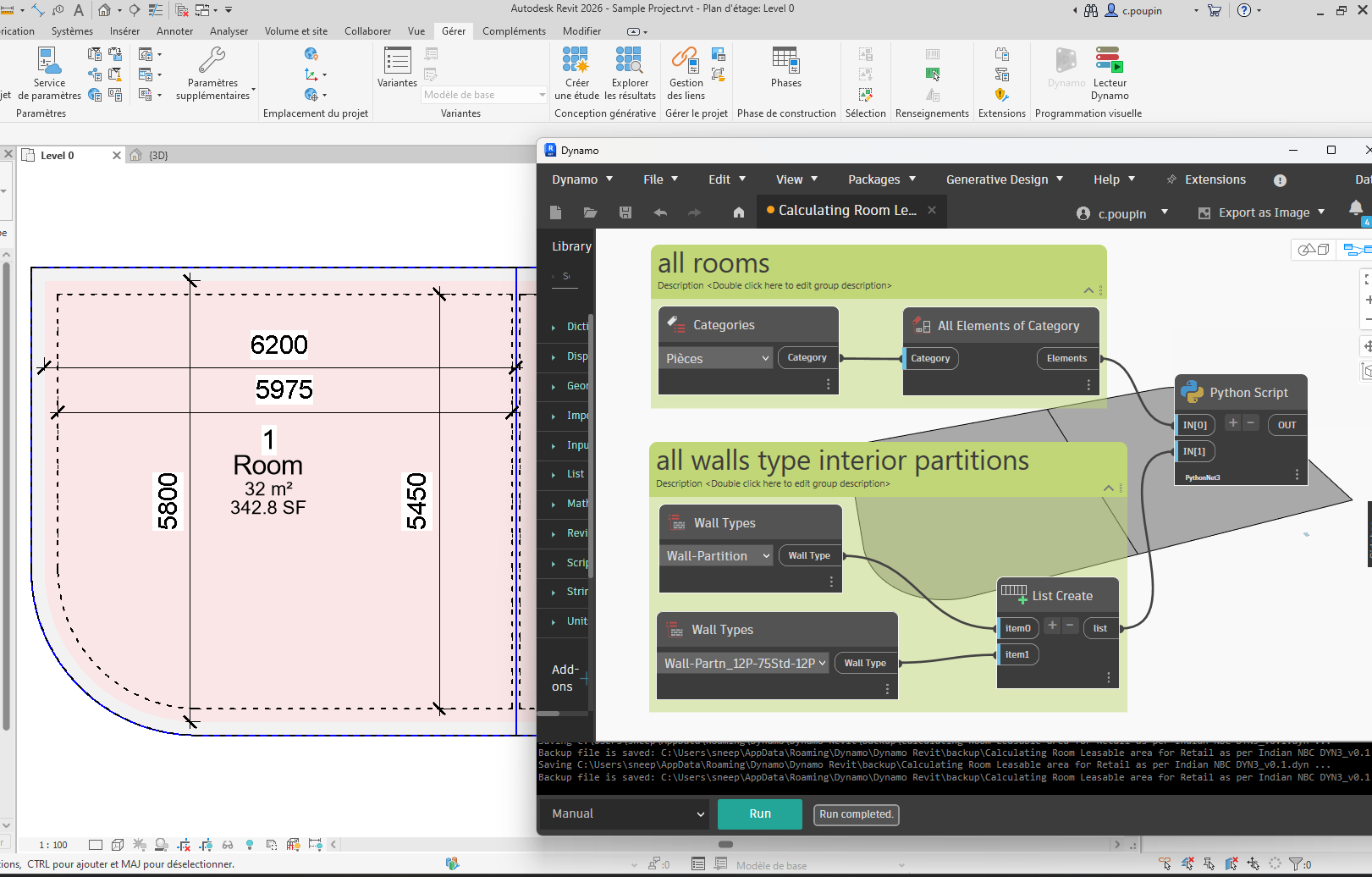
I am looking to calculate the leasable room area for Retail and commercial design as per Indian NBC. Basically to calculate the area of the room which will calculate the exterior edge of the exterior walls, centre of Partition walls as they share with other Tenant and Exterior edge of the interior wall. Can I do this using any plugin or Dynamo Script?
I can use different wall types for Revit to identify which is Exterior, Interior and Partition Wall.
There are two ways I can see this going. I’d probably start with this option:
1. Locate rooms and usage types (tenant or non-tenant).
2. Identify bounding wall types and widths.
3. Extend room boundaries by conditional offset (full width or half width).
4. Assign area value.
But you could also try this:
1. Identify wall types and conditions.
2. Determine offset based on requirements.
3. "Enclose" areas (there will likely be gaps between wall connections).
4. Match enclosure with room and assign area value.
I did try unsuccessfully creating a Dynamo script and Python using Chatgpt. Can you please help me in creating the required script? I have a very basic level of understanding and creating the script.
You need to show us what you’ve tried so far and where you’re running into issues. Again, if you read the post I linked above, you’ll see that this is not a forum for requesting other people to do work for you. We need to see what you’ve been able to put together so we can suggest how you might fix things or move forward.
I have tried to use Chatgpt to generate the script on the basis of the solution you provided.
I skipped the locate room part, because I first tried to test if it works for all the rooms (tenants or not). Identifying wall boundaries and Assign a area to new shared paramter “Leasable Area.”
Unfortunately all the python scripts that chatgpt produces runs into some or the other error. I am attaching the script sample as well. I want to avoid the python scripting all together if possible to make it clean without errors.
ChatGPT is not good at determining Dynamo node structure. It can be helpful at outlining general logic and core python, but it struggle with the specifics of Dynamo and the Revit API.
We can’t even tell you what it’s doing wrong without seeing the code. If you want to avoid python then I recommend searching the library for nodes that deal with rooms and geometry that your process will require.
I’ve elevated your permission levels so you can share files now.
Hi, I have tried extracting wall thickness and deriving area in new paramter “Leasable Area”. If you can check and recommend changes. I am getting error while extracting curves and combining them.
Can’t tell you what’s going on if we can’t see it. Please share a new screenshot with all the node preview bubbles pinned.
I can tell you that there’s still some weird logic in your code at this point. Combining the wall and boundary geometry doesn’t make sense as you’re duplicating the dataset but also filtering only part of it.
I recommend doing this on only the active view, as it WILL require manual review as the rules for any one national standard for leasable area have far too many exceptions to automate completely, so I like to push the qa on the user at the time of use.
Get all rooms
for each room
Get the room boundary segments
For each segment, get the bounding element and extract it’s width if it is a wall; if not skip it as this is an area separation curve which can’t demise tenant space per any standard I know of
get the room on the other side via the derivatives and wall width
if the occupant is the same as the original room, ignore it
elif the occupant is null, move the boundary curve by 1/2 of the wall thickness out of the room and append that to the list of curves to use for separation lines
elif the occupant is not the same append it to the list of curves to use for separation lines
get all unique curves using the center point as the key
generate room separation lines at each unique curve
generate a base area
again, for each room:
Move the area to the center of the room location point
if the Area has an area value, append it to the results list and make a new area
else move onto the next room
delete the last Area if it isn’t in the list of areas
The Revit API is required as I do not know of any packages or tools which allow passing the boundary as an object. As such I would recommend either custom Python script in Dynamo, a custom node (C# or DYF) in Dynamo, or an add-in. If any of the steps above don’t make sense you likely will want to hire a developer.
DB.CurveLoop.CreateViaOffset method can be used to create custom offsets for each curve, and we can find the bounding element (wall) for each boundary segment.
import clr
import sys
import System
from System.Collections.Generic import List, IList, Dictionary, HashSet
#
clr.AddReference('ProtoGeometry')
from Autodesk.DesignScript.Geometry import *
import Autodesk.DesignScript.Geometry as DS

#import Revit API
clr.AddReference('RevitAPI')
from Autodesk.Revit.DB import *
import Autodesk.Revit.DB as DB

clr.AddReference('RevitNodes')
import Revit
clr.ImportExtensions(Revit.GeometryConversion)

#import transactionManager and DocumentManager (RevitServices is specific to Dynamo)
clr.AddReference('RevitServices')
import RevitServices
from RevitServices.Persistence import DocumentManager
doc = DocumentManager.Instance.CurrentDBDocument


class CustomRoom:
    def __init__(self, room):
        self._room = room
        s_opt = SpatialElementBoundaryOptions()
        s_opt.SpatialElementBoundaryLocation = SpatialElementBoundaryLocation.Center
        self._outsegments = max(self._room.GetBoundarySegments(s_opt), key=lambda loop : sum(l.GetCurve().Length for l in loop))

    @property
    def OutCurveLoop(self):
        return CurveLoop.Create(List[DB.Curve]([x.GetCurve() for x in self._outsegments]))

    @property
    def Room(self):
        return self._room

    @property
    def LeasableSurface(self):
        lst_offset = List[System.Double]()
        for curve in self.OutCurveLoop:
            # get the associated wall via the segment.
            assoc_segment = next((s for s in self._outsegments if s.GetCurve().Intersect(curve) == SetComparisonResult.Equal), None)
            assoc_wall = doc.GetElement(assoc_segment.ElementId)
            # if interior wall do no offset
            if assoc_wall.GetTypeId() in lst_walls_type_partition_Ids:
                lst_offset.Add(0)
            # if  exterior wall offset it
            else:
                lst_offset.Add(assoc_wall.Width / 2)
        # offset curveloop
        extendLoop = DB.CurveLoop.CreateViaOffset(self.OutCurveLoop, lst_offset, XYZ.BasisZ)
        # create Surface
        return DS.PolyCurve.ByJoinedCurves([c.ToProtoType() for c in extendLoop], 0.001, False, 0).Patch()

def toList(x):
    if isinstance(x, (list, dict)) or \
            (hasattr(x, "GetType") and x.GetType().GetInterface("ICollection") is not None):
        return x
    else : return [x]

#Preparing input from dynamo to revit
lst_rooms = toList(UnwrapElement(IN[0]))
lst_walls_type_partition = toList(UnwrapElement(IN[1]))
lst_walls_type_partition_Ids = [x.Id for x in lst_walls_type_partition]

out = []
for room in lst_rooms:
    if room.Area > 0.001: # edit 25/06/2025
        c_room = CustomRoom(room)
        out_surf = c_room.LeasableSurface
        out.append([c_room.Room, out_surf, out_surf.PerimeterCurves(), out_surf.Area])

OUT = out
Thanks a ton Cyril @c.poupin . Its lot simpler and more precise.
I would liken your help little further.
Is there a way to select all wall types for Interior Partition at once, all with the name “Partition” in it, instead of adding all partition wall types.
I am getting a warning in Surface area node (Asked to convert non-convertible types), although the Leasable area is generating correctly. Can you please check if I should avoid or is there a way to resolve this?
I don’t love using partition types to identify area separations. They tend to be too varied so users loose track (“oh I forgot to add that partition type for this run”), and you might also have one within the same tenant or within common areas.
This code will look at the occupant of a room, and put a demising line at the outside face (if no room is found or if the room has an occupant of “Common”), at the center line if the occupants differ, or skip putting the demising line if they are the same.
Thankyou @c.poupin . This works fine. Should I ignore the warning in Surface area node (Asked to convert non-convertible types) because the value is generating correctly?
@jacob.small - Thanks, that makes sense. I agree—partition types can get tricky to manage consistently. Right now, I’m using a Python script to handle area calculations for Retail design, which works well. But I can definitely see your approach being really useful during the As-built stage when accuracy and clarity in demising lines become more critical. Appreciate the insight!
in your case, you can replace in the python script out.append([c_room.Room, out_surf, out_surf.PerimeterCurves(), out_surf.Area])
by out.append(out_surf.Area)