Hello,
I’m working on a Dynamo script where I need to set multiple parameters for several Revit elements, with specific values for each element.
Example :
I have a list of elements = [element1, element2, element3]
A list of parameter names = [parameter1, parameter2]
A list of values = [[value1, value2], [value3, value4], [value5, value6]]
I would like to achieve the following:
-
element1 → parameter1 = value1, parameter2 = value2
-
element2 → parameter1 = value3, parameter2 = value4
-
element3 → parameter1 = value5, parameter2 = value6
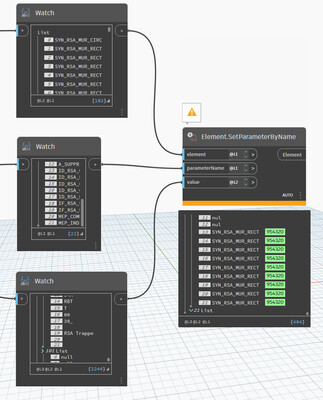
I’m trying to use SetParameter like this, but I can’t get it to work.
I need 102 elements as output from the SetParameter node.
I feel like I’m on the right track and maybe just missing a node.
Thanks in advance !
Gautier
No - you need (number of elements) * (number of parameters) from the set by parameter node. Each sublist will be the same element repeated (the number of parameters) times and the number of sublists will be (the number of elements).
Offhand I think you want longest lacing, @L1 @L2 @L2.
If I understand @gautier_vasseur correctly, it’s probably easier to have multiple Element.SetParameterByName nodes ?
i.e you feed in all elements to each of these nodes, but feed in parameter names and values separately
Second jacob’s recommendation. The L1/L2/L2 combination is a classic and scaleable approach, and a good eventual segway into python iteration (regular/zip).
If you need an example of it in action it is the exact combination i use in my tutorial on levels here:
@jacob.small @GavinNicholls You are right ! I tried this combination but thought it was wrong because I had more than 102 elements in the output.
Thank you for your help !