Hi…
I have been using the Bumblebee packages for Excel export since they came out pretty much. For me, I’ve found them more reliable then the other Excel nodes including the OpenXML but they’ve had one BIG advantage in that if the data is export to a table location the table in Excel automatically expands to include the additional data.
Sadly it appears that the bumblebee nodes no longer work in Revit 2025. I’ve had a look at getting ChatGPT to rewrite the code to CPython3 (I’m not a coder in any meaningful way) but it seems to be unable to do this without installing external packages like openpyxl which from reading elsewhere on here isn’t a good idea if I need the code to be widely used across the practice.
Can anyone provide some generally guidance here please as to the best way forward? I need the functionality provided by Bumblebee but in a way that will work in Revit 2025 and beyond. Am I going to have to look at Zero Touch nodes or is there another way this can be tackled?
Cheers
K.
First up: are you sure you have the right version of the package for Revit 2025?
The source code is available here: GitHub - ksobon/Bumblebee: Excel interop for Dynamo
It has a GNU license which is quite permissive, so…
One option would be to fork the code from Konrad’s repo and update it yourself. You will then need to own all maintenance in perpetuity.
Another would to produce a pull request in his repo to patch the issue for the larger community. Konrad would still own the maintenance but you could contribute as needed.
Another option would be to provide Konrad with some incentive to give up a weekend to patch it for you. Excel interop is VERY painful to develop, so without encouragement I suspect this won’t be as much of a priority as say spending the evening with his family.
Lastly, you have the OpenXML and OOTB excel nodes, and the option of using CSV and appending the data into excel file (my personal preference).
Looking at the source code it’s not been updated in 7 years… I have the latest available version of the package installed in Dynamo.
there is no way I could fork the code and maintain it, I simply don’t have the skills for that currently. My ability goes as far as hacking something around to get it to work, I’ve also never used Github for anythings meaningful!
I have contributed a small amount every month to Konrad’s Patreon website since he set it up, while each individual contribution is small, it would have added up over time… whether that is sufficient to cover a patch like this I’ve no idea but the intent is there at least. I can drop him a message though and see what the options might be for this.
I’m after an automated process that works for all staff members regardless of their knowledge of Revit Dynamo or indeed Excel. Using a CSV that sits externally would be another level of complexity I’d rather avoid if I could, but it may be something I need to consider.
Sigh… I need to rant for a second.
In 20 years working with AEC firms globally I have found that the best solutions are those which address the people problems rather than turning them into technical ones. If a retailer wants a cashier they hire them and train them up on that tool. They also upskill staff as systems and processes evolve. Same in manufacturing. I really wish AEC would learn from those industries here.
Ok rant over.
Since you have been involved with a Konrad’s patreon, you might want to ping him there.
What do you want to use excel for? Need a specific here not a catch all. I’ll see if I can diagram a CSV workflow.
It’s okay Jacob, I can figure out a CSV workflow using Excel VBA that will work which would remove my dependency on Excel export nodes which are clearly going to be problematic for the foreseeable. Thanks for the offer though.
Hi Keith!
Whilst not entirely in the spirit of the forums i had so many issues getting consistent, performative and correct excel read and write to work in Python. This was one of a handful of things that gave me enough frustration to look beyond Python and pyRevit at the time, but I can attest its a big jump to take.
I eventually jumped the gap to C# and found that ClosedXML (to my understanding a wrapper around OpenXML to simplify its implementatability) was quite easy to integrate and work with. Not sure if it would be integrateable via zero touch nodes, but here is my code for my addin as an example of how easy it is to implement in that environment:
I tend to use tsv in dynamo these days, as much of a cop out as it is vs getting excel read/write. OpenXML presented a few challenges for us over the years but some have been addressed such as reading formulae vs their value.
Thanks Gavin, I’m going to look at the CSV route just now as that’s something I can handle inhouse. This does serve to highlight the difficulties with using Dynamo to overcome some of the shortcomings of Revit and the dependency on those who have been good enough to invest their time and expertise to produce and maintain custom packages.
If you just need the data in a table, VBA likely isn’t needed. Data tab > From Text/CSV > provide the path. This becomes the equivalent of a xref in Revit. Users can then edit and work happily until they’re ready to return to Revit. When they get there have them save it as a new CSV, and then build your Dynamo graph around that. The ‘read’ aspect of excel is also easier than the ‘write’, so you can leverage Python to read what you need there - I believe that @c.poupin has recently posted a few solutions around this.
It’s part of a more involved process of reviewing Revit drawing content and revisions against our drawing register to ensure both are in sync. There is no requirement at with this workflow to push data back to Revit, just have it there so that it can be manipulated by Power Query. As the number of models for any given project can vary significantly it’s become a fairly involved process and exporting directly to my TIDP was a tidy solution. CSV’s will introduce an additional step but I can get Excel to read the files in a given folder and update the relevant tables accordingy.
Hi,
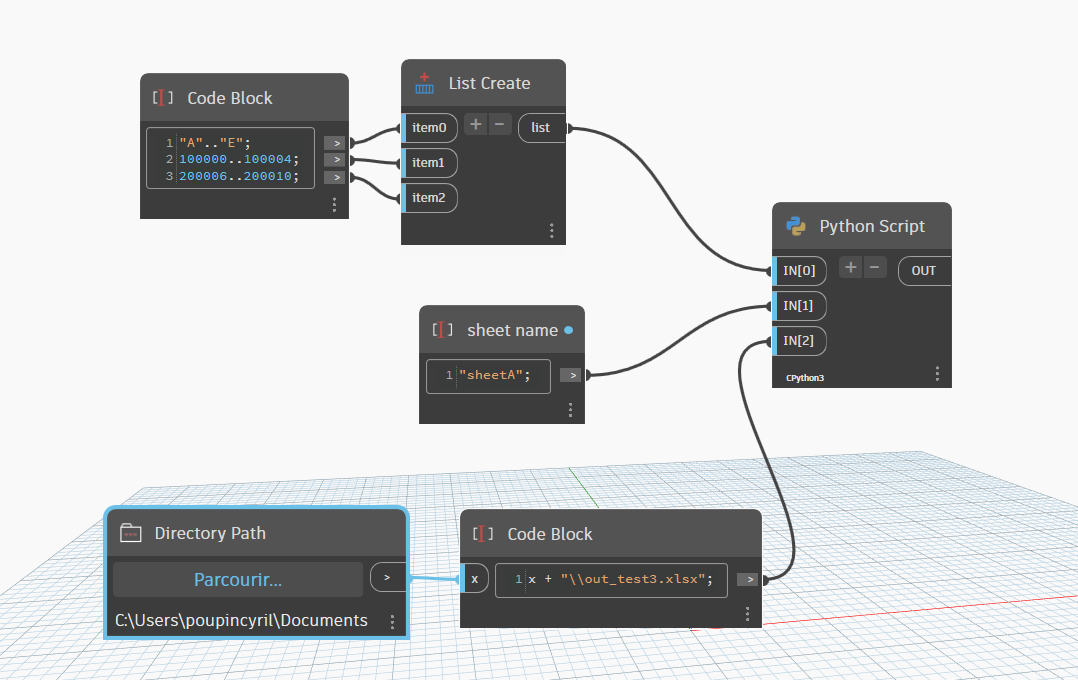
for info openpyxl, (like pandas) is included in Dynamo Cpython3 or PythonNet3, no need to install them
here is an example
import sys
import clr
import System
import os
import sysconfig
# standard library path
sys.path.append(sysconfig.get_path("platstdlib"))
# site-package library path
sys.path.append(sysconfig.get_path("platlib"))
import pandas as pd
from openpyxl.worksheet.table import Table, TableStyleInfo
from openpyxl.utils import get_column_letter
import traceback


def autosize_columns(df, ws):
    """
    A function that sets the width of each column in a given worksheet (ws) based on the maximum length of data in each column in the Pandas DataFrame (df).

    Args:
    - df: Pandas DataFrame containing the data to be written to the worksheet.
    - ws: Worksheet object representing the worksheet where the data will be written.

    Returns: None
    """
    margin = 7
    lstvalues = df.values.tolist()
    lstColvalues = df.columns.values.tolist()
    column_widths = []
    for row in [lstColvalues] + lstvalues:
        for i, cell in enumerate(row):
            current_lenCell = len(str(cell)) if cell is not None else 1
            if len(column_widths) > i:
                if current_lenCell > column_widths[i]:
                    column_widths[i] = current_lenCell
            else:
                column_widths += [current_lenCell]
    for i, column_width in enumerate(column_widths, 1):  # ,1 to start at 1
        ws.column_dimensions[get_column_letter(i)].width = column_width + margin

datas_array_array = IN[0]
sheet_name = IN[1]
out_xls_path = IN[2]

is_uniform = len(set(len(array) for array in datas_array_array)) == 1
if not is_uniform:
    raise Exception("Error", "sub-lists are not uniform (same size)")

lst_columnsName = datas_array_array.pop(0)

# Create a Pandas Excel writer using XlsxWriter as the engine.
with pd.ExcelWriter(out_xls_path, mode="w", engine="openpyxl") as xlsx:
    df = pd.DataFrame(datas_array_array, columns = lst_columnsName)
    #
    df.to_excel(xlsx, sheet_name=sheet_name, index=False)
    # get worksheet
    ws = xlsx.sheets[sheet_name]
    table = Table(displayName="Table_" + sheet_name, ref="A1:" + get_column_letter(ws.max_column) + str(ws.max_row))
    # Add a default style with striped rows and banded columns
    style = TableStyleInfo(name="TableStyleMedium9", showFirstColumn=False, showLastColumn=False, showRowStripes=True, showColumnStripes=False)
    table.tableStyleInfo = style
    ws.add_table(table)
    autosize_columns(df, ws)
# open file
os.startfile(out_xls_path)

OUT = out_xls_path
However, openXML SDK is also an interesting alternative that has the advantage of running on all types of Python Engines and C# (though more complex).
Thanks, @c.poupin, that’s really helpful. I may revisit tweaking the BB nodes as well in that case.
Yes unfortunately dependency is one of those things that is ultimately unavoidable, it’s always just a matter of being aware where you have it and knowing your alternatives in the event should one of those no longer function as required. As Dynamo presses forward and many of the OG package managers run out of time to maintain their work or simply move on, it will be a challenge that I expect the community will need to actively address. Python based packages will generally not age well as we go through extra flavors of Python become depended upon or even required (e.g. IP2.7 > CP3).
I believe that for any firm of a decent scale (100+ or so), they should expect to hire or support at least one fairly capable Python if not C# developer who can bypass the need for package dependency in all but the most complex of scenarios, such as using an advanced package like BiMorph or Data Shapes, even if just for heading towards scalable and manageable solutions. All signs in Autodesk’s future roadmap point to needing APS capable developers as well - very hard to find in most markets in my experience (we have just one where I work).
I’d say 250+ needs the full time developer on staff. 100-200 could be a part time developer or a hired consultant. Firms with less than 100 is likely best to bring in a consultant.
Perhaps just now. But the speed at which solutions like ChatGPT are developing, it don’t think it will be long before in-house development for this kind of thing becomes much, much easier. Indeed, we can see it happening already.
The hallucination is still very real depending on the tasks it is being applied to, but the destination will likely make that more feasible as we press on.
Chatgpt will ironically get mislead by open source packages such as BB at times given it has likely scraped it and much more in python for dynamo in its training. Teaching it to stop lieing will be a major step for the VC’s to swallow.
Honestly ChatGPT is becoming the worst of the group… they’re coasting on reputation at this point, and as others come to market may be shaken out of it (think back to what deepseak did to their stock price a few months back).
That said, with the pace of change in Revit and Dynamo over the last 5 years it’s either going to require training model maintenance which will be unattainable for most firms, or it’s going to require investing in access to a paid model (which may cost more than hiring the consultant mentioned before).
The 250+ firms will still hire the developer full time, that developer will do more than they do now.
The 100+ firms will still need the part time developer, but that person won’t need to wear that hat as much.
The <100 firms will still want to bring in a consultant, as the cost of maintaining the custom model to prevent hallucinations will be unattainable, while the cost to use the non-customized models will also increase to a point where it’ll be less attractive and some will simply pass on using it (OpenAI is forecasted to be operating at a sizable loss for all of the foreseeable future - last I checked they are spending about $2.25 for each $1 they bring in).
Time will tell I guess, one things for sure though, the tech isn’t going away… It’s already opened up interesting avenues for us that I simply couldn’t have done before. I do think a paid subscription is worth it as well, and far cheaper than hiring a consultant. It has a way to go though…
100%.
Long term we can only guess, but but I’m guessing that a subscription for a functional use assisting minimally skilled users (what most firms have - you’re an outlier as you’re more skilled and aware of the tools available than most of the industry is) will be on par with hiring a decent development consultant. Things look good now as even the ‘high tier’ paid version ($20/month) is operating at a consistent loss for OpenAI and the models really don’t suit as well. CoPilot does better as it’s a bit easier to tailor to the use case, but even it struggles when the APIs change.
Timely thread Keith: just hit the same wall you have with regards BumbleBee in r25 
My big issue with CoPilot is it sucks at actually generating usable code, keeps putting in non-breaking spaces rather than tabs… ChatGPT is much more reliable in this respect.
This is an interesting read if you have a few minutes spare. Written by a couple of ex Open AI employees. Obviously it’s just speculation but…
[[Visit AI 2027]]