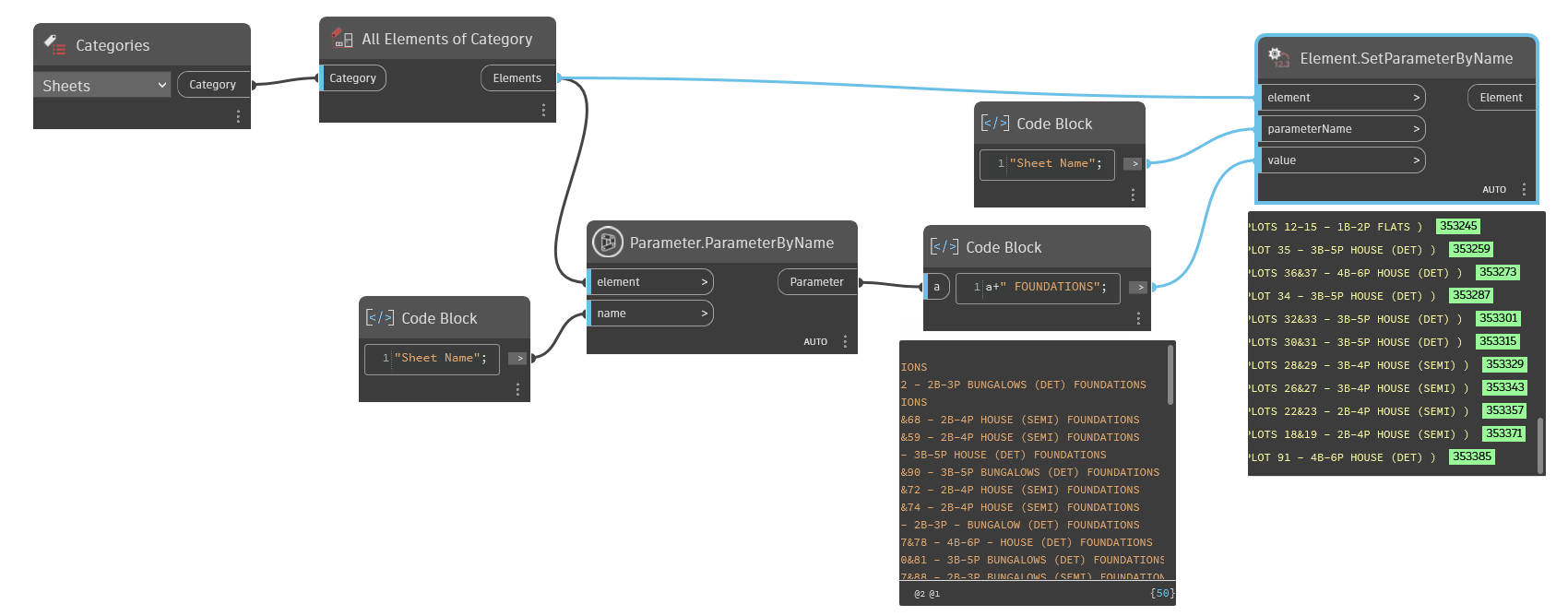
First of all, it’s a bit odd that you’re setting the parameter values to title block(?) instances rather then to sheets itself.
Second, you went pretty complicated way to achieve appended sheet numbers.
It’s much easier, if you’ll get all sheets, then get it’s names, create a code block and type a+”FOUNDATIONS”
connect sheet names to a input, and you’ll get a result.
Then just use Set parameterByName, connect sheets and new appended sheet names
The suggestions have simplified the script a lot but unfortunately it doesn’t work, for some reason the string isn’t appearing in the preview of SetParameterByName?
Is there some extra step to set these parameter values that I’m missing?
Just in case this will help someone else in future;
I swapped the get parameter by name node with Sheet.Sheetname, I think resolving the problem which was related to the parameter name being included in the string being replaced which had a colon “Sheet Name: “.
I’ve simplified further with set sheet name node and also added an input so it can be easily used with Dynamo player to append a string of text to all sheets in a project.
This gets the parameter element - you generally want to get the parameter value so the node to use is Element.GetParameterValue... not Element.GetParameter...