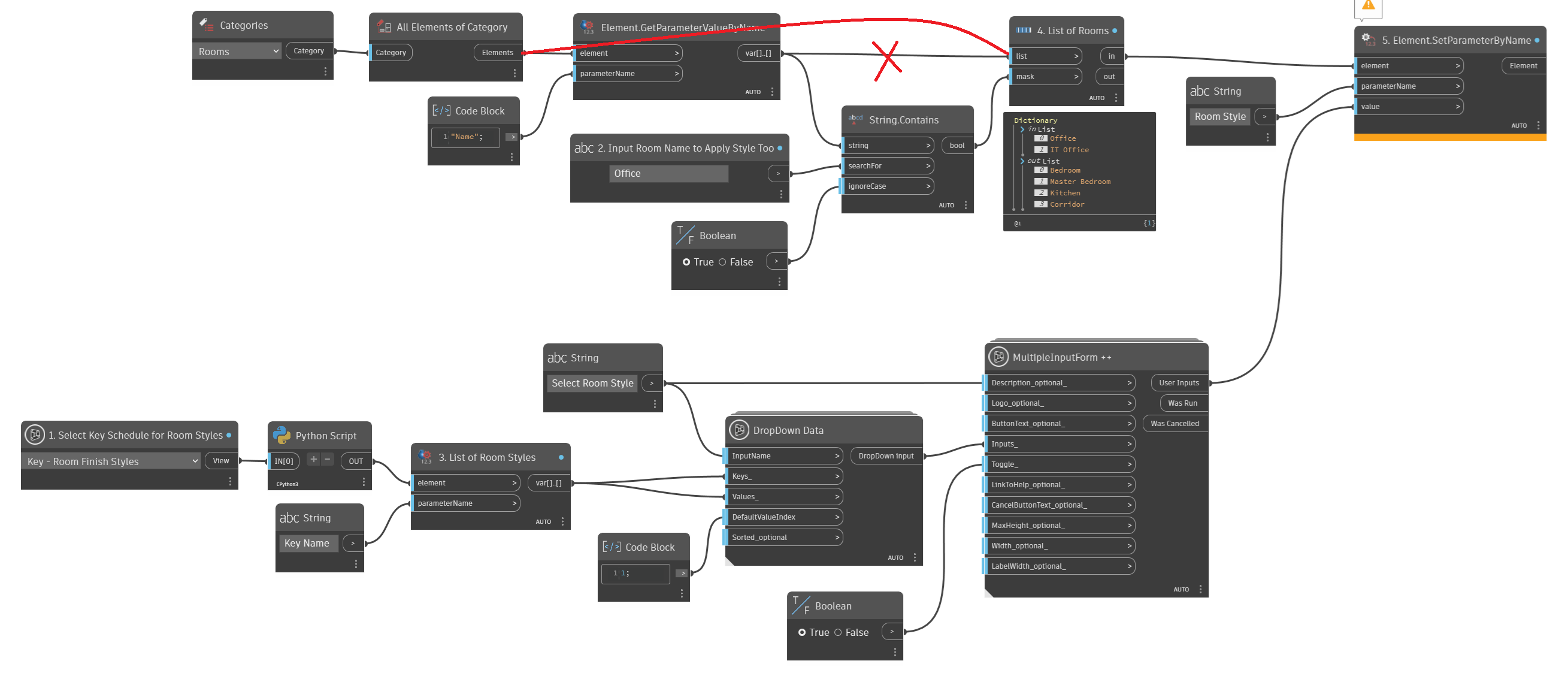
I am trying to set up a script that allows me to select a Key Schedule with my room styles.
Then it looks up all the Key Name values and presents it as a drop down selection using the Data-Shapes dropdown data feeding into a multiple input form (having issue here too as the popup ui doesn’t always appear).
Next I look at all my rooms in the project and filter the list based on user input.
Then it is supposed to apply the selected room style to all the rooms in the filtered list.
Example, I select my key schedule, then select OFFICE as my style, then search my rooms for all that contain the word “office” (user input) and apply the room style to those rooms in the filtered list.
The issue is I am getting an error on the Element.SetParameterByName saying it is the wrong argument type.
You should feed the Elements itself for the element not String. Currently you’re feeding string as an Element. Try to adjust your graph as shown below, and you should be good to go:
Keys are stored as an Element. You can use this: python script
to query the Key Schedule view for all elements contained in it.
After that, it’s a matter of mapping the Key Names against the corresponding Element, and pushing the Element to SetParameterValueByName instead of the Key Name.
I am still getting the same error. It may have something to do with the Data-Shapes node but I am at a loss. Also forgot to mention I have tried it in Revit 2025 and 2027 both have the most recent updates installed.
It is saying that the Room Style Parameter (which is the Key value from a Key Schedule) is of the type Element ID. How do you set that parameter type to something using dynamo?
The Element.SetParameterByName takes Var() as the value.
You know that “Office” is index 1 of your list of strings. You also know that Element #------ (whatever number it is) associated to Office is also located in index 1.
So, you could approach this one of a few ways, but generally:
IndexOf your output from the datashapes node to see where it lands in your List of Room Styles, then GetItemAtIndex the Python script using those indices, to produce the ElementID needed to feed into SetParameter.
or
Build a Dictionary that maps your List of Room Styles to their corresponding ElementIDs, then use output from the datashapes node to call the Dictionary values, again feeding it into SetParameter.
I was able to get the Element ID using the List.IndexOf and List.GetItemAtIndex but now it is only applying that value to one element in my list when it should be doing it to 2 rooms.
I want all rooms containing “Office” in the name to get the style “OFFICE” applied but it is only applying to the first element.
I tried renaming the rooms to change the list order and it always only sets the value for the first item in the list only.
That would be lacing behavior - your SetParameterValueByName node seems to be short lacing for its Auto behavior. Since the key list is only one value, it’s stopping after the first index.
…to be honest, I’m not actually sure why it’s doing that versus longest lacing in this context. But a quick fix would be to repeat your key list a number of times equal to the list.count of your room list, so that you wind up with lists of equal length and structure.
I got it to work by counting the number of items in my Room List after Filtering and then using that to make a list of the element ID repeated that number of times.
EDIT: I right clicked on the Element.SetParameterByName node and set the lacing to Longest instead of auto. Removes the need for the workaround.