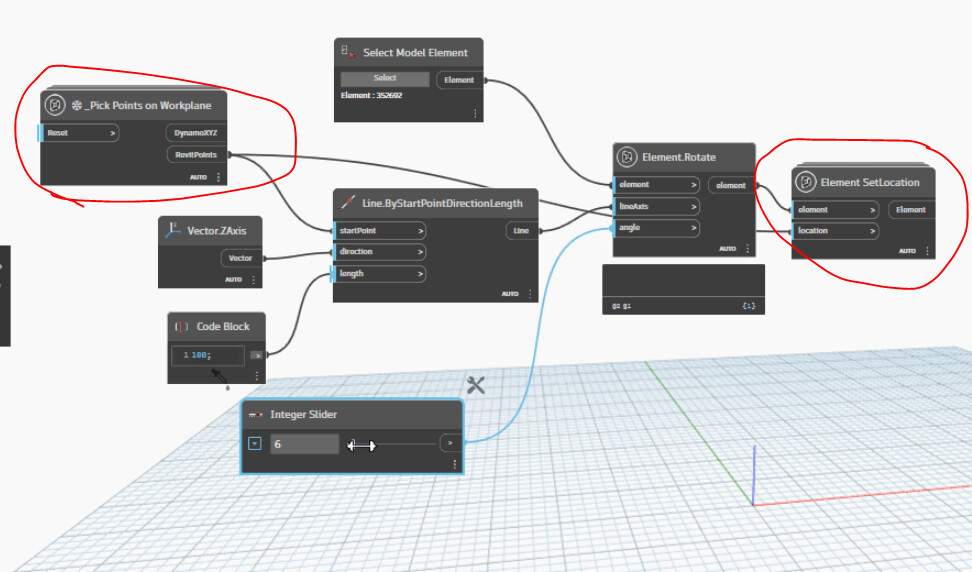
How can I rotate ImageInstances with Dynamo?
I have to replace some Generic Models that are hosting ‘escape door’ symbols by jpg’s. I can manage to place them but not rotate them in their floorplan.
Can someone help?
How can I rotate ImageInstances with Dynamo?
I have to replace some Generic Models that are hosting ‘escape door’ symbols by jpg’s. I can manage to place them but not rotate them in their floorplan.
Can someone help?
I don’t know how to rotate the image instances, but see if you can apply a rotational transform as a start point.
That said…
That could either be either genius or horrific. Even odds on either, but I’m a bit scared at the performance impact…
I will try to apply
but I wouldn’t know which node to use. It’s odd because I can use the Rotate function in Revit and it automatically grabs the center of the image. But can’t apply Dynamo for some reason
I used DWGs of those icons
(loaded in Detail Items) in the past.
Worked great for me.
same here, using JPGs sounds like a bad idea.
Which gives us the issue of the screenshot, also different scales makes them annoying
Can’t you just draw it as detail item by tracing the dwg (or exploding) with filled regions?
Edit:
I have that same family, but there’s no issue with printing for me.
Have you tried switching to a different pdf printer to test, or use the export pdf option?
Yes we tried many, don’t forget, this still doesn’t solve the scaling that it doesn’t do ;).
I am just looking to rotate images, that is all. I can’t understand why manually it works, but any node or python code can’t seem to handle it.
is it something here you are after ??

pick point was just for a location rotation origin…you could just use a bounding box with centerpoint…yeah seems the rotation node do some funny things when rotate so i just set the location after…dirty but works
Same
i dont know how many image instance you will place…but could be a little bit afraid it could slow the model…best with a library for signage as real detail/annotation families IMO ;)) or probably do it in bluebeam-pdf or even photoshop etc
About 40 of them, copied over to 9 different views. But the model is 200mb in size. I’m not worried
Allright 
It’s been a week since I’ve had it come up so I’m due to say this again… RVT file size has no real bearing on performance unless you’re drastically under powered for hardware.
All the same I am rather interested to know how this performs over time and in downstream work (i.e. will PDFs be slower to print/open/navigate/etc.) as I’m still in “this is genius or horrific” on the idea.
Well tomorrow is my last workday at this job. So I’m just following instructions and got curious if I could rotate the pictures upon placement.
yes its possible as i show you
It doesn’t unfortunately
EDIT - I just noticed you’re using a different Element.Rotate node. Which package is that one from?

yeah try some of these rotate node from openmep or dynamep…