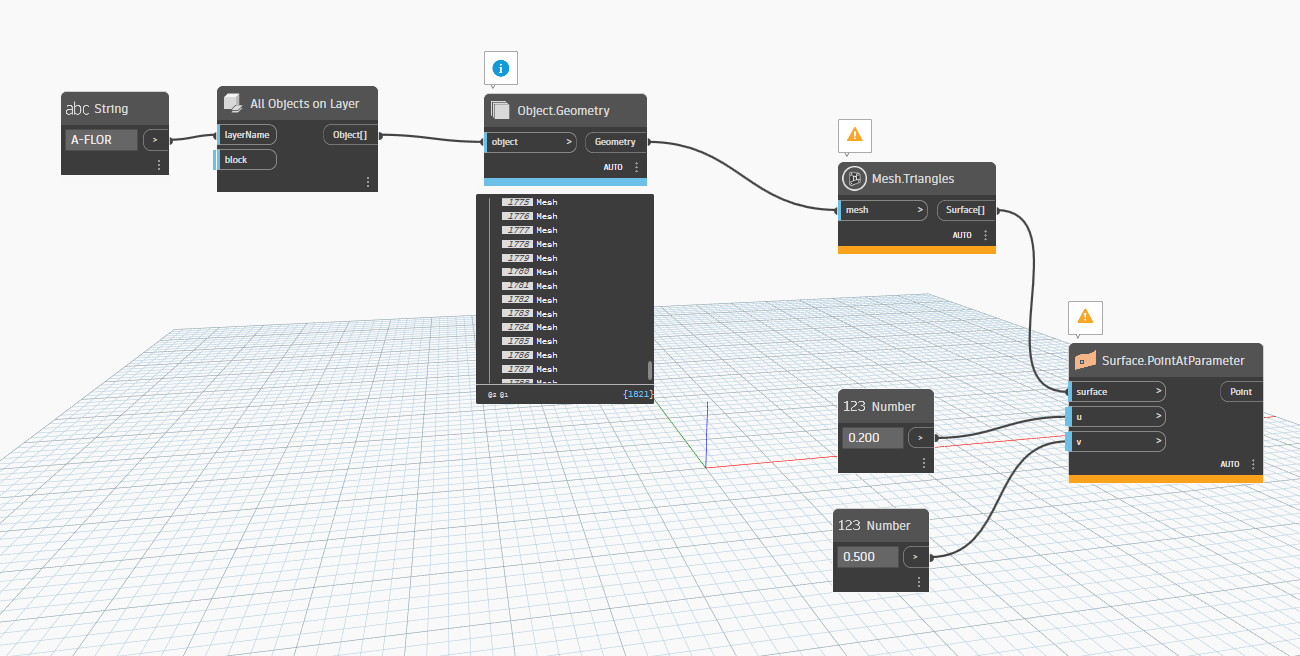
Hello, I need to get a functional surface in Civil3D from 3D Revit solids.
I have the meshes of the design, but I can’t create a surface because I have meshes that are completely vertical and meshes that are located directly beneath others. I only need the ones on top, and I was creating a Dynamo script in Civil3D for this. Doing it manually is impossible because of the size of the file, and I have to update this surface every week.
My idea (ChatGPT plan) for vertical meshes is to compare the ‘Normal’ (the vector perpendicular to a plane) with the horizontal, and if it is almost the same, remove them directly. Then, compare the centers of the meshes, and for those that have the same position in X and Y, delete the ones with a lower Z. This is what I have for now.
I´ll really appreciate your help. Thanks!!
You’re close - ChatGPT isn’t helping much though. I recommend you stop using it and wait for the specialized AI tools to hit the market as they’ll be more useful. For now a forum search would have gotten you enough insight to build this out yourself.
List.Clean (false input) to remove the invalid triangles from the Mesh.Triangles node.Surface.NormalAtParameter (0.5,0.5 for parameter inputs at the ‘middle’ of the surface - but for planar surfaces like produced by a mesh any two doubles will do) to get the ‘facing direction’ of the surface.Vector.AngleWithVector to get the angle from the original surface to the Z axis (Vector.ZAxis node).< node to test is the angle is less than 89.999. Anythnig at 90 is ‘vertical’, and anything less than 90 is facing down.List.FilterByBoolMask where the list is the flattened list of triangles (step 1) and the bool input is the booleans from the < node.- Hide all geometry preview except for a code block coming from the ‘in’ output of the FilterByBoolMask node. Make sure these make sense.
- Convert the displayed triangle surfaces to triangles as nine numbers and write to disc, or other interop format (JSON, csv, etc.) which you can use in Civil 3D.