Hi Everyone,
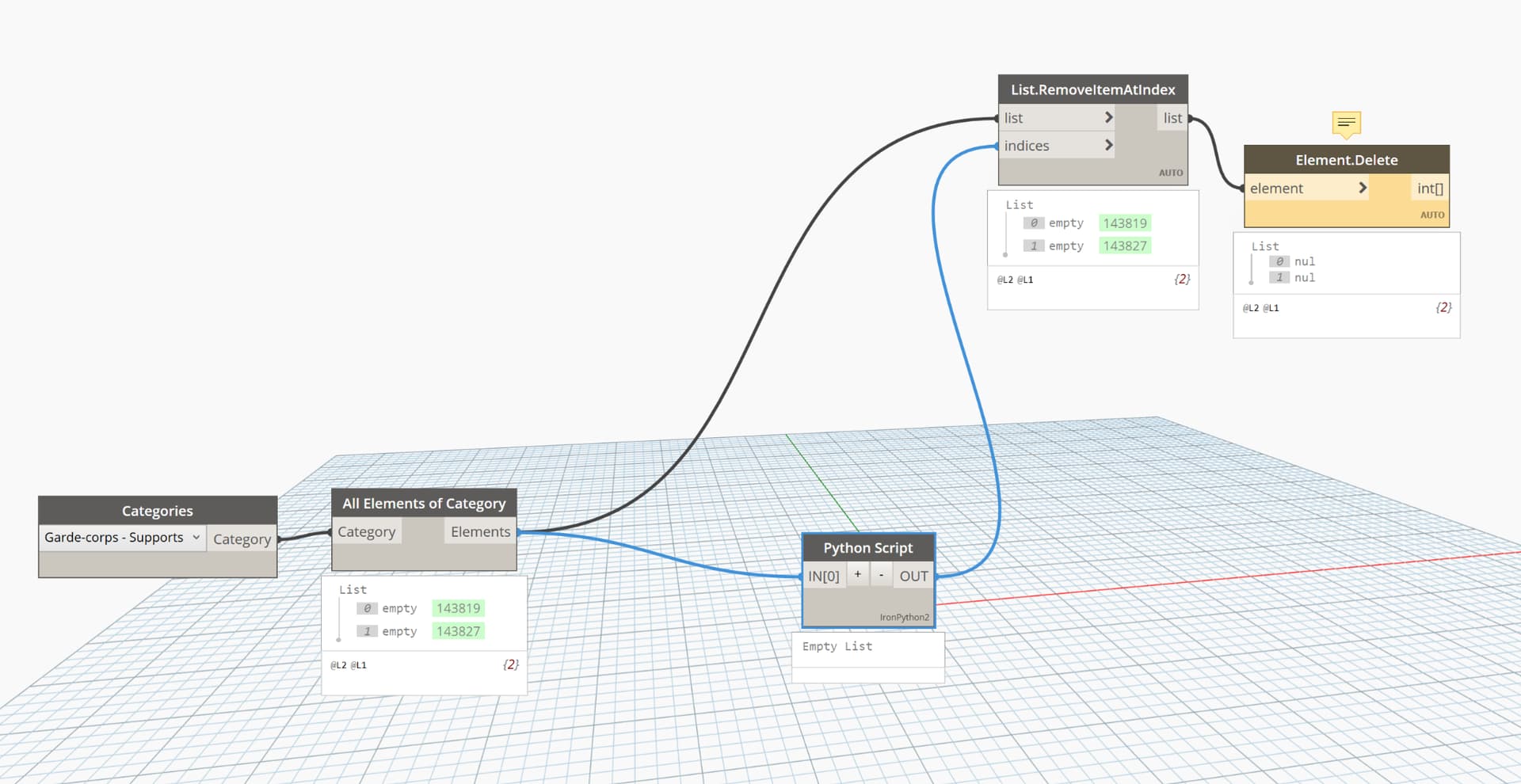
My Python script returns an empty list () even though it is supposed to detect duplicates in a list of Revit elements.
After checking: The elements are correctly retrieved via All Elements of Category, But in the script, IN[0] seems to contain nothing or is not usable (returns null / empty).
Do you have any ideas ?
Here is what my Phython script says :
items = IN[0]
seen = {}
duplicates =
for i, item in enumerate(items):
if item in seen:
duplicates.append(i)
else:
seen[item] = i
duplicates.sort(reverse=True)
OUT = duplicates
Can you define what you mean by ‘duplicate elements’?
The code you are showing would return only one copy of everything in the list (i.e. [A, B, A] would return [A]), however you don’t have any duplicates in the list so you are getting fan empty list.
Hi Jacob ! How are you doing ?
By “duplicate elements,” I mean Revit elements that share the same identifying property — for example, elements that have the same name, type, or a specific parameter value (such as Mark, Id, or any other custom/shared parameter).
The goal of my script is to find elements in the list that are not unique based on this property. For instance, if I’m checking for duplicates by the Mark parameter and I have three elements with Mark = A123, then these would be considered duplicates. I still don’t get why my Python script doesn’t solve the issue 
The Python script never looks at the mark. Or anything else about it. It just asks ‘is the first wall {age3616dhrowb} already in the list? Ok keep it. Is the next wall {tyvwoa26392tbaso} already in the list? Ok keep it.
You can look at the element IDs (not what is being compared by your Python) to know these are not the same object.
I also question your reasoning for deletion.
Say you have two walls with mark 1. One wall on the first floor, one wall on the second floor. Your method indicates one of these two should be deleted (along with it anything that is hosted on it, and now your room isn’t bound). So while your “duplicate” isn’t there anymore, you might have new problems to deal with.
Most of the Revit users want to address the warnings like ‘duplicate elements in the same place’ or other quality flags. That is also doable, but needs to be addressed in a VERY different manner.
I’m thinking I might just use existing Dynamo nodes for this, but I haven’t found any that fit my specific need — which is to detect and delete duplicate elements, keeping only one copy when multiple identical instances exist (i.e. same type and same location).
Thanks for the feedback — it’s a good reality check.
You’re right: my current script is not comparing any parameters, just object instances, which explains why it’s returning nothing — no objects are truly “equal” in the list.
Also, I appreciate the caution regarding deletion. My intention wasn’t to blindly remove anything with a shared Mark, but rather to find elements that are truly stacked — same type, same location (within a small tolerance), and likely created by accidental copy-paste.
The ‘nearly identical’ comparison is actually quite nice as a concept - doubly so as you’re intending to introduce some manual review. How I might go about it:
- Before running the graph, create two shared parameters: a text parameter for “Location String” and a true/false parameter for “Review Duplicates” or similar on all categories
- Get all model elements.
- For each element, extract the category name, element type ID as a string, and a string representation of the location point (or the midpoint of any linear location curve) rounded to your desired tolerance (1/16”, 1mm, whatever seems right for your project), and any other ‘common’ data you want to look for (I would personally reduce this if not ignore it for now - matching types and locations should be sufficient for the automation effort).
- Concatenate the category name, type ID string, and location point string into a single value.
- Group the elements by the concatenated strings and set the “Location String” parameter using the associated values.
- Count the groups (watch list levels) and test for values greater than 1.
- Filter the groups of elements by the count test. 8) Set the “Review Duplicates” parameter for everything in the ‘in’ output (has more than one element per string) to true and entry thing in the ‘out’ to false.
- Back in Revit build a multi category schedule using a filter for ‘needs review = true’ and grouping by the location string.
You should be able to select any element in the schedule, show it in a 3D view, and mark the as ‘duplicate review’ parameter as false after deleting any valid duplicates.
Thanks again for your advice! I’ve now got a script that works as intended. Really appreciate the help