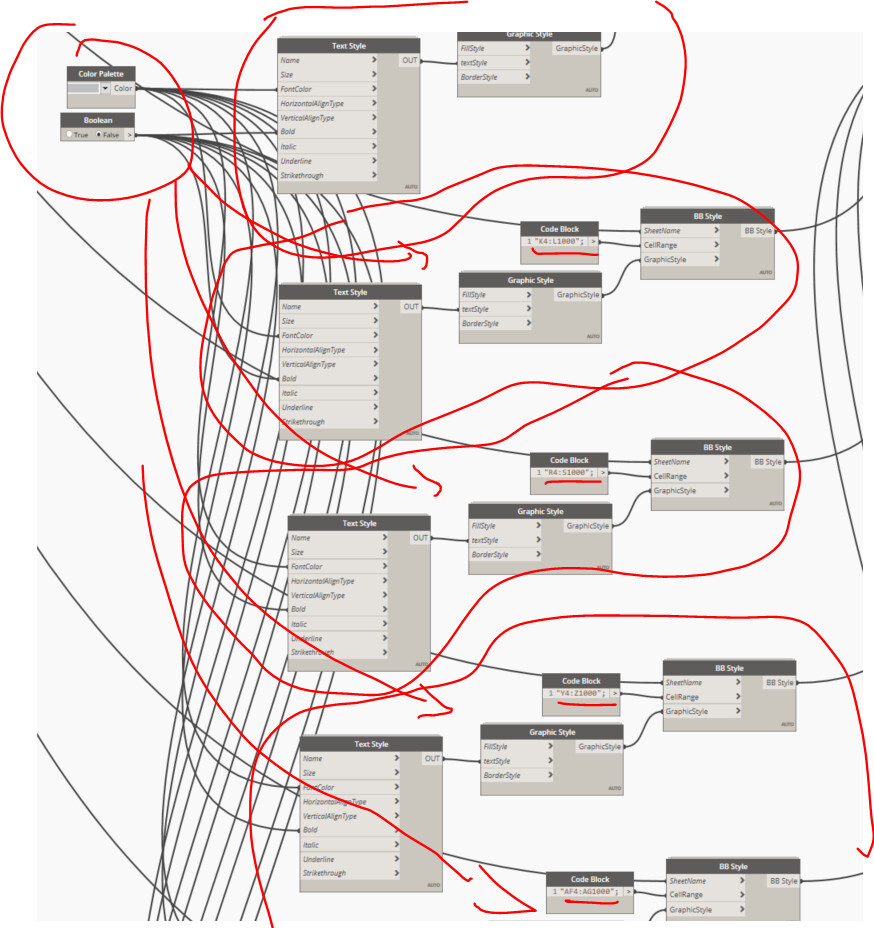
Essentially you just want to take all of those inputs from each repeated group and combine them into lists. This will likely be a structured list unless you’re already providing one value for every permutation in each group.
As always, it’s recommended you search the forum for similar topics first and try to get a start on something. If you get stuck on your initial attempt, then we can start to give you feedback on how to fix things.
Thnak you for the answer.
I’ve already done a search, but I really don’t know how to put together lists of columns in a single code block line. The Create list node doesn’t work with this group of nodes that I’m using.
Basically I would need to write on the same line: “A1:B1000 + D1:E1000+K1:L1000”
Work through node by node, from the beginning to the end. You can create a list in a code block using the following syntax: [item1,item2,item3,item4...];
The Create List node will also work if you provide each of the individual code blocks as inputs.
I highly recommend you work through the Dynamo Primer and get familiar with all the basics. List management and list levels (which you may need to use) are foundational to writing your own graph logic.
Based on what you’re trying to do, the second image should be correct. Any node will work with lists, that’s a core Dynamo feature. You just have to match them to the node’s functionality and your list structure.
"D4:E1000,K4:L1000" is a single string. Notice how it doesn’t show as a list of two values. ["D4:1000","K4:L1000"] is a list of two strings. Notice how it shows the list levels.
The BB Style node takes a cell range to apply the provided style. That cell range does not have to be continuous. The single string you provided will style all those cells based on single font color you provided. In your case, it sounds like you want different cell ranges with different colors (each of the groupings you have currently). That requires a list of ranges for a list of colors.
Nevermind.
I solved using the same node for each column group and works fine. I tried all manner to write the same list, but actually I think the node doesn’t acept separete groups of cells