Hi Dynamites
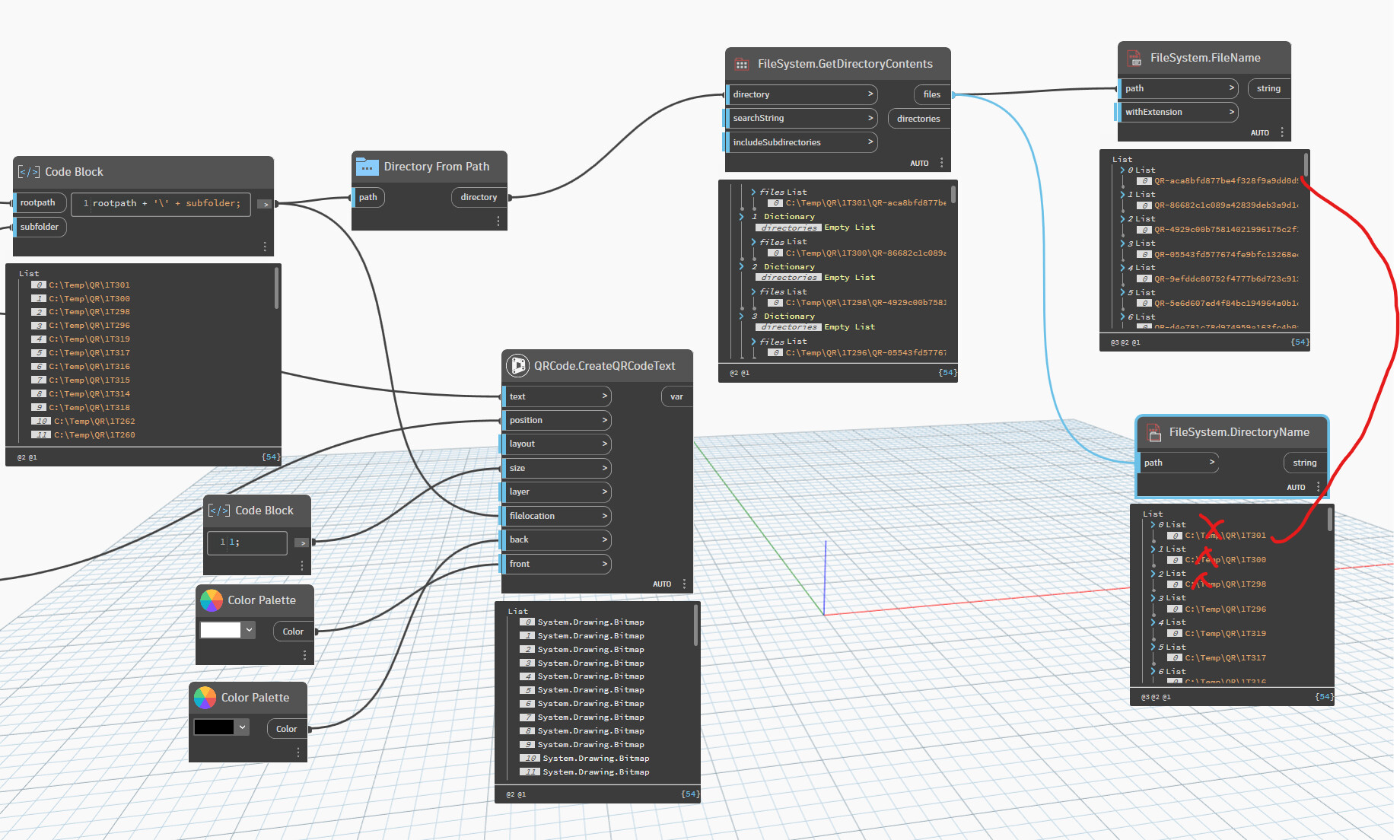
I’m using the Civil Nodes QRCode.CreateQRCodeText to generate a bunch of QR codes and place them in specific locations
This node creates QR code images with random filenames. I’d like to know which which image is for which record from the filename.
Ideally, there would be another input to the node for the filename-For example, I might feed in the same value as the text input, so for a QRcode text input of ‘ABC123’, the filename would be ABC123.png
Second best is to retrieve the filename after it is created, so at least I know the mapping between text input and filename:
i.e ‘ABC123’ –> QR-0aa57fb33a364963bfb7f629a3a2a245.png
In my screenshot- FileSystem.FileName doesn’t work because it is expecting System.Drawing.Bitmap
The only other idea I had (untested) was to build a filelocation input for each record (one image per folder) and then get the parent folder for each image, but this complicates it.
Any help greatly appreciated
thanks
Andrew
thanks @jacob.small
I’m tinkering around with it- workaround so far is to put each image in its own folder, then extract what I need.
So if I remove my ‘rootpath’ string from the Filesystem.DirectoryName and match it up with the FileSystem.FileName I’ll have what I want
not pretty but will probably work.
2 Likes
Python is an option using the .NET Save method of the bitmap image object
Untested code ahead! (May require some System imports)
Note: filepaths have to be full path string with escaped backslashes e.g. "C:\\temp\\test.bmp"
Note 2: The output will be a list of nulls
import clr


def to_list(item):
    if isinstance(item, list):
        return item
    return [item]


bitmaps = to_list(IN[0])
filepaths = to_list(IN[1])

assert len(bitmaps) == len(filepaths)

OUT = [bitmap.Save(filepath) for bitmap, filepath in zip(bitmaps, filepaths)]
1 Like
The Image.WriteToFile node might be easier to implement: Dynamo Dictionary
1 Like
thanks @jacob.small & @Mike.Buttery
Quick ‘n dirty will have to do for now but I’ll revisit when I get some time
You could have put your request in The Civil Nodes Feedback Thread so the author of that package could add it to the wish list 
Reading the folder and match the files with your list of texts might result in the wrong mapping. If there are more files in the folder, the lists won’t match, and you must be absolutely sure that the folder contents is sorted by creation time and not by file name.
Jacob suggested the Image.WriteToFile node and I think that is currently the only way to be sure that the QR Code is the correct one. And you can use your own file name instead of the guid-like name.
3 Likes
Hi @Anton_Huizinga
thanks for the reply.
I didn’t know there was a CN feedback thread- now I do …
On this issue- it didn’t occur to me that I could unwire the filelocation input and use Image.WriteToFile subsequently.
To both create the QRcode image and reference it in using the correct filename- I’m doing the below. This kinda works- have to run it twice since the image does not exist when CreateImageReferenceByFilename runs- might be able to solve this with some kind of wait…
I’ll play around some more and put something in the CN feedback thread
1 Like
You can do a wait node with DynamoScript. Image.WriteToFile is the wait trigger and ExternalReference.ImNotGoingToTypeAllThatTextThatComesAfterTheDot is the data payload
3 Likes
thanks @Mike.Buttery, I didn’t know how to do the wait
The graph now very nearly does what I want- the remaining issue is that QRCode.CreateQRCodeText creates an image in the same directory as the dwg if it doesn’t have a filelocation input- so the images are doubled up in the dwg- but this is easily cleaned up
i.e detach all the images with the guid like name
@Anton_Huizinga I’ve put this in ‘The Civil Nodes’ Feedback Thread I think it would be a useful improvement to others
2 Likes