Hi guys! It’s a new year; there is new blood here. I was thinking about sharing my ideas/uses for the working scripts I use in every project.
I’m a civil engineer and road designer, so these scripts are mainly for roads, and I would appreciate it very much if you could share your ideas/descriptions for your finished scripts. I’m not looking for a hand-me-down script, just ideas.
Also, can you share the packages that are most useful for you?
I use the following packages:
Camber (for old Arkance nodes), The Civil Nodes (for old Toolkit nodes), Data-Shapes ( for drop-down lists) and Monocle (for easy workflow in Dynamo)
Thank you!
Here are my ideas/scripts that I’ve created/updated and that work:
For Civil 3D modelling and annotation
1. Alignment from polyline. It is intended for small exits from the main road. Creates an alignment, names it after the main road stationing and side of the main alignment. Creates existing surface profile, designed profile (connecting alignment start point on surface and end point on surface), and creates profile view.
2. Offset elevation. Creates texts with surface elevation along a polyline, at an interval from the alignment

3. Volume surfaces. Just as it sounds. Creates volume surface, automatically creates a name for the volume surface, deriving from the datum surface name
Then there are scripts that I use for different reports:
4. Data extraction. (not my script, I just added to it). Gets the volumes of previously created corridor solids, filters and sums them by shape code, corridor name and regions (optional). Exports data to Excel.
5. Get the station and Offset from the block. Export to Excel.
6. Get start and end station and length from the polyline. Export to Excel.
7. Cogo Points with PSet. Export to Excel. I mainly use it to get the report of trees that need to be cut down (from PSet - their species, diameter, quantity of trunks, from Cogo Point – coordinates, stationing and offset)
I have also created many scripts to enrich my IFC model:
8. Road barriers from polyline, Road barrier anchors from polyline, pedestrian barriers from polyline. All creates a barrier fence and places posts with a defined interval.

9. Places a block along the alignment from Excel. Block name, Alignment name, stationing and offset are in the Excel
10. Placing Soil Piles (with or without capping beam). Pile Stationing and Depth (length) are defined in Excel, multiple offsets, pile diameter – in Dynamo Player

11. Replacing existing 2D blocks with 3D blocks. Rotating them along alignment, for example, placing marking poles, placing light poles, etc.


12. Road Markings from polyline. Continuous, dashed or symbols.
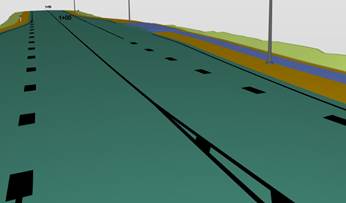
13. Placing road sings with or without sign poles

14. Creates 3D station Labels (not my script, I just added to it).

