
Hello Dynamites! 
This Challenge is now over!  Thanks to everyone who participated, it is always amazing to see what ya’ll come up with.
Now, its time to vote!  . We can’t wait to see who the community votes in as winner and runner-up!
  We will keep the poll open until January 19th at 6:00 am EST and announce our winners shortly after!

All graphs are present in this thread, so that you can inspect each DYN file to help you choose your favorite! You can vote based on any criteria you like: approach, creativity, wow factor, complexity / simplicity, humor or any other criteria of your choice! We have a wide range of ornaments and Christmas trees to pick from. Each member can vote for up to  of their favorite entries.

- Entry 01: Snow Globe Generator
- Entry 02: Merry Christmas + Happy 2026 Animation
- Entry 03: Solid Wave
- Entry 04: Challenge ++ : No package and No Python !!
- Entry 05: Scream 2026

- Entry 06: The Cycle of Renewal: From Chaos to Blooming
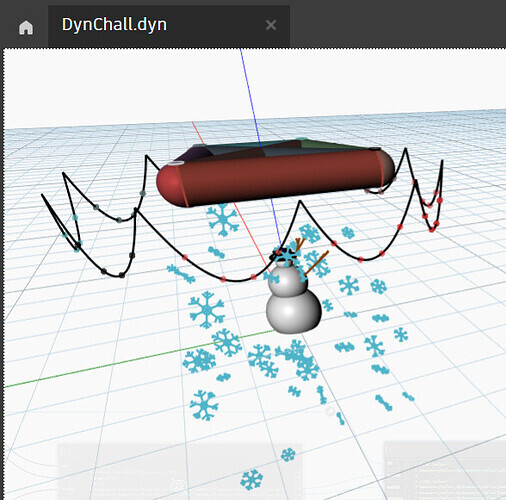
- Entry 07: Just a snowman with lights

- Entry 08: Auld Lang Syne
- Entry 09: Captured 7 Dragon Balls to Bring You Sheng Long
- Entry 10: Animated Happy 2026
- Entry 11: Animated Snow
- Entry 12: Koch‑style (anti) snowflake
Entry 01: Snow Globe Generator
Image:

DYN:
DYN-Xmas.dyn (172.5 KB)
Description:
Snow globe generator through custom parameters (Who doesn’t love a good Number Slider!) along with animated snow.
Entry 02: Merry Christmas + Happy 2026 Animation
Image:

DYN:
Merry Christmas.dyn (79.0 KB)
Description:
A merry christmas and happy new year animation using dynamo. I’ve used different layers in order to emulate the “frames” of the animation and trimmed an invisible polyline in order to create the effect of writing.
Entry 03: Solid Wave
Image:

DYN:
Wave Solids.dyn (38.9 KB)
Description:
Colored Solids saying “Happy 2026“ in a continuous wave.
Entry 04: Challenge ++ : No package and No Python !!
Image:

MP4:
DYN:
Happy2026.dyn (189.2 KB)
Revit file and family:
Dynamo.rvt (2.8 MB)
Boule.rfa (424 KB)
Etoile.rfa (436 KB)
Texte.rfa (424 KB)
Description:
Challenge ++ : No package and No Python !!
This project is based on a Revit file (“Dynamo.rvt”) containing a tree and three loaded families:
- Christmas Ball (“Boule.rfa”)
- Star (“Etoile.rfa”)
- 3D Text (“Texte.rfa”)
Part 1 – Element Creation
The first part of the Dynamo script focuses on the creation and placement of decorative elements:
- Star
Automatic placement of the star at the top of the Christmas tree. - Christmas Balls
- Retrieval of the surfaces where the Christmas balls can be placed.
- Generation of points on these surfaces using a Curve Mapper (user-customizable).
- Automatic placement of the Christmas Ball family on the generated points.
Part 2 – Animation and Dynamic Updates
The second part of the script uses DateTime.Now to enable periodic execution of Dynamo, creating a dynamic and animated model:
- Star
- Periodic variation of its height.
- Random and periodic material changes.
- Christmas Balls
- Periodic and random material changes applied individually to each ball.
- 3D Text
- Random and periodic display of the message “HAPPY 2026”.
With Random fonction, each execution is unique.
Entry 05: Scream 2026 😱
Image:

DYN:
Christmas1.dyn (10.6 KB)
Description:
Scream 2026
The thread symbolises the future because, er, it goes up…
The sphere is red because, … AI is coming!!!
Entry 06: The Cycle of Renewal: From Chaos to Blooming
Image:

DYN:
fractal test 6.dyn (126.2 KB)
Description:
“The Cycle of Renewal: From Chaos to Blooming”
2025 has been the most special year for me since I first encountered Dynamo. I want to extend my heartfelt gratitude to the entire Dynamo Team. I am always cheering for your efforts in continuous updates and supporting this wonderful community!
I have always been fascinated by Fractals. This contest gave me a precious opportunity to deeply ponder how to implement fractal logic effectively. While I had ambitious design goals, time was limited, so I focused on creating an “Over-engineered” logic using Python recursion and L3 data structures.
The Story of the Workflow:
0s ~ 30s (The Year 2025): The fractal tree sways in the “mathematical wind,” symbolizing the challenges and adversities of the past year. Despite the shaking, fruits ripen on the branches, representing our resilience.
30s ~ 60s (The Year 2026): As the cycle turns, gravity takes over. The fruits (the burden of the past) fall away to the ground. In their place, geometric flowers bloom at the tips of the branches, symbolizing a bright and hopeful 2026.
Entry 07: Just a snowman with lights 🙂
Image:
DYN:
DynChall.dyn (80.6 KB)
Description:
Just a snowman with lights
Entry 08: Auld Lang Syne
Image:

DYN:
PlaySounds.dyn (39.7 KB)
NewYear2026.dyn (73.7 KB)
Description:
Auld Lang Syne performed on a battered 1980s Casio keyboard by an enthusiastic individual who has had one too many drams — the unofficial soundtrack to Hogmanay since time began.
Entry 09: Captured 7 Dragon Balls to Bring You Sheng Long
Image:

DYN:
Sheng Long.dyn (728.0 KB)
Description:
I have captured the seven dragon balls to bring Sheng Long and grant all your wishes in 2026. Happy New Year to everyone! 
Instructions:
Make a 1st run in manual mode, then change to peridic in 250 or 166ms, the animation restart when any minut start and lasts 15 seconds aprox, Then it stays static for the rest of the minute, so be patient or have a clock handy that shows the seconds, you can make your wish mean sheng long is on the screen!! 
Stable in:
Dynamo Sandbox 2.15
Dynamo Sandbox 3.5
Entry 10: Animated Happy 2026
Image:

DYN:
Happy_2026.dyn (280.6 KB)
Description:
3d Animated Happy 2026 Dynamo Graph!
Entry 11: Animated Snow
Image:
I made videos, because images don’t make much sense.
Also, videos showing how to run them, but I couldn’t upload them here due to size:
DYN:
snow_2026_final.dyn (40.7 KB)
snow_dynamo logo.dyn (111.5 KB)
Description:
Want to see some cool physics simulations in real time — in stunning, movie-quality 24 FPS (at least for a few glorious seconds)?
Want snow deformation so realistic it puts Red Dead Redemption 2 to shame?
Or…  do you want to build a snowman?


Then come and try the Unreal Snowdrop Engine 1.0 — where winter isn’t just rendered, it’s simulated. Or just try the real stuff they might be better I guess…
There are two scripts included in this single entry:
snow_2026_final.dyn
Cool real-time snow physics at an eye-watering “almost 24 fps” (41ms on Periodic run) — at least until Dynamo freezes (pun fully intended). A snowy way to celebrate the New Year.
snow_dynamo_logo.dyn
Beautiful, colorful chaos at a slightly more realistic frame rate (let’s say 10–12 fps), slowly revealing the Dynamo logo as snow piles up.
Credit where credit is due: thanks to @Vikram_Subbaiah for the Dynamo logo geometry
(Dynamo Challenge 01: Redesign the Dynamo Logo with Dynamo - #20 by Vikram_Subbaiah)
As a bonus feature, the logo can also be destroyed by a fully parametric snowball — because of course it can.
 Important note:
They are created and tested in Dynamo for C3D 2026. In sandbox they don’t seem to work for some known and unknown reasons:
- Camber package (known reason)
- some errors because BoundingBox (and maybe other nodes as well) doesn’t seem to work in desingscript or Python only in node form in the Sandbox. (unknown reason)
But sadly I don’t have time to resolve these issues.
Please be careful with Periodic Run. Dynamo has feelings.
Entry 12: Koch‑style (anti) snowflake
Image:
DYN:
Happy 2025.dyn (145.3 KB)
Description:
Happy Holidays,
My submission is a Koch‑style (anti) snowflake rotating in the middle with “Happy 2025” at the bottom and a loop of mini snowflakes falling through the scene. (The video is sped up.) The T‑Spline node really saved the day again, it made the snowflake look so much better.