I have this scripts which places Line Based Detail Families over
Walls from a Linked model. It works fine a for single view,
but not when i try to make it work for multiple views.
I tried most (all?) level and lacing combinations, but no luck.
Or did i get my levels and lacing wrong?
Or can the node only deal with one View?
I’m assuming the curve and familyType iniputs both have 3 sublists to match the 3 views? Try using view @L1 to ensure that each view is paired with each sublist from the other inputs.
If that doesn’t work, you can always duplicate each view for each other input. One-to-one inputs will always work.
Your original screenshot shows 210 items but you seem to have 155 views. Which is correct? Also, if you have one-to-one inputs you don’t need list levels.
Isn’t that what you’re trying to accomplish? Multiple instances to multiple views? It’s hard to tell what the issue is if you’re not being consistent and we can’t see all your inputs. Are the inputs in the last image still all a list of 3 sublists?
The amount of Floor Plans can be different as well the amount of Walls per Floor Plan.
I can do it View By View (the Green part),
but i want to do multiple Views at once (the Pink part).
Right, but for now we need to keep things consistent while we troubleshoot. Pick a working example and then find a solution. The number of views or walls is irrelevant. If it works for a list it works for a list - the length of the list doesn’t matter.
To keep things simple, can you filter some instances down so the inputs lists are only a few items long? Let’s shoot for 2 curves/types for each of 3 views. Then we’ll be able to see all our data at once and understand the structure without having to guess.
Well, not really i guess , because it only works when feeding ONE View .
In that case i only have the Walls from the Linked Model for that (associated) Level,
thus no sublists for each input for the DetailComponent.ByCurve node.
Seems you have lacing set too. Switch lacing back to Auto. If that still doesn’t work, duplicate the views so you have one-to-one inputs and no list levels.
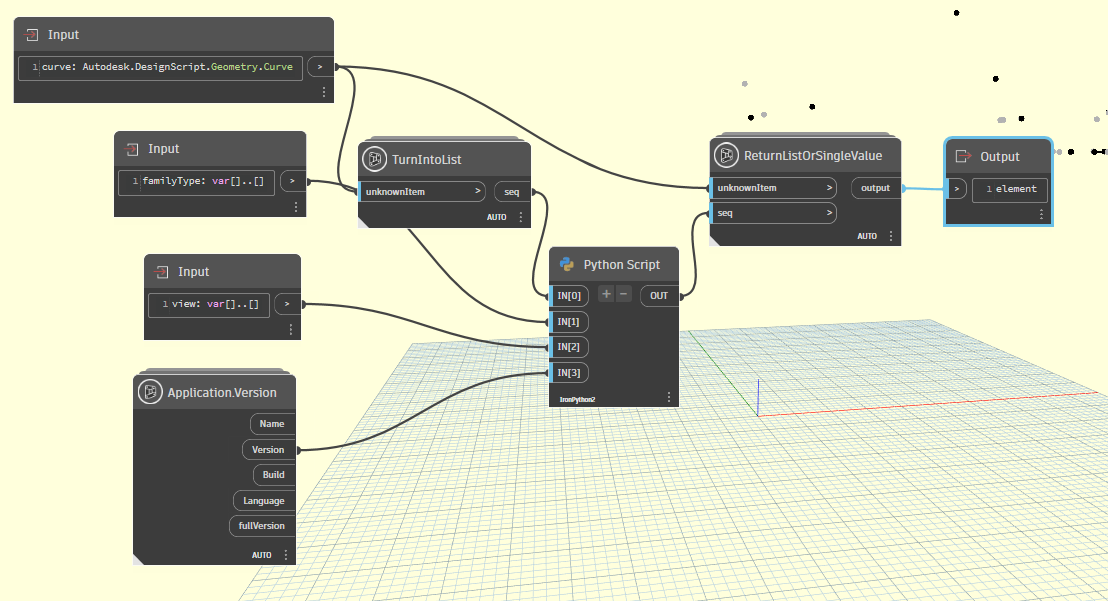
The only “limitations” of the node are the intended structures of the inputs. If you hover over the inputs you can see the specified structure expected for each one:
curve: Curve
familyType: var[]..[]
view: var[]..[]
This is a little different then what I would have expected. The node wants one curve but any list of types and views. This means we do have to force list levels to accept each other input with the curve.
Correct me if i am wrong, but your use create the Detail Component in the same View(?).
If so did you try it feeding different Views?
I need it to work on (multiple) Floor Plan Views specifically.
No, i have different Families depending on the Wall Type.
@Nick_Boyts
Kinda what i thought (i believe i already tried this before), it doesn’t work
for multiple different Views. Index 0 to 71 is Floor Plan 1 and Index 72 to 154 is Floor Plan 2. It works for you because you use the same View(?).




 .
. .
.


 .
.

