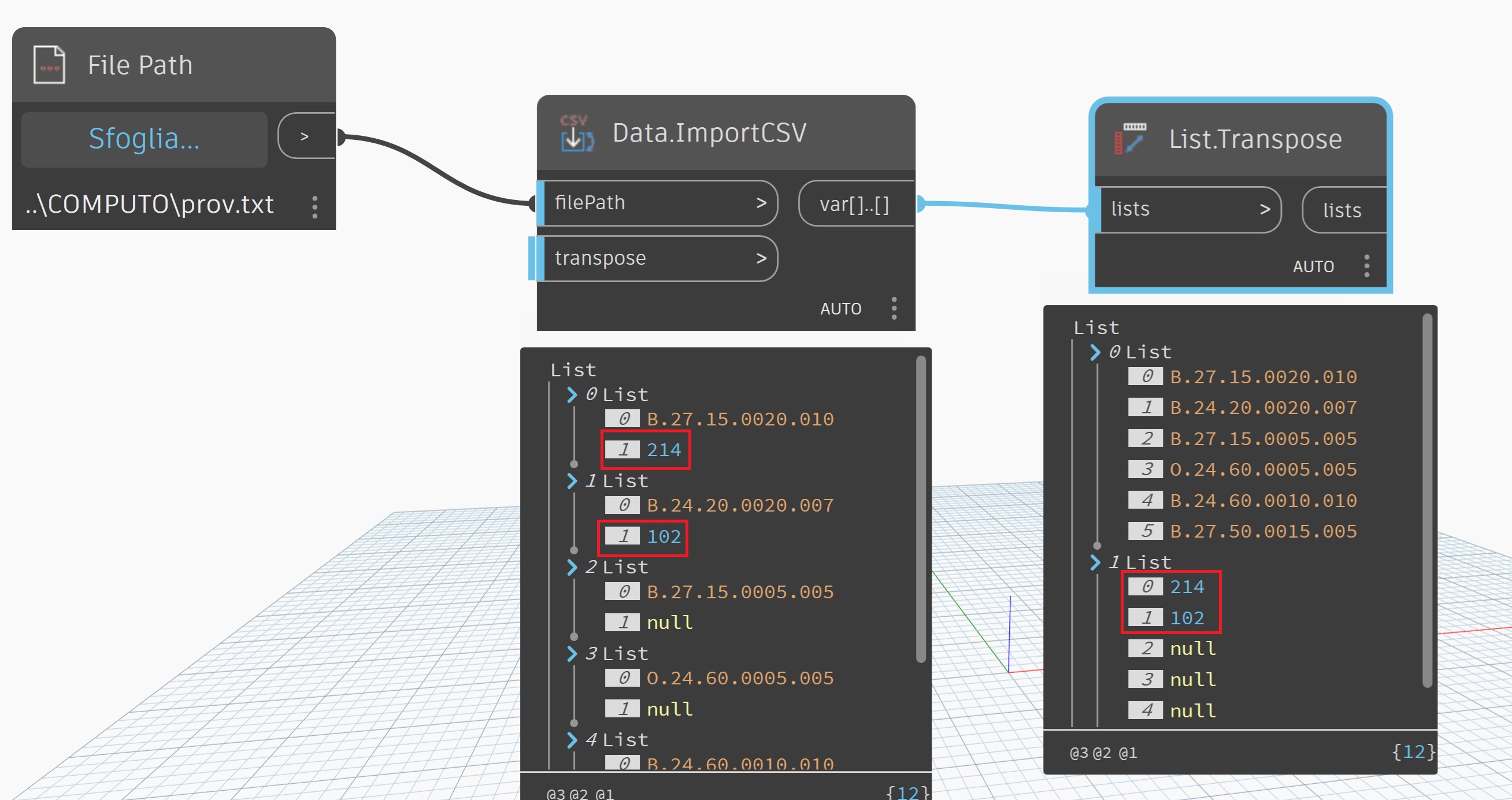
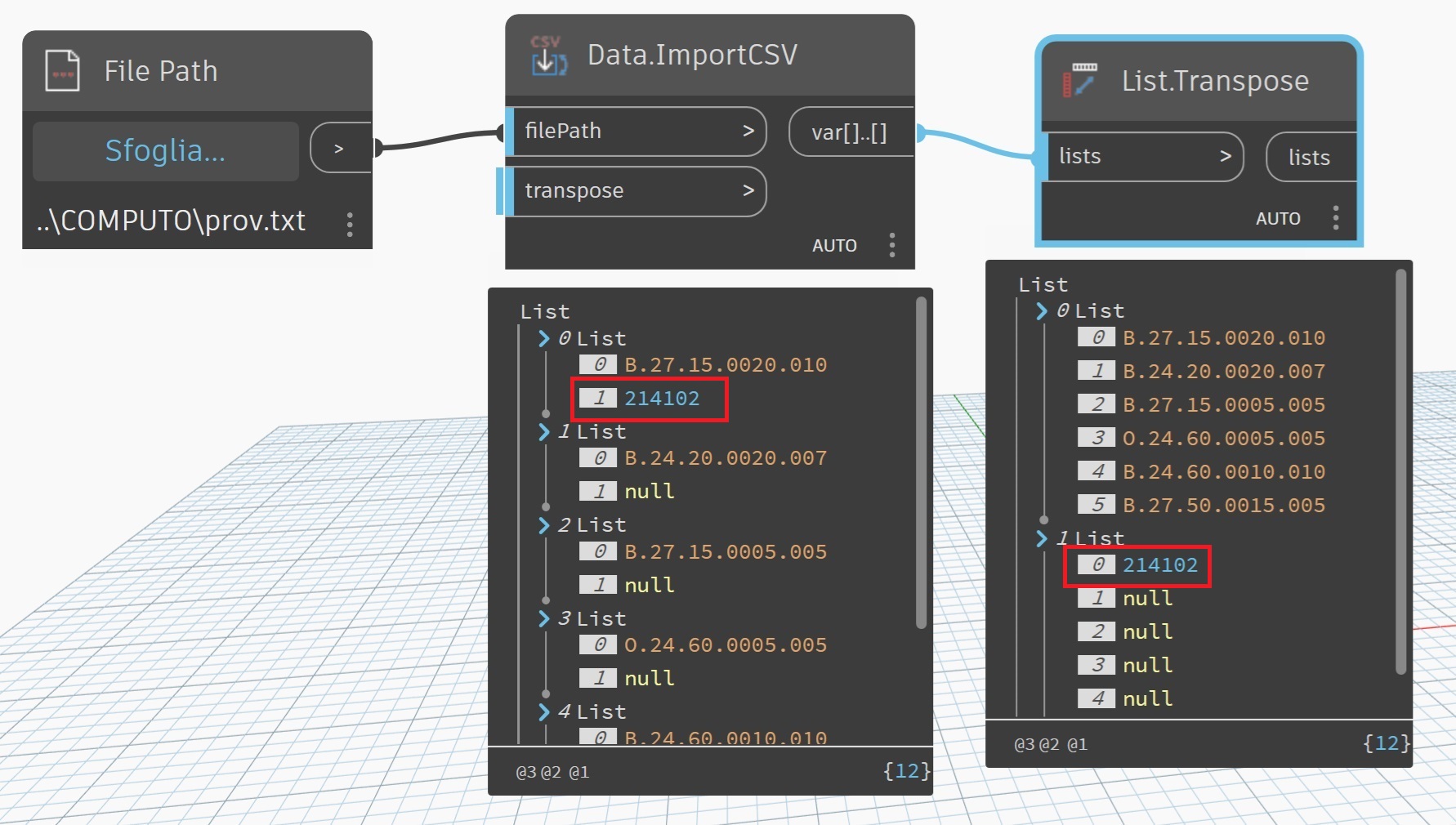
Data.ImportCSV reads the number 214,102 incorrectly in two ways.
If the number is written with a comma in the CSV file, it reads two numbers (214 and 102).
If it is written with a period (214.102), it reads 214102.

See images

Help?
Thanks
The Data.ImportCSV is a basic parser and strictly separates on commas. (see the code here) The code will convert a number like string with a period to a double otherwise it will error and default to the string. I would check that your file is correct.
Ultimately you will need to pre-process you csv file to conform to the strict format or alternately use a python node and pandas.
Further, the number format must be consistent throughout, i.e. is 123,456 an integer 123456 (non-euro), two integers 123 and 456 (csv) or a double 123.456 (euro)? If you are using commas in any number style you will need to change the delimiter to a semicolon or tab
2 Likes
there are quite a few posts on this topic- here is just one:
it depends a bit on the method- sometime enclosing fields containing commas in quotes will work- this is a common option when saving to CSV format
i.e
"1,999","a,b,c"
"2,999","d,e,f"
would be interpreted by the csv module as 2 columns, both strings.
But it can come unstuck if you’ve got quotes in your data…
As @Mike.Buttery says, Pandas is probably the most robust method.
However, it might be easier just to avoid the problem altogether by using another format like pipe or tab delimited
you need to use python in this case
try:
import clr
clr.AddReference('ProtoGeometry')
from Autodesk.DesignScript.Geometry import *
import sys
import csv

csv_file_path = IN[0]

data = []

try:
    with open(csv_file_path, 'r', newline='', encoding='utf-8') as f:
        reader = csv.reader(f, delimiter=',')
        for row in reader:
            data.append(row)
    OUT = data
except Exception as e:
    OUT = str(e)
The Python csv module does not have the ability to parse European number formatting, however pandas does. (That’s why I suggested it) If you change all delimiters to a semicolon and set the following arguments delimiter=";", decimal=",", thousands="." it can.
1 Like
Thanks for your answers... they helped me a lot
Bit my tongue on this long enough. @ingalvolt glad you have a solution among the previously provided responses - feel free to mark which ever helped you the most, but I’m putting this here so that we can all learn a bit about best practices for managing code which crosses cultures.
There are actually 10 different ways numbers can be formatted in the 862 (give or take) different cultures supported by Windows (one of the 10 is a fake one used for testing):
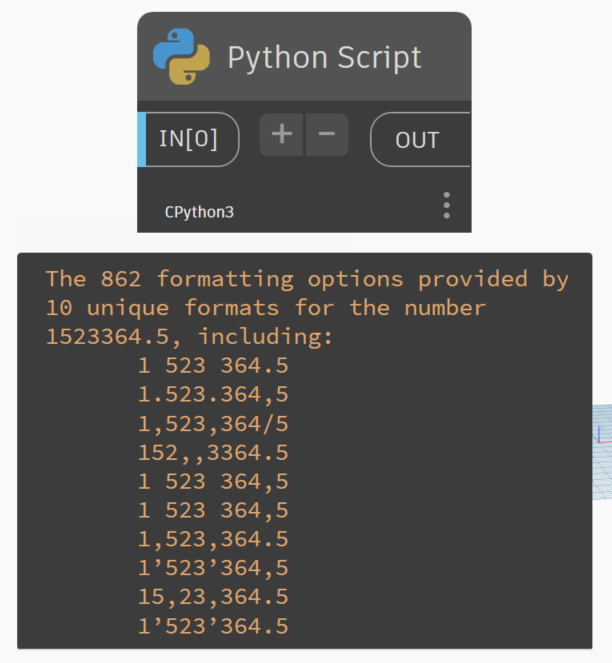
Other environments (i.e. Python, HTML, etc.) will have different counts. As such it’s important that we account for these types of changes in any situation where code might cross a cultural barrier.
When reading/writing from disc it is a best practice and even a industry norm to ALWAYS use the invariant culture. This is because you don’t know how the next system to read/write the data will work with the content, and computers don’t care at all about how the number is stored, just that it’s consistent. Any localized formatting including decimal marker, digit grouping, and the like should only come into play when displaying values.
Take the number one-million five hundred twenty three thousand three hundred sixty four and a half - written to disc (saved to CSV) it should always be 23364.5. When that value is read into a tool it should then be converted to the display setting defined by the user’s configured culture. Doing so means that:
- A user in Boston, Massachusetts sees 1,523,364.5
- A user in Berlin, Germany sees 1.523.364,5
- A user in Borås, Sweden sees 1 523 364,5
- A user in Bangalore, India sees 15,23,364.5
- A user in Berne, Switzerland sees 1’523’364.5
- A user in Babol, Iran sees 1,523,364/5
If you don’t first convert the value to the invariant format and just write the string as it might be returned by say the calculator on your PC, you’ve got a CSV with all of those formats in them, and now you have to spend more overhead converting from the great many string options when you go to read the file. Reading the file is the point at which you want as much speed as possible as that’s usually the ‘slowest’ part of the operation as everything gets converted from bits to bytes to objects in memory - adding the extra step of converting the objects in memory to get a number will be another inevitable hit. So while tools like Pandas are good to allow conversion (although Mike would need to try all possible formats from my image above, where at least one of which has a hidden character in the string), the best practice is to avoid this step before writing to disc (a once per file operation vs a many time operation for reading files) by converting to the invariant format.
2 Likes
Don’t get @jacob.small started on date formats 
3 Likes